Summary: A Kanban board is a visual tool for organizing work processes. It consists of columns such as "To Do", "In Progress" and "Done", each representing a phase of the work process. Tasks are managed as cards within the columns and move from left to right across the board as they are being worked on. This way, a Kanban board improves transparency, optimizes workflows and helps identify bottlenecks early.
A Kanban board is a valuable tool for project managers who need to deal with complex and changing requirements. It makes work visible, improves flow and helps ensure nothing falls through the cracks. Especially in the world of technical projects, where many moving parts often need to be coordinated, a Kanban board can be a key to success. Let’s take a look at how this tool can help you.
What Is a Kanban Board?
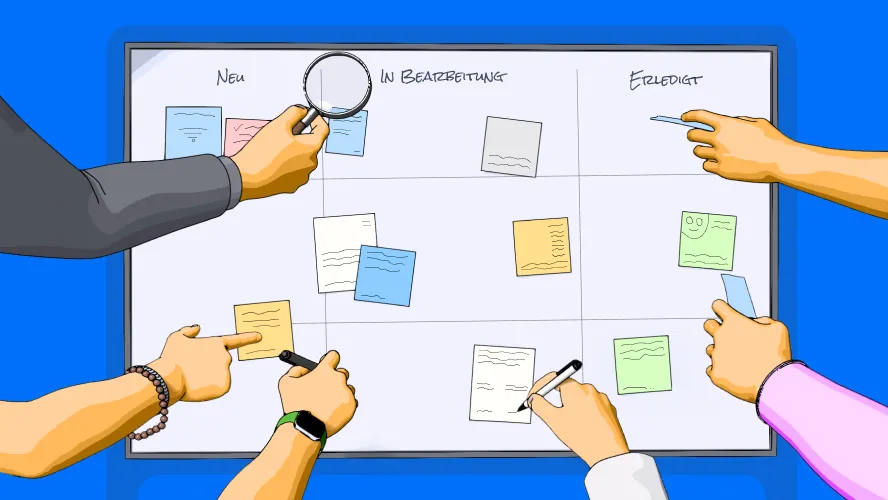
Imagine a board. Columns are drawn on it: “To Do”, “In Progress” and “Done”. Every task (see To-Do List) that you or your team need to complete is placed as a card on this board and moved from one column to the next as it progresses. That is the essence of a Kanban board.
Kanban was originally developed by Toyota in the 1940s. The goal was to increase efficiency in production. Today it is no longer limited to factories – it has become a cornerstone of agile project management methods.
A Kanban board shows you what needs to be done, what is currently being worked on and what is completed. All at a glance. Sounds simple? That’s exactly the beauty of it.
What Is a Kanban Board Used For?
A Kanban board is versatile and flexible. It’s like a toolbox that you can use for almost any type of work. Whether you work in software development, IT operations or product management – a Kanban board helps you keep an overview and manage your projects efficiently. If you make the Kanban board a central part of your jour fixe meetings, these sessions will become significantly more efficient.
Typical Use Cases
- Software Development: In the world of software, a Kanban board is an indispensable tool. It helps teams organize tasks such as bug fixes, feature development or test cycles. Developers see exactly what they need to work on, while product managers can monitor progress.
- IT Operations: In the IT department, daily work is often driven by tickets – requests that need to be handled. A Kanban board ensures that these tickets are not lost and are always processed in order of priority.
- Product Development: From the initial idea to the market launch of a product, there are many steps that need to be tracked precisely. A Kanban board makes work transparent and shows where the focus should be.
Extended Use Cases
A Kanban board is not limited to traditional project work. It is also suitable for many other scenarios:
- Human Resources Management: Tasks such as recruiting new employees or organizing training programs can be managed via a Kanban board. Each phase – from job posting to hiring – becomes visible.
- Marketing Campaigns: Planning and executing campaigns can be complicated since many departments are involved. With a Kanban board, marketing teams can coordinate their activities, create content and monitor the progress of advertising campaigns.
- E-Commerce and Inventory Management: Online retailers can use a Kanban board to manage orders, inventory and shipping processes.
Benefits for Daily Work
A Kanban board not only brings structure to daily work but also improves efficiency and communication within the team:
- Transparency: All tasks are visible. The team knows what is being worked on, and you as a project manager can immediately see whether someone is overloaded or whether blockages are occurring.
- Prioritization: The visual representation makes it clear which tasks need to be completed first (setting priorities, Eisenhower matrix). This helps keep important topics in focus and meet deadlines.
- Continuous Improvement: Kanban enables teams to identify weaknesses in the workflow and continuously optimize.
A Personal Example
Some time ago, I led a team responsible for integrating a new CRM software. Requirements changed almost daily, and we had to deal with many dependencies. A Kanban board helped us keep track of things. We were able to clearly prioritize tasks and identify bottlenecks early. For example, it became clear that the API integration had the longest lead time, so we could allocate additional resources. Without the board, we probably would have missed important deadlines.
A Kanban task board is therefore more than just a board with cards. It is a tool that makes work visible, traceable and efficient – in every project, in every industry and in every department.
How Does a Kanban Board Work?
Kanban is based on three fundamental principles:
-
Visualize your work. When you can see your tasks, you understand them better (see Getting Things Done). A Kanban board makes work tangible. This is especially helpful for knowledge work, which is often very abstract.
-
Limit your Work in Progress (WIP). Overload is the enemy. Work on fewer tasks simultaneously, and you’ll complete them faster.
-
Optimize the flow. Keep your tasks moving. If something is blocked, solve the problem.
Tools and Platforms
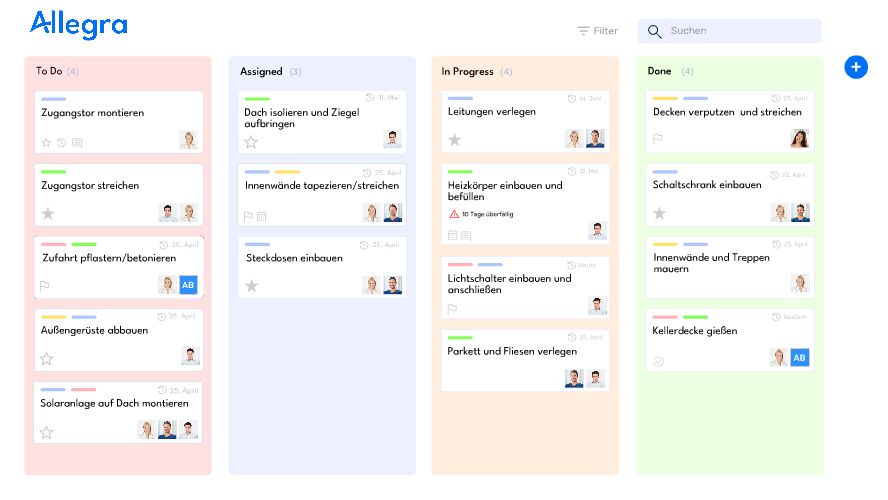
Kanban boards exist in physical or digital form. For technical projects, I recommend tools like Trello, Jira, Microsoft Planner and Allegra. You can find an overview of project management tools and agile project management software in our articles. These offer features such as drag-and-drop, notifications and analytics. But even a whiteboard and sticky notes can work wonders.
Why Is Kanban Particularly Suited for Technical Projects?
Technical projects are often chaotic. Requirements change constantly, and unexpected problems arise. This is where Kanban excels:
- Flexibility: Adapting to changes is easy. Move cards, adjust priorities – done.
- Improved Workflow: It reveals bottlenecks before they become problems.
- Teamwork: Everyone can see what’s happening. No more hidden tasks.
Once I worked with a team that was working on an API integration for multiple systems. We had so many dependencies that we lost track. With Kanban, we could make progress visible and identify blockers early. That saved us weeks.
What Distinguishes a Scrum Board from a Kanban Board?
Scrum has adopted some ideas from the Kanban board and uses this representation to visualize the processing of sprints. Details on Scrum roles and Scrum artifacts can be found in our articles. The key differences are:
- Scrum describes a time-boxed process, while Kanban describes a continuous flow. A Scrum board always refers to a Scrum sprint with a defined start and end date. Once the sprint is completed, the board is cleared. In Kanban, the task board exists as long as the workflow is in use.
- In Scrum, the “sprint capacity” is the limit for the work that can be accomplished in the entire sprint. It refers to all work items in the sprint regardless of their position in the workflow.
- During a sprint, the number of items to be processed is constant. The Kanban board, on the other hand, allows adaptation to new circumstances at any time.
- In Kanban, there are no fixed roles as in Scrum.
Scrum is primarily used in agile software development, while Kanban also has many followers outside the software community.
What Are the Advantages of a Kanban Board?
As a project manager, you need clarity. Kanban gives it to you.
-
Real-time Overview: You always know where the project stands and can react to changes immediately. With a glance at the board, you can see which tasks are blocked, where bottlenecks are forming and how your team’s progress looks. This overview enables you to make quick and informed decisions.
-
Efficient Resource Management: By limiting parallel tasks, you ensure that nobody on the team is overloaded. This not only improves the quality of work but also reduces the risk of burnout. Resources can be deployed more targeted and effectively.
-
Better Communication: A Kanban board makes your work transparent. All team members and stakeholders understand what is happening without the need for lengthy meetings or explanations. This promotes collaboration and avoids misunderstandings.
-
Fostering Accountability: Since every team member can see the tasks and progress on the board, they automatically take more responsibility for their work. This strengthens engagement and motivation within the team.
-
Adaptability and Flexibility: When new tasks or priority changes occur, they can simply be incorporated on the board. Kanban allows you to remain flexible and adapt to changes without having to recreate the entire plan.
-
Measurable Improvements: With Kanban, you can measure data such as lead time and cycle time. These metrics give you insights into your team’s performance and help you continuously improve. This way you can identify bottlenecks and optimize strategically.
A Kanban board is like a dashboard for your project. It shows you what’s going well and where you need to intervene. At the same time, it creates a structured but flexible environment that benefits both you as a manager and your team.
How Do I Create a Kanban Board?
Creating a Kanban board is simple but requires a certain degree of planning to make it effective. Follow these steps:
-
Define the goal. Consider what the board should represent. Do you want to display the entire project lifecycle or just a part of it? Define clear goals and decide whether the board will be used across teams or for a specific department. A precise goal helps design the board meaningfully and avoid chaos.
-
Create the columns. The classic columns are:
- To Do: Tasks that need to be completed.
- In Progress: Tasks currently being worked on.
- Done: Completed tasks.
Depending on your needs, you can add more, e.g. “Review”, “Blocked” or “Testing”. Remember to choose the number of columns so that they meaningfully support your team’s workflow without overloading the board.
-
Create cards. Each card represents a task. Write clear titles and add details if necessary. Typical attributes are:
- Task title
- Description with relevant details
- Responsible person
- Due date (optional)
- Tags or labels for categorization
Use colors or labels to mark categories such as priorities, responsibilities or deadlines. Checklists on cards can be helpful for breaking complex tasks into smaller steps.
-
Limit the WIP. For each column, define how many tasks can be worked on simultaneously. These work-in-progress limits prevent overload and promote focus on completing work rather than multitasking. Adjust the limits based on team size and project requirements.
-
To ensure the Kanban board is used efficiently, clear rules should be established:
- Who is allowed to create, move or delete cards?
- How often is the board updated?
- When does a review take place to optimize the process?
-
Review and improve. Hold regular retrospectives to optimize the board. Ask your team whether the board effectively supports the work process and make adjustments. Consider whether additional columns, labels or automations could be useful to further increase efficiency.
-
Implement the board into daily routine. Make sure the board becomes part of your team’s daily work. It should be regularly updated and used in meetings or check-ins to ensure it remains relevant. This promotes acceptance and continuous use of the board.
A well-designed Kanban board is more than just a tool or one of the best-known project management methods – it is a system that improves collaboration, creates transparency and helps your team achieve its goals.
What Common Mistakes Should You Avoid?
A Kanban board can significantly increase productivity – but only when used correctly. In practice, there are some typical mistakes that limit efficiency or reduce the benefit of the system. Below, the most common problems are described and how they can be avoided.
1. Working on Too Many Tasks Simultaneously
One of the biggest mistakes is working on too many tasks in parallel. This leads to:
- Loss of focus and longer processing times
- Bottlenecks in the “In Progress” column
- Team members getting scattered
Solution:
Set clear Work-in-Progress (WIP) limits, e.g. a maximum of three simultaneous tasks per person.
2. Unclear Task Descriptions
When tasks are not sufficiently described, misunderstandings and unnecessary delays arise. Common problems include:
- Missing details about the scope of work
- Unclear responsibilities
- No prioritization
Solution:
Every Kanban card should contain clear information:
- Title and brief description
- Responsible person(s)
- Due date (if relevant)
- Tags or labels for categorization
3. Kanban Board Is Not Regularly Updated
An outdated Kanban board quickly loses its informative value. When tasks are not correctly moved or completed tasks are not archived, incorrect workflows result.
Solution:
- A regular sync in team meetings helps keep the board up to date.
- Assign responsibilities for maintaining the board.
- Set up automatic reminders in digital tools like Allegra or Trello.
4. Lack of Analysis and Workflow Optimization
Kanban is a continuous improvement process. However, many teams forget to review and adjust their way of working.
Solution:
Use regular retrospectives to analyze:
- Are there bottlenecks in certain columns?
- Are WIP limits being respected?
- Do additional columns or automations need to be introduced?
5. No Clear Process for Blocked Tasks
Some tasks cannot be continued because they depend on external factors (e.g. approvals or feedback). These tasks block the workflow.
Solution:
Add a “Blocked” column to make blocked tasks visible. This enables the team to resolve dependencies more quickly.
How Can You Improve a Kanban Board?
A Kanban board brings order. But it can get better. You can sharpen it like a knife. Structure it. Automate it. Simplify it. Here are ways to make it more efficient.
1. Swimlanes for Better Overview
Swimlanes divide the board into clear lanes. They show what matters.
Options:
- By Priority: High, Medium, Low.
- By Team: Marketing, Development, Support.
- By Workflow: New Features, Bug Fixes, Testing.
Why? It helps find tasks faster. You can immediately see where bottlenecks are.
2. Colors and Labels for Clarity
Colors direct the eye. They make the board understandable at a glance.
Examples:
- Red: High priority.
- Green: Small task. Quickly done.
- Blue: Waiting for approval.
Why? Clear structure. No lengthy explanations. Everyone knows what to do.
3. Use Automations
Modern tools like Allegra, Jira, Monday.com save time. They take over routine work.
What can be automated?
- Notifications: A task is stalling? The system reminds automatically.
- Task Assignment: A new task? The right team member gets it.
- Deadline Reminders: Deadline approaching? A message goes out.
Why? Less manual work. Faster response. Nothing forgotten.
4. Measure Metrics, Optimize Progress
If you want to get faster, you need to measure. Numbers show where things are stuck.
Key metrics:
- Lead Time: How long does a task take until completion?
- Work Velocity: How many tasks are completed per week?
- Blocked Tasks: Where are things stuck?
Why? Facts instead of assumptions. Making decisions based on data.
5. Combine Kanban with Other Methods
Kanban is flexible. It works well with other systems.
Combinations:
- Scrumban: Scrum with Kanban elements. Good for agile teams.
- Lean-Kanban: Avoid waste. Make processes leaner.
- OKRs + Kanban: Connect long-term goals with daily tasks.
Why? Every work style is different. Kanban adapts.
A Kanban board is never finished. You improve it over time. Less chaos. More clarity. More speed. That’s the way.
How Does Kanban Fit with Other Methods?
Kanban doesn’t stand alone. It can be connected with other systems. Scrum. Lean. OKRs. Every combination has its purpose. Here are the most important ones.
1. Kanban or Scrum? – Two Paths, One Goal
Both are agile. But they work differently.
| Feature | Kanban | Scrum |
|---|---|---|
| Flow | Continuous progress | Sprint by sprint |
| Flexibility | Changes possible at any time | Only between sprints |
| Structure | No fixed roles | Scrum Master, Product Owner, Team |
| Meetings | Only when needed | Daily standups, fixed reviews |
| Use Case | Good for ongoing processes | Better for clear development cycles |
Kanban fits when work needs to be flexible. When tasks flow.
Scrum fits when fixed sprints are necessary. When clear goals need to be achieved in fixed rhythms.
2. Scrumban – The Best of Both Worlds
Many teams mix Kanban and Scrum. They use the flexibility of Kanban and the structure of Scrum.
How Scrumban works:
- Fixed sprints, but with Kanban flow.
- WIP limits to avoid chaos.
- Meetings from Scrum: daily standups, retrospectives.
- No fixed sprint end. Work continues to flow.
For teams that need more flexibility but don’t want to completely abandon Scrum.
3. Kanban and Lean – Less Waste, More Speed
Kanban and Lean are related. Both ensure efficiency. Together they are even stronger.
Key Lean principles in Kanban:
- Just-in-Time: Work starts only when resources are available.
- Kaizen: Continuous improvement, step by step.
- Pull System: Nobody assigns work. The team pulls what it needs.
Good for production, service teams and companies that want to streamline processes.
4. Kanban with OKRs – Strategy Meets Reality
OKRs (Objectives + Key Results) set goals. Kanban helps achieve them.
Example:
- Objective: “Increase customer satisfaction in support.”
- Key Result: “Reduce processing time by 30%.”
- Kanban Board: Clearly visualize tasks, make progress visible.
Kanban ensures that strategic goals don’t just exist on paper.
Conclusion: The Right Mix for Every Team
Kanban can stand alone. But it can also be combined.
- Scrum provides structure. Kanban provides flexibility. Scrumban combines both.
- Lean makes processes leaner. Kanban keeps them moving.
- OKRs give direction. Kanban makes progress visible.
Every team is different. The best method is the one that works.
What Tools and Resources Are Recommended?
Digital Tools
-
Trello: Trello is a user-friendly and visually appealing tool that is particularly suitable for beginners. With its intuitive drag-and-drop interface, teams can get started quickly. It offers features such as labels, checklists and integrations with third-party tools like Slack or Google Drive. The free version is sufficient for many small to medium projects. However, Trello has limitations in scalability and advanced features like detailed workflow automations.
-
Jira: Jira is a powerful tool specifically designed for software developers and technical projects. It offers deep customization options, from specific workflows to automated rules. It integrates seamlessly with development tools like Bitbucket or GitHub. The learning curve can be steep, especially for new users, but the range of features justifies this. Jira is excellent for large teams that need a comprehensive project management tool.
-
Monday.com: Monday.com is a versatile platform that offers more than just a Kanban board. In addition to classic Kanban features, users can display their workflows in timelines, Gantt charts and calendars. It offers robust automations that simplify recurring tasks. The design is modern and the user interface easy to navigate. However, it may be overkill for very simple projects, and costs are higher than simpler alternatives.
-
Allegra: Allegra is a lesser-known but highly customizable tool for simple to demanding projects and a full-fledged European alternative to the better-known Jira. Unlike the other tools mentioned here, it supports not only agile but also traditional and hybrid project management. It offers features such as individual workflow definitions, Gantt charts and detailed reports. Allegra is particularly suitable for projects with high security requirements or strict compliance regulations, as it offers extensive data protection features. Allegra is ideal for teams that practice both traditional and agile PM and are looking for a robust system with a self-hosting option.
Physical Boards
For small teams or local projects, whiteboards and sticky notes are often sufficient.
Further Resources
For implementation, we recommend agile project management software and an overview of project management tools. In-depth articles: agile project management, agile principles, agile values, agile practices, Scaled Agile Framework and Agile vs. Waterfall.
- Books: “Kanban: Successful Evolutionary Change for Your Technology Business” by David J. Anderson.
- Online Courses: Platforms like Coursera, Udemy or LinkedIn Learning offer comprehensive Kanban training.
How Can Kanban Help Your Next Project?
Kanban is more than just a board. It is a mindset that brings order to chaos. It helps you work more efficiently, avoid bottlenecks and strengthen your team.
Why not try it on your next project? Start simple. A small Kanban board is enough to make a big difference.
Frequently Asked Questions
What is a Kanban board?
A Kanban board is a visual tool that displays workflows in columns such as ‘To Do’, ‘In Progress’ and ‘Done’. It helps organize tasks, monitor progress and identify bottlenecks early.
How does a Kanban board work?
A Kanban board is based on three principles: visualization of work, limiting parallel tasks (WIP limits) and optimizing workflow. Tasks are moved from one column to the next until they are completed.
What is a Kanban board used for?
A Kanban board is used to organize tasks in projects and track progress. It is suitable for software development, IT operations, product development as well as marketing and human resources management.
What advantages does a Kanban board offer?
A Kanban board improves transparency, promotes efficiency, helps with prioritization and enables better communication within the team. It also supports continuous optimization of workflows.
Which tools are suitable for Kanban?
Digital tools like Trello, Jira, Monday.com and Allegra are excellent for Kanban boards. For small teams, physical boards with sticky notes can be a simple and effective alternative.
Anita Coltuneac
Author