Scrum artifacts are an essential component of this agile project management method. In the following, we describe the most important products that are created during the course of a Scrum project.
Product Backlog

The product backlog is the list of desired changes and additions for a product. The Product Owner is responsible for it (see also Scrum roles). This includes new features, bug fixes, changes to documentation, and anything else considered useful and value-adding. We refer to these entries as “backlog items” or “user stories.”
The list of user stories is ordered so that the most important story is at the top. This should be the next one the team works on. Directly below it is the user story that the team should implement second, and so on. Since user stories near the top of the product backlog will be worked on soon, they should be concise and easily understood by the entire team. User stories further down the list may be larger and less precisely formulated. They are refined over time and may be split into multiple user stories.
Sprint Backlog
The sprint backlog is the team’s to-do list for this sprint. This list must be completed by the end of the sprint. The sprint backlog contains all the user stories selected by the team for implementation in this sprint, along with the associated tasks.
A user story is implemented by completing the assigned tasks. A task is typically assigned to one team member, while a user story is the responsibility of the entire team.
Burn Charts

A burn chart illustrates the relationship between time and functionality. Time is represented on the horizontal axis and functionality on the vertical axis.
A burnup chart shows how much functionality the team has implemented within a given time period. Each time something new is completed, the line moves up a bit.
A burndown chart illustrates how much work remains. Generally, the list of remaining features to be delivered is expected to decrease over time as the team implements the desired functionality. Sometimes the list changes suddenly, for example when scope is added or removed.
These events appear as vertical lines in the burndown chart: a vertical rise indicates that functionality was added. If the line goes down, functionality was removed.
Task Board
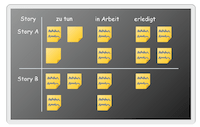
A description of Scrum artifacts would be very incomplete without the famous task board. The simplest task boards consist of three columns with the headings:
- “To Do”
- “In Progress”
- “Done”
A task board is placed in the room so that every team member has access to it. When teams are geographically distributed, electronic, web-based task boards help – many project management tools and agile project management software offer such boards.
Tasks are moved across the board so that it is visible which tasks are done, which are in progress, and which have not yet been started. This visibility allows the team to assess its current situation well and adapt if necessary. The board also helps stakeholders and the Product Owner observe project progress.
A variant of the task board is the Kanban board. The combination of Scrum with Kanban is called “Scrumban.” Almost every well-known agile project management software offers the Scrum task board and Kanban.
Definition of Done

The list of Scrum artifacts would be incomplete without the “Definition of Done.” In a project, it is important that all participants have a shared understanding of what “done” means. When a programmer has finished creating the source code and testing it, the software is still far from being ready to hand over to the customer. When a tester has completed their examination with a positive result, it does not yet mean the system can go into production. A salesperson understands “done” as being able to sell the product to customers who can use it immediately.
To avoid confusion resulting from these different understandings, Scrum teams clearly define the meaning of the word “done” for themselves. A typical criteria list looks like this:
- Code written
- Code reviewed
- Regression tests passed
- Customer acceptance
- etc.
This list of things that must be completed before a user story can be called “done” is called the “Definition of Done.” Many teams have their Definition of Done checklist posted next to their task board.
Further Information
If you’re interested in reading more about Scrum roles, you can do so there. In this article, you can see an overview of Agile Project Management. For implementation, we recommend agile project management software and a comparison of project management tools. Further reading: agile principles, agile values, agile practices, Scaled Agile Framework, and Agile vs. Waterfall.

Gabriella Martin
Editor and Writer
Gabriella Martin is a Yale University graduate and holds a Master's degree in German Literature from the University of Tübingen. She loves explaining complex things in simple terms.