Summary: To-do lists are a simple and effective time management method and the foundation for nearly all forms of work organization. They range from simple personal lists with items to check off to complex team-capable task planning in project management with Kanban boards and extensive structuring options. However, to-do lists primarily serve self-organization. They help prioritize work and maintain an overview, leading to higher productivity and job satisfaction.
A Structured Workday with To-Do Lists
A to-do list (synonyms: task list, open items list) is an overview of all pending tasks and open items that need to be completed within a given timeframe. The simplest form is a checklist — such as a shopping list.
What Types of To-Do Lists Are There?
To-do lists come in many forms. The spectrum ranges from simple sticky notes to complex task management systems. First, you should decide whether you want to use the to-do list only for your personal time management or whether you want to be able to share tasks with others. You choose one of the two options:
- Personal to-do lists
- Team-capable to-do lists

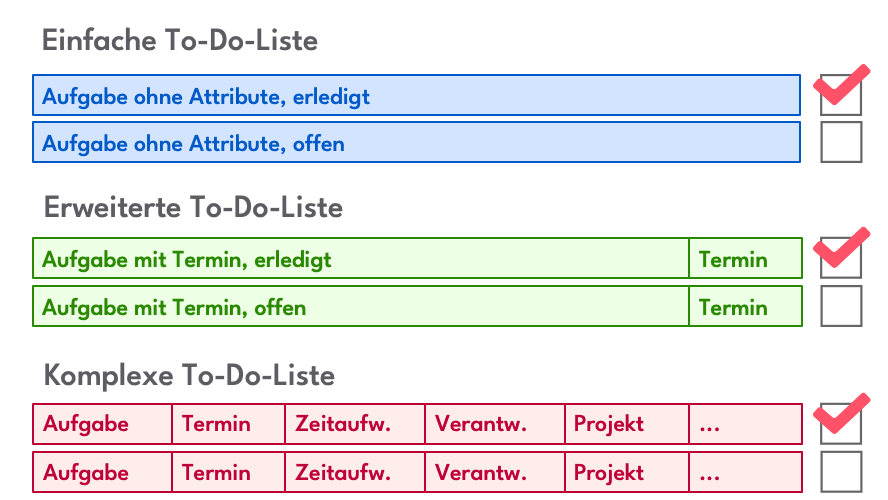
You can design your to-do list completely freely. Common variants include the
- Simple List: only with a brief task description and status (open or completed)
- Extended List: with a brief task description, deadline, and status
- Complex List: with additional attributes and method support such as Getting Things Done, RACI, or ABC Analysis
Complex team-capable to-do lists often also offer other display formats beyond just a list, such as a task board or Kanban view or a timeline. The transition to workflow systems and project management systems is fluid.
| Attribute | Description |
|---|---|
| Brief Description | Title or short task description |
| Status | At minimum "open" and "completed"; in more complex cases, additional statuses can be added. |
| Due Date | When the task should be completed. For recurring tasks, you can specify the repetition interval here. |
| Area/Project | If the task belongs to a project or work area. Some systems also call this a "list." |
| Attachments | Other electronic documents, images, photos, and records belonging to this item |
| Description | A detailed description of the task, e.g., in HTML or RTF |
| Responsible Person | In teams, the person currently responsible for completion. If the RACI method is supported, this is the "R" (Responsible). |
| Priority | Task priority, e.g., according to the Eisenhower Principle (important and urgent, etc.) |
| Effort | The estimated time required to complete the task |
| Location | Links the task to a location. When you visit the location, you know everything that needs to be done there. |
| Tags | Tags can be assigned to a task for categorization |
| Watchers | People who have an interest in this item |
| Manager | For the four-eyes principle, a person who keeps an eye on this task. If the RACI method is supported, this is the "A" (Accountable). |
Paper, Excel, or Software? Digital Open-Items Lists Offer Many Advantages
Depending on whether you decide to keep a personal or team-capable list, and whether you want to work with a simple, extended, or complex list, you can choose from:
- Paper-based lists
- Excel-based lists
- Digital open-items lists with specialized software
Paper-based solutions are easy to implement, and it’s motivating to check off completed tasks on paper. However, such handwritten lists are not team-capable, cannot handle complex lists, are difficult to structure and prioritize, are unorganized, error-prone, and overall inefficient. Paper-based to-do lists are no longer state of the art.
But then there’s Excel, the tool for everything. Indeed, you can use it to maintain useful personal to-do lists (see also To-Do List in Excel). Sorting and filtering works reasonably well, and some people find that if they make the Excel list available on a shared drive, this solution is also team-capable. So why should you bother with specialized to-do list software?
Templates for To-Do Lists:
- Pinterest (account required)
- MS Word format and PDF
- Excel format
- Microsoft To-Do App
The Advantages of Digital Solutions
Choosing the right tool for your to-do list can be decisive. While handwritten lists on paper or simple Excel spreadsheets are classic methods, digital to-do lists offer a wealth of advantages that make them the best option for many.
- Flexibility and Customization: Digital tools allow you to quickly edit, re-prioritize, or reorder tasks — without the tedious rewriting required with paper lists.
- Access from Anywhere: With a digital to-do list stored in the cloud, you can access your tasks anytime and from any device. Whether on your smartphone, tablet, or computer — you always have your list with you.
- Reminder and Notification Features: An app reminds you of upcoming deadlines or tasks so you don’t forget anything. This is especially helpful for complex projects with multiple deadlines.
- Access Control: Unlike paper lists and Excel lists, a good to-do app lets you control access to entries with appropriate permissions. This way, everyone sees only what they should see and can only change what they have permission for.
- Different Views: Digital tools offer additional views of your work beyond simple list displays, such as a task board. The filtering options are also far beyond what an Excel spreadsheet can offer.
- Traceability: Good digital to-do list solutions record all changes to lists and their entries, making them traceable and transparent.
- Integration with Other Tools: Many digital to-do solutions can be connected with project management tools or communication tools like Slack, Google Workspace, or Microsoft Teams to optimize your workflows.
- Long-Term Organization: With digital lists, you can plan not only daily tasks but also structure long-term projects. You can create lists for different areas, e.g., professional, personal, or team tasks.
- Environmentally Friendly: By eliminating paper, digital solutions help save resources and protect the environment.
- More Room for Details: To-do apps provide space for notes, attachments, and links to important documents. This enriches each task with valuable additional information, which paper lists and Excel solutions usually lack.
- Multiple Lists in One Place: Good digital to-do list solutions offer the ability to maintain more than one list. You can split your to-dos into private tasks, team projects, or long-term goals — a to-do app enables managing multiple lists centrally in one place.
- Protection Against Loss: Digital lists cannot be lost. They are typically stored in the cloud and accessible from any device, whether smartphone, tablet, or computer.
- Better Teamwork: Good digital applications offer features for task distribution and team coordination that paper or Excel simply cannot provide.
- Method Support: You can further improve your productivity by using more complex methods for time and work management instead of simple to-do lists. Some to-do list programs support approaches like Getting Things Done, Pomodoro, or RACI.
Digital to-do lists offer you not only better organization and overview but also features that go far beyond the possibilities of paper or Excel. If you want to work more productively, in a more structured manner, and more flexibly, digital to-do lists are the ideal choice.
Software for To-Do Lists:
| Team-Capable To-Do List Software | Personal To-Do List Software |
|---|---|
Creating a To-Do List: 9 Tips
1. Think First
A to-do list doesn’t begin with writing but with thinking. Before you list tasks, you should clarify what goals you’re pursuing and what tasks lie ahead. First, collect everything that comes to mind — whether professional or personal. It often helps to simply brainstorm freely so you don’t forget anything. Once you’ve sorted your thoughts, you can more clearly see which priorities need to be set and how to best allocate your time. This step not only creates structure but also helps you direct your energy specifically toward what matters. A clear overview from the start makes the to-do list significantly more effective and prevents you from overlooking important things.
2. Organize and Prioritize Tasks
Not every task is equally important. Once you’ve collected your to-dos, you should organize them by importance and urgency. Use methods like the Eisenhower Matrix to categorize tasks: Which tasks are urgent and important, which can wait? By setting priorities, you prevent yourself from being distracted by unimportant activities. Also, divide extensive tasks into smaller, achievable steps. This way, you maintain control over your schedule and can start purposefully with the most important items. Organizing and prioritizing ensures that you work more productively and can focus on what matters without being overwhelmed by minor things.
3. Break Down Large Tasks
Large tasks can quickly feel overwhelming and lead to procrastination. The key to tackling such tasks lies in breaking them down into smaller, manageable steps. Instead of “Create presentation,” you could note subtasks like “Research topic,” “Develop slide structure,” or “Finalize design.” Each completed sub-step gives you a sense of accomplishment and motivates you to continue. Additionally, by breaking things down, you can better estimate how much time each phase requires and plan more effectively. Small, clearly defined steps not only make it easier to get started but also ensure that even complex projects become achievable piece by piece.
4. Group Similar Tasks
Completing similar tasks in one go saves time and energy. Tasks like writing emails, making calls, or sorting documents often require a similar approach and can easily be bundled together. This principle, also known as “batching,” minimizes the time lost from frequently switching between different activities. For example, you can handle all administrative tasks of the day in a designated time block. By grouping similar tasks, you reduce mental load and work more efficiently. At the same time, you feel more productive after completing such a task block, since you’ve checked off a larger number of tasks in a short time.
5. Be Clear and Precise
A good to-do list thrives on clear and precise formulations. Instead of using vague terms like “Start project,” write specific steps like “Complete research on topic X” or “Write introduction for report.” Precision helps you not only better understand what concretely needs to be done but also makes the list more action-oriented. This avoids self-misunderstandings and keeps you more motivated because you can clearly see what the next step looks like. Clear formulations also ensure that you make faster decisions and use your time better. A well-formulated task leaves no room for ambiguity and is the key to a successful to-do list.
6. Update Your List Regularly
A to-do list is only helpful when it’s current and relevant. Take time regularly to review and update your list. Remove completed tasks, adjust priorities, and add new tasks. Especially with long-term projects or dynamic work environments, it’s important to keep the list flexible and plan for changes. An outdated or cluttered task plan can quickly become demotivating and leads to important tasks being overlooked. Also consider whether your list is still clear enough or needs restructuring. Regular updating keeps your to-do list an effective tool that accompanies you through the day and boosts your productivity.
7. Keep To-Do Lists Simple
Less is more — including with to-do lists. An overloaded or overly complicated list can quickly feel overwhelming and lose its intended function. Keep your list as simple as possible: focus on the most important tasks and avoid writing down every little thing. When your list is clear and organized, you can more easily maintain an overview and work more efficiently. Avoid unnecessary details or excessive subdivisions. A good to-do list should be understandable at a glance and not require additional thinking. The simpler you keep your list, the more likely you are to successfully complete your tasks.
8. Remember to Build in Buffers
Even the best to-do list doesn’t work if it leaves no room for the unexpected. Plan buffer times between your tasks to absorb delays, spontaneous meetings, or unforeseen challenges. Planning that’s too tightly packed often leads to stress and makes it difficult to respond flexibly to changes. By consciously planning time reserves, you ensure more composure and more realistic daily goals. These buffer times also help you stay focused and avoid overload. Remember: a successful to-do list is not only efficient but also flexible enough to handle everyday life with its surprises.
9. Use Colors
Colors are an effective tool for making to-do lists clearer and more intuitive. They help capture information at a glance and clearly communicate priorities. Here are the main reasons why using colors in to-do lists makes sense:
- Quick Orientation: Colors make it possible to instantly identify important information without having to go through the entire list. For example, red tasks can be marked as urgent, yellow as medium priority, and green as completed.
- Improved Prioritization: By using colors, tasks can be visually hierarchized. This makes it easier to focus on the most important items without being distracted by less urgent tasks.
- Categorization: Colors are excellent for grouping tasks by topic or category. For example, blue can stand for work tasks, green for personal errands, and yellow for team projects.
- Motivation Boost: Colors can have a motivating effect. Checking off or marking a task in a prominent, positive color (e.g., green) conveys a feeling of progress and success.
- Visual Clarity: Especially with extensive to-do lists, color coding helps reduce chaos and increase clarity. Color-coded lists are easier to read and better to understand.
- Flexibility: Colors can be adapted to individual needs. Users can, for example, define which colors stand for which categories or priorities, making the list more personal and user-friendly.
Overall, using colors makes to-do lists not only more functional but also more appealing. They increase efficiency and promote productivity by presenting information quickly and clearly.
A to-do list is not just an organizational tool but also a way to track your progress. Regularly check which tasks have been completed and which are still open. This tracking gives you a sense of fulfillment and helps you identify potential bottlenecks early. Use this opportunity for reflection as well: Were your tasks realistically planned? Did you add too much or too little? By reflecting regularly, you can continuously improve and adapt your list management. Monitoring progress not only shows how productive you are but also gives you the opportunity to learn from your successes and challenges.
Your To-Do List Isn’t Working? Avoid These Mistakes!
Sometimes it seems like to-do lists cause more chaos than they bring order. Why to-do lists don’t work often lies not in the list itself but in how it’s maintained. Here are some common mistakes you should avoid to make your to-do list truly effective:
- Too Many Tasks at Once: An overloaded to-do list can feel overwhelming and often results in nothing getting done. Limit yourself to the most important tasks and work through them step by step.
- No Prioritization: When all tasks seem equally important, you don’t know where to start. Use priorities or markings to highlight the most urgent or important tasks.
- Unrealistic Time Planning: It’s frustrating when you put more on the list than you can actually accomplish. Estimate realistically how long each task takes and plan in breaks.
- Unclear Task Formulation: Vague tasks like “Finish project” are hardly helpful. Formulate your tasks concretely, e.g., “Write introduction for the report” or “Create diagrams for the presentation.”
- No Flexibility: Life is unpredictable, and sometimes tasks need to be postponed. Make sure your to-do list leaves room for changes.
- No Regular Review: A to-do list is only as good as its maintenance. Update it regularly and cross off completed tasks to keep an overview.
- Forgetting to Celebrate Successes: A to-do list should not only be a work tool but also provide motivation. Reward yourself for completed tasks to keep motivation high.
If you avoid these common mistakes, your to-do list will not only be more functional but also become a tool that truly helps you achieve your goals and organize your daily life.
The Benefits of To-Do Lists at a Glance
- Better Organization: With a to-do list, you keep an overview of your tasks. You can clearly structure your daily, weekly, or monthly planning and ensure that you don’t forget anything.
- Individuality: To-do lists can be tailored exactly to your needs. Whether you add detailed descriptions, deadlines, priorities, or estimated time requirements — you design your list in whatever way is most effective for you.
- Less Distraction: A to-do list frees your mind from the burden of having to remember all tasks. This allows you to fully concentrate on the current task without constantly thinking about other things.
- Motivation Through Success: Checking off completed tasks provides a sense of satisfaction and boosts motivation. It shows you how much you’ve already accomplished and gives you drive for the next steps.
- Efficient Use of Time: By setting priorities on your to-do list, you can ensure that the most important tasks are completed first. This helps use time more effectively and meet deadlines.
- Stress Reduction: When everything is on a list, you feel less overwhelmed. You have control over your tasks and can work through them step by step without the feeling of missing something.
- Long-Term Planning: To-do lists help not only with daily planning but also with long-term organization. You can break larger projects into smaller steps and work toward your goals incrementally.
- Better Communication: In teams, to-do lists can help clearly assign tasks and maintain an overview of joint projects. They promote transparency and avoid misunderstandings.
Whether for your professional daily life, personal projects, or personal time management — a to-do list is a simple but powerful tool for getting through the day more productively and with less stress. Additional methods like Timeboxing or Time Blocking complement list management.
Frequently Asked Questions
What Belongs in a To-Do List?
A to-do list should contain all important tasks that need to be completed. This includes clearly and precisely formulated activities, and optionally priorities (e.g., urgent, important), deadlines, estimated time requirements, and additional information such as notes or links as needed. Large tasks should be broken down into smaller steps. Similar activities can be grouped to increase efficiency.
What is the Best To-Do List?
The best to-do list is the one that matches your individual needs and work habits. It should be clear, easily accessible, and customizable. For some people, a simple handwritten list on paper works, while others swear by digital tools like Todoist, Microsoft To Do, or Notion, which offer prioritization, deadlines, and reminders.
How Do You Write a Good To-Do List?
To write a good to-do list, first collect all tasks that need to be completed. Formulate them clearly and precisely, for example “Write email to customer X” instead of “Handle emails.” Prioritize your tasks by importance and urgency. Break larger projects into small, manageable steps and add deadlines. Group similar tasks to work more efficiently. Keep the list clear and update it regularly so it always remains relevant and helps you maintain an overview.
What Does a Good To-Do List Look Like?
A good to-do list is clear, organized, and well-structured. It contains the following elements:
- Clearly formulated tasks: Each task is precisely described, e.g., “Prepare presentation: create slide layout.”
- Priorities: Tasks are sorted by importance and urgency (e.g., with numbering or colors).
- Deadlines: Each task has a due date to facilitate time planning.
- Categorization: Similar tasks are grouped, e.g., “Emails,” “Meetings,” or “Projects.”
- Time Estimate: Optionally, the estimated time requirement can be specified.
- Flexibility: The list is adaptable and allows changes as needed.
- Making Success Visible: Completed tasks are checked off to show progress.

Christoph Friedrich
CEO Alltena GmbH
Christoph Friedrich is a computer scientist and certified Project Management Professional. He has extensive experience in the introduction and integration of project management tools as well as the analysis and definition of processes in project and service management.