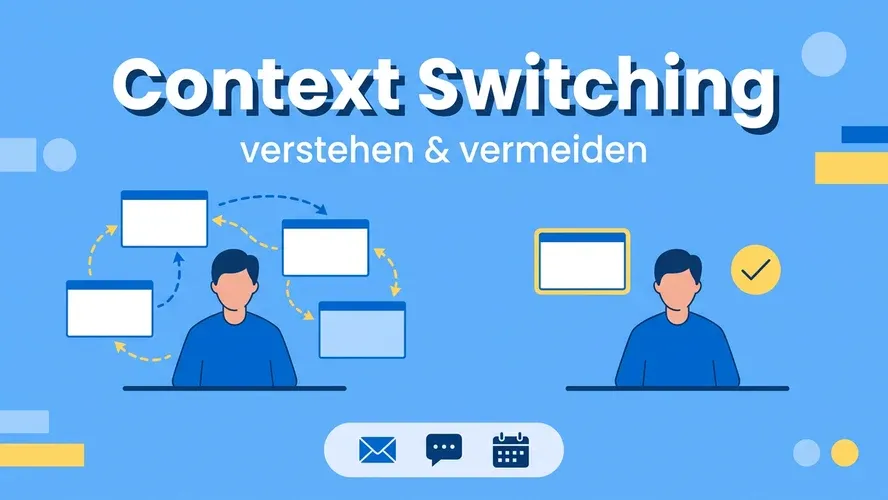
You’re in the middle of an analysis when a chat message pops up. Shortly after, your email inbox chimes, then the next meeting starts — and by the end of the day you’ve touched many things but finished few of them with the care the tasks deserved. This constant jumping around is, in everyday work life, mostly context switching.
The good news: context switching is not an immutable law of nature. With clear team agreements, honest prioritization, and a work environment that creates less friction, focus can be regained.
What Is Context Switching?
Context switching describes the process of shifting your attention from one task to another. Your brain has to reorient each time: What was the last status? What information do I need now? Where was that file?
Every such switch has a cost: it takes time to return to the same level of concentration you had before the interruption. In teams, the problem multiplies when priorities are unclear, information is scattered across many channels, or no one knows what actually matters right now.
Context Switching and Multitasking: The Difference
Both disrupt work — but they are not the same thing:
- Context switching: you work on different things one after another and jump from one thing to the next before the previous one is finished. Example: you’re writing a concept and immediately switch to a different matter when asked.
- Multitasking: you attempt to handle several tasks simultaneously — for example, answering emails in parallel during a video call.
In practice, both often occur in combination. For a more in-depth look at parallel processing and typical pitfalls in project settings, see the article Multitasking im Projektmanagement.
Why Does Context Switching Happen So Often?
Some causes are found nearly everywhere:
- Notifications and availability pressure: Many teams feel the expectation to respond quickly — whether via chat, email, or tickets.
- Too many separate tools: Switching between project software, ticketing systems, spreadsheets, and file storage creates tool friction and thus additional context switches.
- Unclear priorities: Without a shared order of importance, people react to the loudest thing rather than the most important.
- Unstructured meetings and ad-hoc check-ins: Every short “quick question” pulls others out of their concentration.
- Too much work in parallel (high WIP load): Keeping many tickets or projects “open” at the same time means constantly switching between contexts.
What Are the Consequences of Context Switching?
The effects go beyond simply producing “less output”:
- Longer lead times: Every interruption requires a ramp-up period — summed over the course of a day, this is significant.
- Higher error rates: Constantly re-entering a task leads to overlooked details or work being passed on half-finished.
- Mental exhaustion and stress: Constant sensory overload and the feeling of never being “done” demonstrably burden well-being and satisfaction.
- Poorer team coordination: When everyone is firing away in their own context, the shared picture of dependencies and progress is lost.
Studies on interruptions and stress in knowledge work are frequently cited; regardless of specific numbers, the direction is clearly felt in practice: fewer context switches usually means calmer, more predictable work.
Strategies: Reducing Context Switching in Daily Work
The following measures work for individuals and at the team level — and often reinforce each other.
1. Make Work Visible and Prioritized
What isn’t written down becomes an improvised mental holding pattern — and an invitation for every new interruption. Whether it’s Getting Things Done, a clear “Top 3” list, or a shared board: what matters is that priorities are visible to you and those around you. Then others can gauge when something truly can’t wait.
2. Define Success Criteria and “Done”
When it’s unclear when a task is finished, follow-up questions and correction loops arise — more context switching. A clear Definition of Done and measurable intermediate results reduce room for interpretation and keep everyone in the same frame of reference.
3. Prioritize Honestly — and Be Allowed to Say No
Not everything is equally important. When leadership is transparent about what takes strategic precedence, team members can better focus on a few things. A clear “Now A, then B” prevents the simultaneous juggling of many “top priorities.”
4. Focus Time and “Do Not Disturb” Rules
Block uninterrupted working periods in your calendar for concentrated work. Combine this with agreed-upon windows for chat and email — for example, Time Blocking or the Pomodoro Technique if fixed cycles help you. A status in chat (“Focusing until 2 pm”) sets expectations without seeming unfriendly.
5. Use Asynchronous Communication
Not every question needs an immediate answer. Written updates, documented decisions, and clear response-time expectations relieve pressure on everyone involved and reduce the constant need to “quickly check in.”
6. Batch Similar Tasks Together
Batching means: emails all at once, all approvals in one slot, all brief check-ins at the end of the morning. This keeps you in the same thinking mode for longer and means fewer context switches.
7. Limit Work in Progress (WIP Limits)
Only a limited number of active tasks per person or column — for example in Kanban — makes overload visible. WIP limits force honest conversations about capacity instead of constantly switching between half-finished items.
8. Lighten the Meeting Load
Many status rounds can be replaced by written updates or a shared progress overview. Where meetings are necessary: agenda, goal, fixed end time — so that at least the context switch into the room is used efficiently.
9. Connect Tasks to Goals
When people can see why a task makes a difference, they are less likely to fall into reactive jumping. A connection to team or company goals provides orientation and makes it easier to ask: is this more important right now than what I’m working on?
One System Instead of Tool-Hopping: Work Management
A recurring bottleneck is the fragmentation across many specialized tools with no shared data foundation. Projects run in one piece of software, requests in a ticketing system, operational to-dos somewhere else — every transition is a context switch.
Work management consolidates the view of projects, tasks, and services. The Allegra product family (project, task, and service management) is designed exactly for this: making the same information usable for different ways of working, rather than constantly jumping between isolated worlds. For more on the concept: Workmanagement vs. Projektmanagement.
Conclusion
Context switching is ubiquitous — but not inevitable. Those who identify triggers, make priorities visible, protect focus time, and reduce friction in collaboration improve not only productivity, but often also morale and the quality of work. Small routines, consistently applied, have more impact than a single large tool-switching project.
Frequently Asked Questions
What does context switching mean?
Context switching describes the repeated shifting of attention between different tasks, tools, or topics before one thing is finished. The brain has to re-engage each time, which costs time and makes mistakes more likely.
Is context switching the same as multitasking?
No. With context switching, you switch between tasks one after another. With multitasking, you try to handle several things simultaneously. Both can disrupt concentration, but they arise differently.
Why is context switching harmful to productivity?
Every switch incurs restart costs, increases stress, and raises the risk of errors. These add up over the course of a day: tasks take longer, and the feeling of mental overload grows.
What helps most quickly against context switching?
Typically effective measures include: visible priorities, protected focus time, batched communication (fixed windows for email/chat), WIP limits, and fewer parallel tools when the same work can be mapped in a shared system.
Can software reduce context switching?
Yes, if it creates a shared picture of work and requires less manual synchronization between separate systems. What matters less is the number of features — what matters more is the end-to-end traceability of tasks, projects, and services — for example with integrated work management.

Senior Advisor
Jörg Friedrich is the original author of the project management software Allegra and continues to accompany its development to this day. He has many years of industry experience as a project and department manager. He also serves as a professor in the Faculty of Computer Science and Information Technology at Esslingen University of Applied Sciences.


