“Why should I burden my memory with things I can just write down?”
This quote is attributed to Thomas A. Edison, who recorded his ideas, sketches, drafts, experiments, and observations in more than 5,000 notebooks. They helped him organize and document his countless projects, including his inventions such as the light bulb, the phonograph, and the movie camera.
These notebooks were an essential part of his working process, and many of them are preserved in archives today, offering insights into Edison’s creative thinking. They stand as an impressive testament to his tireless work and his extraordinary spirit of innovation. Edison understood that the human mind is not always capable of retaining everything, and used his notebooks as an extension of his memory. This practice helped him stay organized and ensured that none of his valuable ideas were lost.
The idea of extending one’s memory through external information storage is therefore not entirely new. The concept scales from a simple shopping list to the final checklist before launch into space. The world is full of lists.
Most time management methods can be thought of as a collection of lists (more precisely, queues) with associated workflows. The difference lies in the number and type of lists and the specified workflows. The Eisenhower Matrix, for example, viewed this way consists of four lists, a simple categorization process, and an equally simple completion process.
Compared to other methods of this kind, the GTD method has a very concrete and nuanced picture of a productive workflow. If you often find yourself thinking about your next task before you’ve finished the current one, the Getting Things Done method can help. This approach is about getting those thoughts out of your head and into a to-do list tool, so you can devote your full mental capacity to the work that truly matters — instead of constantly thinking about what’s next.
What Is the Getting Things Done Method (GTD)?
The Getting Things Done (GTD) method is a widely used system for self-organization and productivity improvement. It was developed by David Allen to help people efficiently manage their tasks, commitments, and ideas without feeling overwhelmed by the daily flood of to-dos.
The core idea behind GTD is that the human brain works better when it doesn’t have to deal with managing tasks, and is instead free to focus on completing the task at hand. To achieve this, all pending tasks are offloaded into a reliable external system in order to “clear the mind.” This reduces stress and increases personal productivity.
The GTD workflow consists of five steps:
-
Capture: All tasks, ideas, and commitments are collected in a trusted system. This can be a notebook, an app, or a digital tool. The important thing is to get everything out of your head so no thoughts keep “swirling.”
-
Clarify: In the next step, each item is reviewed and it is determined what needs to be done with it. A decision is made as to whether an action is required, whether the task should be delegated or postponed, or whether it is no longer relevant at all.
-
Organize: The clarified tasks are sorted by priority, project, and context. Tasks that can be completed right away are handled immediately, while larger projects are broken down into manageable sub-tasks and organized into categories such as “Waiting for” or “Next Actions.”
-
Reflect: The entire system is reviewed regularly (at least weekly) to ensure it is current and complete. Priorities are reassessed and tasks are adjusted as needed.
-
Engage: The final step is to work through tasks efficiently, based on priorities and the availability of time and resources.
We go into these steps in more detail below.
Benefits of the GTD Method
The GTD method offers numerous advantages, especially for people dealing with a large number of tasks and projects. The most important benefit is that it creates mental space by offloading all tasks into a reliable system. This reduces the constant thinking about open to-dos and makes it possible to focus fully on the current task.
In addition, the method helps you maintain an overview and not forget any tasks. By systematically capturing and organizing all commitments, nothing slips through the cracks. The GTD method is flexible and can be adapted to individual needs, whether for professional projects, personal tasks, or creative ideas.
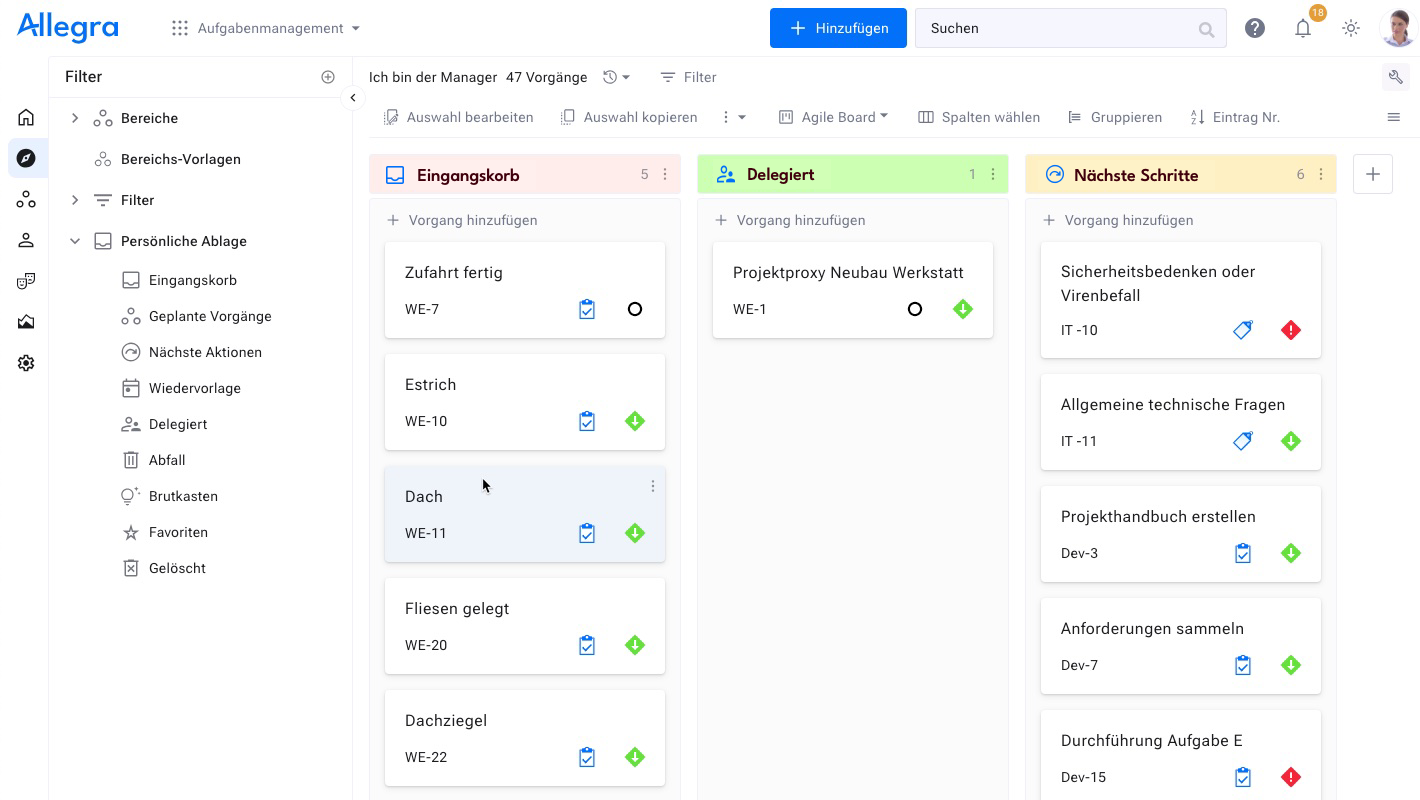
Allegra is a powerful project management software with integrated logic for the GTD method. Every user finds a "Personal Inbox" in their issue browser. Clicking on nodes displays the corresponding items. Dragging items onto a node assigns them to the corresponding category. Items for which the user has been newly assigned as the processor appear in the inbox.
Items can easily be set for follow-up or delegated. The whole thing is fully team-capable — all permission and notification functions of the base system also work in this context. Configuration is not necessary, but possible.
How Does the GTD Method Work?
The GTD workflow consists of five simple steps designed to bring structure to the way you handle your to-dos:
1. Capture
The first step of the Getting Things Done (GTD) method is to get all thoughts, tasks, and commitments out of your head and into an external system. This system, which David Allen calls the “Inbox,” serves as a collection point for everything that demands your attention — professional tasks, personal projects, or spontaneous ideas. It doesn’t matter whether you use a digital tool such as an app, a software solution, or an analog notebook; what matters is that you regularly record everything that comes to mind. The goal is to relieve the mind of the burden of storage, since our brains are better suited to processing information.
The initial focus is on capturing, i.e., collecting — not on immediately organizing. Everything that “swirls around” in your head as “stuff” is simply transferred into the inbox. This inbox should not be confused with a classic email inbox; it is more of a comprehensive to-do list that collects all your tasks and information. Methods such as the Eisenhower Matrix can help with prioritization before items are structured later. It doesn’t matter whether this information is unstructured or incomplete — what matters most is that it gets out of your head and into a safe place.
Capturing must be quick and uncomplicated so that you can add information and tasks at any time without losing details. If you are working with a team, a project management platform or work management platform can be used not only to capture your own tasks but also to organize the team’s work. Supplementary information such as due dates, stakeholders, or important documents can be added later to complete the context. The key is that regular capturing immediately creates relief and allows you to focus on the current task without constantly thinking about unfinished ones.
The GTD method is strongly supported by Allegra. Items that have been newly assigned to a user as processor automatically appear in their inbox. This allows items of any kind to be captured through the following channels:
- Creating an item in the application
- Via email
- From Microsoft Outlook
- From Microsoft Teams
- From Slack
2. Clarify
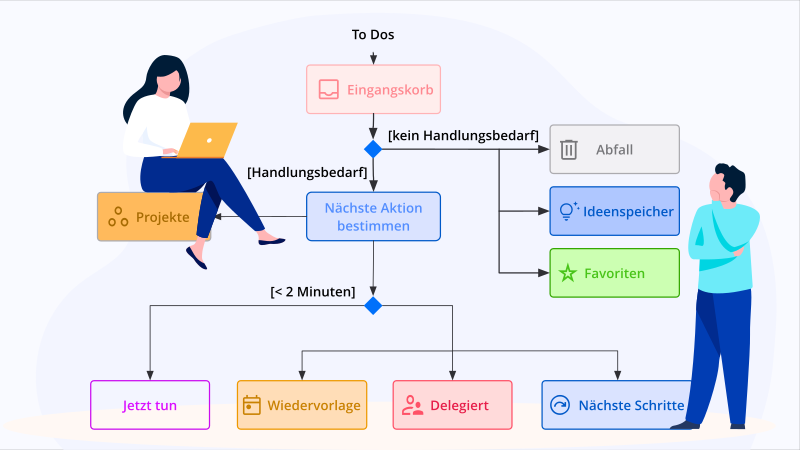
After all relevant information has been collected, the next step of the GTD method begins: clarifying. Here, the captured material is reviewed and transformed into concrete, actionable tasks or relevant information. Each item is systematically examined to decide which of the following categories it belongs to:
- Do it: Tasks that take less than two minutes should be handled immediately to quickly check them off the list.
- Delegate: If a task doesn’t fall within your area of responsibility or someone else can do it better, it is delegated to the appropriate person.
- Defer: Tasks that require more time or planning are moved to the appropriate list or category to be addressed later.
- File: Information that serves as reference material but requires no immediate action is archived.
During clarifying, attention should be paid to ensuring that each task contains sufficient information. This includes:
- a clear title
- context information
- documents or files
- as well as assignment to the relevant project or goal.
Important aspects such as the stage of work, possible blockers, or dependencies on other tasks should also be taken into account. Where applicable, ideas from the ALPEN method can be used here.
For larger projects or complex tasks, it is advisable to break them down into smaller, manageable steps. For example, the task “Write an e-book” could be divided into several smaller tasks such as “Create concept,” “Draft outline,” and “Write text.”
An important part of the clarifying process is also the prioritization of tasks. By assigning a priority to each task, you can respond flexibly to changes. Deadlines often shift or unexpected tasks arise. Setting priorities ensures that the most important tasks get done, while less urgent tasks can be delegated or deferred when needed.
Only after clarifying does organizing take place, in which tasks are finally moved from the inbox into the appropriate projects or lists.
- Tasks that can be completed immediately are set to status "done"
- Delegate tasks by selecting them on the right and then dragging them to the "Delegated" node on the left. Specify the new processor and optionally a follow-up date. You will be reminded in time.
- Move tasks — for example into backlogs or Sprints — by selecting items and dragging them to the corresponding node on the left in the navigation tree.
3. Organize
In this step, the processed material is placed into a structured system. The organization is done through lists or categories that represent different types of tasks.
| List | Meaning |
|---|---|
| Everything that comes in through the various communication channels is collected here. In Allegra, you will automatically find here all items that have been newly assigned to you as processor. | |
| Tasks that require multiple action steps and are to be carried out in a project are moved to this list. In Allegra, these would be the regular issue lists in the various projects. | |
| Here you will find tasks that are tied to a specific action context and should be completed as soon as possible. | |
| (Waiting/Waiting for) These are tasks that require a prior step. In Allegra, this category is used for delegating tasks. | |
| (Calendar) Enter important appointments with a fixed time frame here, such as meetings. | |
| Material that no longer needs to be attended to and can be deleted at some point. | |
| (Someday/Maybe) Tasks that have no priority and may not be implemented at all, or only at a later point in time. | |
| (Reference material) Here you can store anything that might be relevant to tasks or projects, such as articles or photos. |
This structure ensures that nothing is forgotten and every task finds its place in the system.
After the Clarify and Organize steps, your inbox should be empty. Everything should have been moved into the appropriate project or the appropriate list, so that the next time you look at your inbox you should only find new items.
- The GTD structure is built into Allegra and can be used immediately.
- Delegation and follow-up have the corresponding logic built in.
- Reference material is called "Favorites," and the "someday" category is called "Idea Storage."
- Assigning items to categories is done simply by drag & drop.
- In Allegra, the GTD methodology is team-capable and integrated into the global task management system.
4. Reflect
The GTD method is not one where you note down a task and then simply ignore it. Instead, it requires a regular review and adjustment of priorities. It is therefore essential to know exactly how important each task is. When new tasks arise that are more urgent than existing ones, awareness of each task’s priority helps you adjust your work plan flexibly and respond better to changing requirements.
When and How Often Should You Review Your Tasks?
Reviewing tasks can easily become a distraction — so it should not happen too often, as this would otherwise impair concentration. A good recommendation is to review your tasks twice a day: once in the morning to plan the day, and once in the evening to prepare for the next day. Make reviewing a fixed part of your daily routine. This way, you can start the day with a clear head, without feeling like you constantly need to reorganize your task list or calendar. Remember that the GTD method aims to free your mind. Therefore, avoid going through your tasks too often, as this would be counterproductive.
In addition, it is worth carrying out a more comprehensive review once a week. During this review, you should go through the tasks completed in the last few days as well as those planned for the coming week. This ensures that nothing has been overlooked and that you can head into the new week with clear priorities.
Tip: You can schedule your regular GTD list reviews using the Time Blocking method.
- GTD only works if users consistently, regularly, and persistently carry out the steps described here. Not everyone has the self-discipline required for this.
- In Allegra, the GTD methodology is integrated into the global work management system and offers users all the benefits of the method without significant additional effort.
5. Engage
The final step of the GTD method is the actual execution of tasks. This is about working through tasks efficiently and in the right order. The decision about which task to tackle next is based on several factors:
- Available time: How much time is currently available? Some tasks require long stretches of time; others can be completed quickly.
- Available energy: What mental or physical energy is required for the current task? On a stressful day, it may make sense to handle smaller tasks, while demanding projects are reserved for times of higher energy.
- Priority: Which tasks have the highest urgency or the greatest benefit?
This structured approach ensures that the right tasks are always tackled at the right time. If desired, you can additionally prioritize using the Eisenhower principle.
Getting Things Done as a Team
Making Getting Things Done usable for teams offers clear advantages. Each team member can easily organize their personal task management this way as well. Every team member can set individual follow-up dates for each item. Items can be delegated while still remaining within the visibility of the person who delegated them.
The “Reference basket” can be used to keep frequently used items quickly at hand (“Favorites”). All items that have been newly assigned to a team member land in the “Inbox.”
Frequently Asked Questions
How does Getting Things Done work?
Getting Things Done (GTD) is an effective productivity method based on the idea that we should offload our tasks into external systems. With GTD you create a list of all tasks and segment them into individual projects. Through a combination of planning, organization, and execution, GTD helps you tackle tasks in a targeted way and boost productivity.
Why is the GTD method so successful?
The GTD method is successful because it offers an easy-to-understand system for keeping track of tasks, priorities, and ideas. It helps you work efficiently and be productive. With GTD you can better coordinate what needs to be done and what you should be doing, which leads to greater success.

Senior Advisor
Jörg Friedrich is the original author of the project management software Allegra and continues to accompany its development to this day. He has many years of industry experience as a project and department manager. He also serves as a professor in the Faculty of Computer Science and Information Technology at Esslingen University of Applied Sciences.


