
One of the Best Task Management Solutions
One of the Best Task Management Solutions
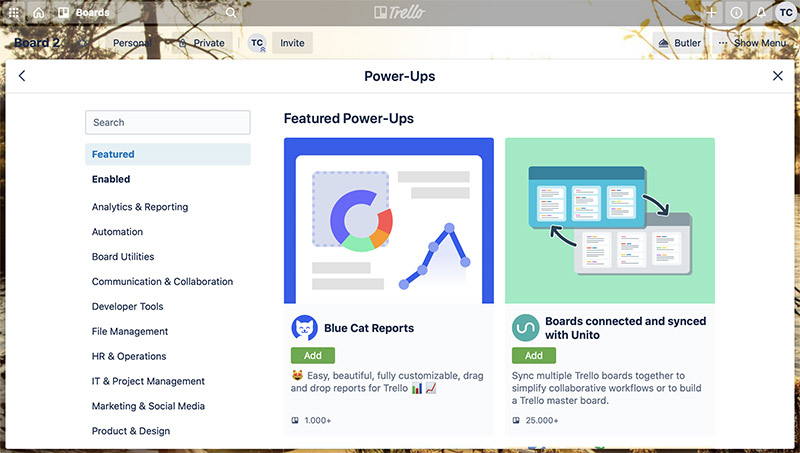
Trello is a feature-rich, pleasant-to-use software for general task management in teams. The software’s functionality can be extended significantly with so-called “Power-Ups,” allowing Trello to be configured into a genuine project management tool as well. In this review, we have taken these extension options into account. In its basic version, however, Trello remains a simple task management tool.
Pros and Cons
General Functionality
Deployment
Trello is offered exclusively as Software as a Service (SaaS) in the cloud operated by the vendor. The vendor guarantees compliance with European data protection standards.
Projects and Project Types
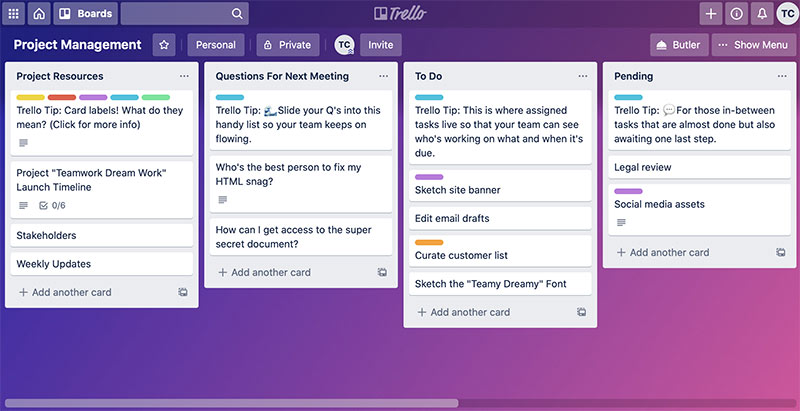
In Trello, items are called “cards.” These are organized into lists, which in turn belong to a “board.” There are board templates, and with the appropriate Power-Ups, cards can also be arranged hierarchically. However, there are no board types in the traditional sense that would allow centrally configured derived boards with their own properties.
Items and Item Types
In task and project management, almost everything revolves around “items.” In Trello, items — or cards — belong to a list, which can influence the behavior of the corresponding items. Lists can be created freely, for example for “Tasks,” “Action Items,” and “Problem Reports,” or sorted by other criteria.
Lists can have their own workflows and different attributes. For example, an action item optionally has a due date, whereas a task may require both a start date and an end date to be specified.
Item Hierarchies
Trello offers the ability — via Power-Ups — to organize cards in a fully hierarchical manner. The type of subordinate items can be restricted depending on the type of the parent item through so-called “Rules.” This can prevent, for example, an item of type “Car” from being subordinated to an item of type “Engine.”
Notifications
Trello has a comprehensive, configurable notification system. Email notifications are based on templates that can be customized. There is an @-mention function and a reminder function.
The notification system is capable, for instance, of sending emails only to the manager of the affected item when that item was completed and has since been reopened.
Access Permissions
Custom roles with corresponding permissions can be defined.
Attributes
In Trello, custom attributes can be configured through the web interface without any programming. A wide selection of attribute types is available, such as label fields, person selectors, and date fields. In addition, the behavior of standard attributes can be meaningfully adjusted — for example, the default value for a start or end date.
For instance, you can create a dropdown field that lists all users belonging to a specific group.
Different default attribute settings can be configured for different projects.
Input Forms
Any number of input forms can be defined in Trello.
Input forms can be structured with tabs and panels.
A different input form can be assigned for creating a new item than for subsequently editing it.
Different input forms can be set for the same item type in different areas or projects.
Dependencies
In project management and task management alike, items are often related to one another. For example, a task cannot be started before another is completed, or an item cannot be closed until a dependent item has been resolved.
Trello provides basic support for defining dependencies or links.
Custom link types can be introduced via plug-ins.
Dashboards
The system offers its users an overview page (dashboard). Each user can either use preconfigured dashboards or compose their own from an extensive list of dashboard widgets. Dashboards can be saved as templates and assigned centrally to users by system administrators. Available dashboard elements include, among others:
- Average response time
- Average processing time
- Number of items in state X over time
- Activity stream
- Predefined filters
Reporting
Trello has no report templates.
Reports can be created in Trello in Excel and PDF formats.
User Management
To manage users, Trello can be connected to an LDAP system. Users and groups can be synchronized with an LDAP server either manually or automatically.
Multiple directory servers can also be connected.
Trello can be integrated for true Single Sign-On with CAS and Shibboleth.
The system supports two-factor authentication.
User Interface and Usability
The software offers a clean, well-organized, and modern-looking user interface. Regular users can get up to speed relatively quickly even without training. Context-sensitive help is available for situations where something is not immediately obvious.
For configuration, you need to familiarize yourself with Trello’s core concepts. Materials are available in the form of tutorials, videos, slide decks, and user manuals. Training courses are also offered.
The user interface can be adapted to user requirements. The available menu items can be individually configured for each user or user group.
Interfaces and Extensibility
Through a comprehensive REST interface, nearly all functions available in Trello’s user interface are also accessible programmatically. For example, users can be managed, projects created, modified and deleted, or queries executed.
Task Management
Delegation
The software supports the delegation of items including follow-up. The delegating party retains their relationship to the item, and the follow-up date is their personal one. The delegating party has an overview of all items they have delegated.
Deputy Function
In Trello, it is not possible to assign deputies to users.
Recurring Tasks
Some tasks and appointments repeat on a cyclical basis — for example, every first Monday of the month. Handling such series of items can be very helpful and time-saving in task management.
Trello allows the creation of recurring items in the same way you would expect from good calendar applications.
Time Tracking
Trello allows you to track effort (time and money) for each item and assign it to accounts. Accounts can be grouped into cost centers and shared across projects.
There is an option to use timers within the application to automatically log time spent. Reports provide an overview of who was working on which activities during any past period.
Support for the Getting Things Done Method
The Getting Things Done method is a proven approach to personal work organization. It allows the personal categorization of items — such as personal follow-up dates or personally marking items as favorites.
Trello does not directly support the GTD method.
Support for the RACI Matrix
For task management and project management, the RACI method defines four item-specific roles through which project stakeholders can be associated with a task. Normally, roles are assigned at the project level rather than per item — for example, there is one project manager or one Scrum Master for the entire project. RACI, by contrast, allows roles to be assigned per item (see /en/blog/project-management/methods/raci-matrix/).
Unfortunately, Trello does not offer a way to model a RACI matrix.
Workflows
Workflows in task management systems are typically represented in two forms. The first method relates to the workflow of a single item passing through different stages. The second method involves defining sets of tasks and working through them.
Trello supports the first variant without a graphical editor.
Project Management
Programs and Portfolios
In many organizations, projects run within the context of programs, portfolios, or product areas. Here, groups of projects must be able to be consolidated in order to maintain an overview.
A fundamental prerequisite for program or portfolio management is the ability to group projects and arrange them hierarchically.
Trello allows areas to be arranged hierarchically to any depth, thereby supporting simple, pragmatic program and portfolio management.
Subprojects
Larger project undertakings with many items cannot be adequately structured through item hierarchies alone — they must be split into subprojects. Subprojects may require different processes, for example for hardware and software development.
Multi-Project Reports
All queries and reports can span multiple projects and subprojects, which can be freely defined using appropriate filters.
Work Breakdown Structure
Before a project plan can be created, the activities to be performed — or the deliverables to be produced — must be structured. To represent such a product structure or work breakdown structure (WBS), items must be arrangeable hierarchically to any depth.
In Trello, a WBS can be fully represented. The order of items can be freely defined at each level.
Interactive Gantt Chart
Gantt charts are used to define and visualize the timeline of project activities and predecessor-successor relationships. Trello offers a simple, interactive Gantt component. It is not possible to display the critical path. There are also no project progress bars, and you cannot compare the current planning status against a baseline.
Resource Planning
Resources of different types can be managed and assigned to items. There is a view in which resource utilization over time is displayed, making overloads or underloads immediately visible. Resources can be sorted by project or department.
Employee Availability
Each employee has a personal calendar showing their availability. The system takes availability into account during resource planning.
Project Progress
In Trello, there is the option to measure project progress by the ratio of completed tasks to total tasks. Additionally, for tasks that are still open, you can enter the estimated remaining effort until completion.
This gives Trello a rudimentary, low-overhead method of progress tracking — though it is not sufficient for more demanding project management needs.
Agile Project Management
The software fully supports agile project management according to Scrum and Kanban. It offers not only the corresponding views such as a taskboard or burn charts, but also has all elements necessary for agile work built into the core of the system — including Epics, User Stories, Backlogs, and Sprints.
Backlog priority, Sprint capacity, and team velocity are supported by corresponding application logic. Tasks left over from a previous Sprint can be automatically carried over to the next Sprint. Sprints can be automatically created in advance.
For software developers, there are integrations with source code management systems such as Git and Subversion, as well as CI/CD servers such as GitLab and Jenkins.
Further Information
Read more about Issue Tracking in product lines or get an overview of ticket systems.

Editor and Writer
Gabriella Martin is a Yale University graduate and holds a Master's degree in German Literature from the University of Tübingen. She loves explaining complex things in simple terms.


