
ClickUp Project Management Software
With ClickUp you get a beautiful web-based project management software. From simple task management to straightforward project management, it covers a wide range of needs. With an interesting hierarchy concept of Workspaces, Spaces, and folders, the system stands out among many other project management tools when it comes to structuring projects — even if genuine support for WBS and project structure is lacking. ClickUp is also one of the few project management tools that supports the Getting Things Done method.
1. General Functionality
Operation
ClickUp is available exclusively in the cloud as Software as a Service (SaaS) and cannot be hosted on your own servers. The vendor guarantees compliance with European data protection standards. Data is stored in the US and Europe.
Projects and Project Types
In ClickUp project management software, tasks are managed in lists. Lists can be organized in folders. Folders belong to Spaces. It is not possible to create multiple levels of Spaces or folders. If you use a Space for a project, only one level of sub-projects can be represented in the form of folders.
In ClickUp, you can create templates for Spaces from existing Spaces. However, you cannot centrally change the configuration of existing Spaces that are based on a particular template.
Tasks and Task Types
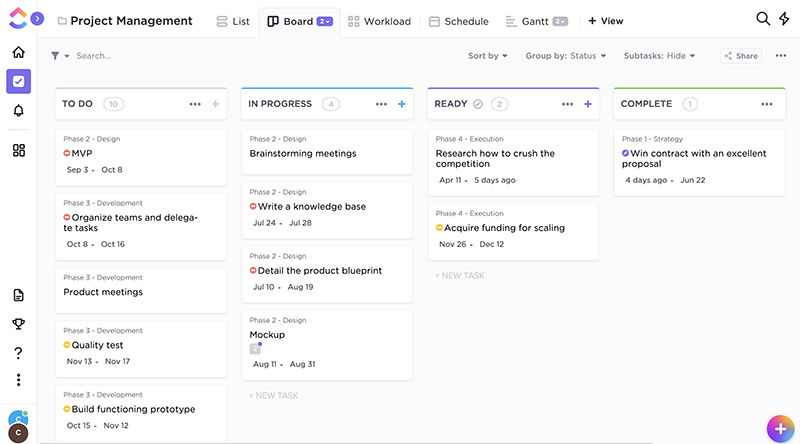
In task and project management, almost everything revolves around “tasks.” In ClickUp, a task always belongs to a list, comparable to a task type. The list defines, for example, the attributes of a task belonging to it. You can create any number of custom lists.
Task Hierarchies
ClickUp offers exactly one level of hierarchy. These “sub-tasks” are partly treated and displayed differently from “regular” tasks. A hierarchical structuring of work packages cannot be achieved with this.
The type of subordinate tasks cannot be restricted based on the type of the parent task. It is fixed to the list type of the parent task. This means, for example, that it cannot be prevented that a task of type “Car” is subordinated to a task of type “Engine.”
Notifications
ClickUp has a simple, configurable notification system.
Notifications can be sent by email, in the browser, or to a mobile device. It is not possible, for example, to send notifications only when an already closed task is reopened and at least two weeks have passed since it was closed. There is an @ function and a reminder function.
Access Permissions
Access rights in ClickUp are granted on a role-based and project-specific basis. Permissions can be assigned for:
- a complete project or workspace
- task types such as tasks, open items, or problem reports
- individual attributes such as the budget for a task
The permission system allows fine-grained control over who can view or modify what.
Custom roles with corresponding permissions cannot be defined.
Attributes
In ClickUp, custom attributes can be configured through the web interface without any programming.
A wide selection of attribute types is available, such as labels, person selectors, or date fields. However, the ability to define meaningful default values — for example, preset values for a start or end date — is missing.
Each Space has its own set of attributes.
Input Forms
In ClickUp, an input form can be defined for each list. The order of the fields is not configurable. Custom fields can be set for each folder. There is no dedicated input form for creating a new task.
Dependencies
In project management and task management, tasks are often related to one another. For example, a task cannot be started before another is completed. Or a task cannot be closed until a dependent task has been finished.
ClickUp provides basic support for defining dependencies or links.
Custom link types can be added via plug-ins.
Dashboards
The system offers users an overview page (cockpit, dashboard).
Each user has the option to use preconfigured dashboards or build a custom dashboard from a comprehensive list of dashboard tiles. Dashboards can be saved as templates and centrally assigned to users by system administrators. The following dashboard elements are available, among others:
- Average response time
- Average processing time
- Number of tasks in state X over time
- Activity stream
- Predefined filters
Reporting
Reports in ClickUp can only be created by exporting to CSV files.
User Management
Synchronization of ClickUp with a directory server is not supported. ClickUp can be integrated with CAS and Shibboleth for true single sign-on. The system supports two-factor authentication.
User Interface and Usability
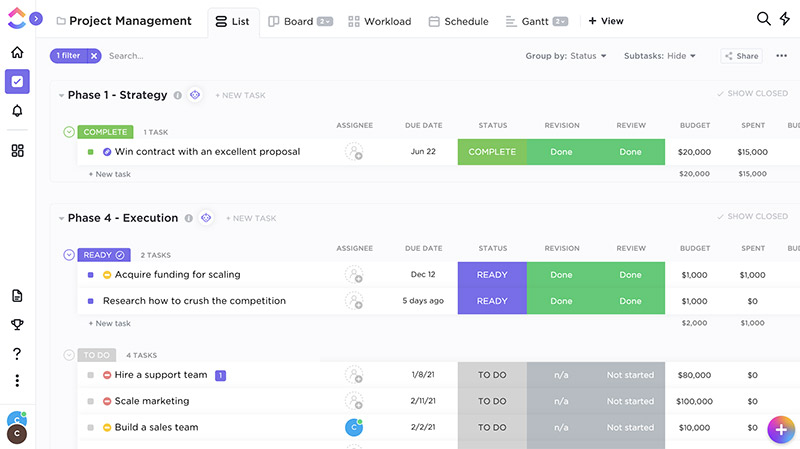
The software offers a clean, well-organized, and modern-looking user interface. Regular users can get up to speed relatively quickly, even without training. Context-sensitive help guides you when something is not immediately obvious.
For configuration, you need to familiarize yourself with the core concepts of ClickUp. Supporting materials are available in the form of tutorials, videos, slide decks, and user manuals. Training courses are also offered.
The user interface can be adapted to the requirements of users. The available menu items can be individually configured for each user or group of users.
Interfaces and Extensibility
ClickUp exposes nearly all functions available in the user interface through a comprehensive REST API. This allows, for example, managing users, creating, modifying, and deleting projects, or running queries.
ClickUp cannot be extended by users; there are no suitable interfaces for this purpose.
2. Task Management
Delegation
The software supports the delegation of tasks including follow-up reminders. The delegator retains a connection to the task, and the follow-up date is their personal one. The delegator has an overview of tasks they have delegated.
Deputy Function
In ClickUp, it is possible to assign a deputy to each user. The deputy can step into the rights of the original user in the event of vacation or illness and act on their behalf. It remains visible who actually triggered an action.
Recurring Tasks
Some tasks and appointments repeat on a regular cycle — for example, every first Monday of the month. Handling such series of tasks can be very helpful and time-saving in task management.
ClickUp allows the creation of recurring tasks in the same way you would expect from a good calendar application.
Time Tracking
ClickUp allows you to track effort (time and cost) for each task and assign it to accounts. Accounts can be grouped into cost centers and released for projects.
There is the option to use timers within the application to automatically log time spent. Reports provide an overview of who worked on which activities during any given past period.
Support for the Getting Things Done Method
The Getting Things Done method is a proven approach to personal work organization. It allows the personal categorization of tasks — for example, personal follow-up dates or personally marking tasks as favorites.
ClickUp fully supports the GTD method.
Support for the RACI Matrix
For task management and project management, the RACI method defines four task-specific roles through which project participants can be associated with a task. Roles are normally assigned at the project level, not the task level — for example, a project manager or a Scrum Master for the entire project. RACI, by contrast, allows roles to be assigned per task (see /en/blog/project-management/methods/raci-matrix/).
ClickUp is one of the few systems on the market that has integrated the RACI matrix into its application logic and presents it in a way that makes its practical value immediately clear.
Workflows
Workflows in task management systems are typically represented in two forms. The first method relates to the workflow of a task passing through various stages. The second method involves defining sets of tasks and then working through them.
ClickUp has no graphical workflow editor. Using a text-based editor, simple conditional action sequences can be defined. There is a good selection of available actions.
3. Project Management
Programs and Portfolios
In many organizations, projects run within the context of programs, portfolios, or product areas. Groups of projects need to be brought together to maintain an overview.
A basic prerequisite for program or portfolio management is the ability to group and hierarchically arrange projects.
ClickUp offers exactly three levels of structure above tasks: Spaces, folders, and lists.
Sub-Projects
Larger project initiatives with many tasks cannot be adequately structured by task hierarchies alone — they must be broken down into sub-projects. Sub-projects may require different processes, for example for hardware and software development.
ClickUp allows projects to be structured one level deep into sub-projects. The various sub-projects can be assigned their own task types with their own fields.
Multi-Project Reports
There are no multi-project reports.
Work Breakdown Structure
Before a project plan can be created, the activities to be performed or the deliverables to be produced must be structured. To represent such a product structure or work breakdown structure (WBS), tasks must be arrangeable hierarchically to any depth.
In ClickUp, WBS can be represented at exactly one level of hierarchy. The order of tasks can be freely defined at both levels.
Interactive Gantt Chart
Gantt charts help define and visualize the timeline of project activities and predecessor-successor relationships. ClickUp offers a powerful, interactive Gantt component. It is possible to display the critical path. There are project progress bars and you can compare the current planning status with a baseline.
Resource Planning
Resources of various types can be managed and assigned to tasks. There is a view that shows resource utilization over time, making over- or under-utilization immediately visible. Resources can be organized by project or department.
Employee Availability
There is no way to map employee availability in the system and factor it into resource planning.
Project Progress
Project progress in ClickUp can be represented in three ways of varying precision and effort:
- By the number of completed tasks relative to the total number of tasks
- By the status of tasks with an assigned completion percentage
- By the Earned Value method (Earned Value)
The last method requires tracking actual effort. In return, it provides a very reliable, conservative estimate of the current and future schedule deviation. Progress and deviations are displayed clearly and in an easy-to-understand manner in corresponding charts.
Agile Project Management
The software provides basic support for agile project management according to Scrum and Kanban. There are corresponding views such as a task board or burn charts, but the core of the system lacks elements essential for agile work, such as epics, user stories, backlogs, and sprints.
Backlog priority, sprint capacity, and team velocity are not supported by corresponding application logic. Tasks remaining from a previous sprint cannot be automatically carried over to the next sprint. Sprints cannot be automatically created in advance.
Alternative Solutions
An alternative to ClickUp with a focus on CRM functionality can be found at Bitrix24.
Form your own opinion of the comprehensive project management software Allegra and book a free live demo.

Editor and Writer
Gabriella Martin is a Yale University graduate and holds a Master's degree in German Literature from the University of Tübingen. She loves explaining complex things in simple terms.


