Allegra as an Excellent Trello Alternative
Trello and the Trello alternative Allegra are two powerful, highly configurable project management tools for team-oriented task management and project management. While Trello’s basic version works with flat “boards” on which “lists” of tasks can be placed, Allegra allows workspaces and issues to be structured hierarchically to any depth. With the help of so-called “Power-Ups,” however, Trello can be extended considerably in terms of functionality, making classical project management possible as well.
Trello as a Cloud-Only Solution
When searching for task management software for teams, Trello ranks pretty high on the list in terms of both feature scope and market penetration. It offers a clear, tidy, and modern user interface along with a broad range of features. Configuring and customizing the system requires thorough familiarization, which is facilitated by comprehensive documentation.
Trello is offered exclusively as Software as a Service (SaaS) in the cloud operated by its vendor. The vendor guarantees compliance with European data protection standards.
Extensive Features, but No Real Projects
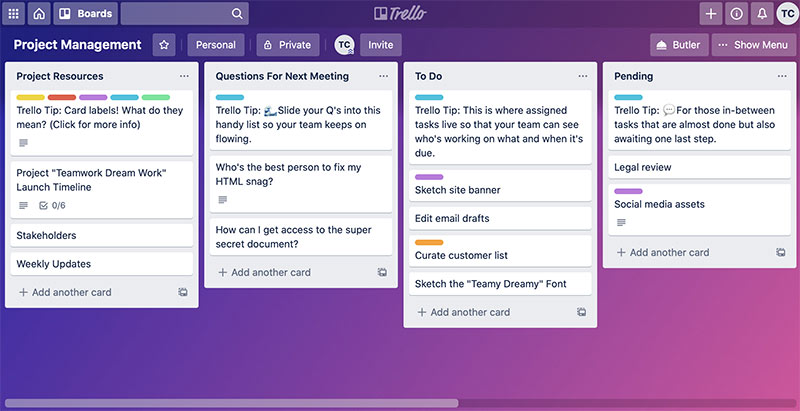
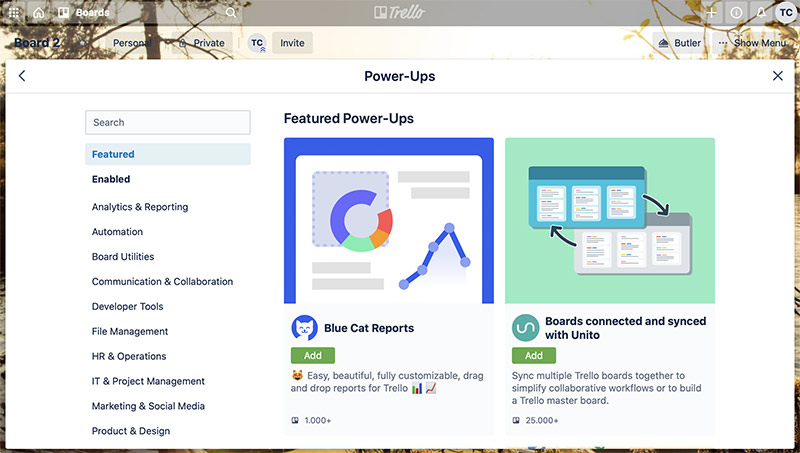
Trello lends itself well to smaller projects thanks to its “board with lists” approach. The system is comprehensively configurable. Many so-called “Power-Ups” are available and can be enabled on a per-board basis. Power-Ups exist for features such as hierarchical structuring, news, time tracking, files, repositories, forums, calendars, and an interactive Gantt view.
In Trello, issues are called “cards.” These are organized in lists, which in turn belong to a “board.” Board templates exist, and with appropriate Power-Ups cards can also be arranged hierarchically. However, there are no board types in the sense that derived boards and their properties could be configured centrally.
Issues and Issue Types
In task and project management, almost everything revolves around “issues.” In Trello, issues (cards) belong to a list, which can influence the behavior of the corresponding issues. Lists can be created freely — for example for “tasks,” “action items,” and “bug reports,” or sorted by other criteria.
Lists can have their own workflows and different attributes. For example, an action item might optionally have a due date, whereas a task might require both a start date and an end date.
Issue Hierarchies
Trello offers the ability, via Power-Ups, to organize cards in a fully hierarchical manner. The type of child issues can be restricted depending on the type of the parent issue using so-called “Rules.”
Trello — Conclusion
Here is a brief summary of the key differentiating characteristics of Trello compared to the Trello alternative Allegra:
- Trello is not available as an on-premises solution, only as SaaS in the vendor’s cloud
- Trello is well suited for smaller projects with a manageable number of issues
- Trello supports only simple, non-graphical workflows
- Trello offers only limited hierarchical structuring options
- Trello can be extended into a project management tool using Power-Ups, though this comes at the cost of coherence in the user experience
- The Gantt view is rudimentary (no critical path, no baseline)
- There are no sub-projects
Trello Alternative: Allegra
The project management software and Trello alternative Allegra from Steinbeis provides comprehensive support for agile, classical, and hybrid project management models. Thanks to its inherent ability to structure spaces and issues hierarchically to any depth, you stay on top of even very large volumes of tasks and projects.
Proven methods such as the Eisenhower principle, Earned Value, Getting Things Done, and the RACI matrix are used throughout to ensure clarity in small and large projects alike.
Functionally Complete and Well Thought Out
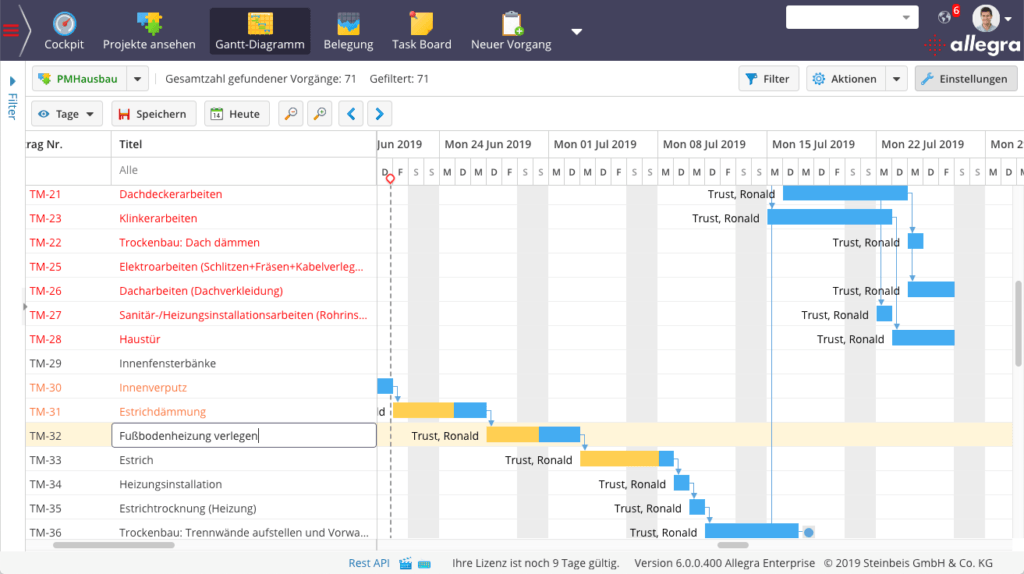
The Trello alternative Allegra supports virtually all the key features you would expect from professional project management and task management software. The user interface is modern and attractive. The configuration options may seem a little daunting at first, but after a short while they prove to be logical and well designed. The Gantt chart, the resource view, and the graphical workflow editor are all interactive.
Powerful Role and Permission System
The role and permission system of the Trello alternative makes a well-thought-out impression and is based on the RACI matrix principle. Access permissions can be configured down to individual fields. All major methods such as Earned Value, milestone trend analysis, the Eisenhower principle, and Getting Things Done are supported. Drag and drop operations can be performed virtually everywhere.
Projects and Project Types
In Allegra, spaces have a space type that largely determines the configuration and behavior of issues within that space. Spaces can be arranged hierarchically to any depth and can be used for projects or sub-projects, for example. Space types allow derived spaces to be configured centrally even after they have been created.
Issues and Issue Types
In task and project management, almost everything revolves around “issues.” In Allegra, issues belong to an issue type that influences the behavior of those issues. Issue types can be created freely — for example for “tasks,” “action items,” and “bug reports,” or sorted by other criteria.
Issue types can have their own workflows and different attributes. For example, an action item might optionally have a due date, whereas a task might require both a start date and an end date.
Issue Hierarchies
Allegra offers the ability to organize issues in a fully hierarchical manner. The type of child issues can be restricted depending on the type of the parent issue. This can be used, for example, to prevent an issue of type “Car” from being subordinated to an issue of type “Engine.”
Notifications
Allegra has an extensive, configurable notification system. Email notifications are based on templates that can be customized. There is an @-mention function and a reminder function.
The notification system is capable, for example, of sending emails only to the manager of the affected issue when the issue was already completed and has now been reopened.
Access Permissions
Custom roles with corresponding permissions can be defined. Permissions extend down to individual attributes of an issue.
Attributes
In Allegra, custom attributes can be configured via the web interface without any programming.
A wide selection of attribute types is available, such as labels, person pickers, or date fields. In addition, the behavior of standard attributes can be meaningfully adjusted — for example, the default value for a start or end date.
This makes it possible, for example, to create a drop-down list field that shows all users belonging to a specific group.
Different default values for attributes can be configured for different projects.
Input Forms
Any number of input forms can be defined in Allegra.
Input forms can be structured with tabs and panels. A different form can be assigned for creating a new issue than for editing an existing one.
For the same issue type, different input forms can be defined in different spaces or projects.
Trello Alternative Allegra with Dependencies
In project management and task management, issues are often related to one another. For example, a task cannot be started until another one is completed. Or an issue cannot be closed until a dependent issue has been resolved.
In Allegra there is straightforward support for defining dependencies or links.
Custom link types can be introduced via plug-ins.
Cockpits
The system provides users with an overview page (cockpit, dashboard).
Every user can use pre-configured cockpits or assemble a personal cockpit from an extensive list of cockpit tiles. Cockpits can be saved as templates and centrally assigned to users by system administrators. Available cockpit elements include, among others:
- Average response time
- Average processing time
- Number of issues in state X over time
- Activity stream
- Predefined filters
Reporting
The Trello alternative Allegra includes an extensive, extendable collection of report templates. Reports can be generated in Allegra in all common formats.
User Management
To manage users, Allegra can be connected to an LDAP system. Users and groups can be synchronized with an LDAP server manually or automatically.
Multiple directory servers can also be connected.
Allegra can be integrated for true single sign-on with CAS and Shibboleth.
The system supports two-factor authentication.
The user interface can be adapted to the needs of individual users. The available menu items can be individually configured for each user or group of users.
Task Management
Delegating
The software supports the delegation of issues, including follow-up reminders. The delegator retains a relationship to the issue, and the follow-up date is their personal one. The delegator has an overview of all issues they have delegated.
Deputy Function
In Allegra it is possible to assign deputies to users.
Recurring Tasks
Some tasks and appointments recur on a regular cycle — for example, every first Monday of the month. Handling such series of issues can be very helpful and time-saving in task management.
Allegra allows the creation of recurring issues in the same way you would expect from good calendar applications.
Time Tracking
Allegra allows you to track effort (time and cost) for each issue and assign it to accounts. Accounts can be grouped into cost centers and released for specific projects.
It is possible to use timers within the application to automatically record time spent. Reports provide an overview of who was working on which activities during any past period.
Support for the Getting Things Done Method
The Getting Things Done method is a proven approach to personal work organization. It enables personal categorization of issues — for example, personal follow-up dates or marking issues as personal favorites.
Allegra does not directly support the GTD method.
Support for the RACI Matrix
For task and project management, the RACI method defines four issue-specific roles through which project participants can be associated with a task. Normally, roles are assigned at the project level rather than at the issue level — for example, there is a project manager or Scrum Master for the entire project. RACI, by contrast, allows roles to be assigned on a per-issue basis (see /en/blog/project-management/methods/raci-matrix/).
Unfortunately, Allegra does not offer a way to model a RACI matrix.
Workflows
Workflows are typically represented in task management systems in two forms. The first method always relates to the workflow of an issue as it passes through various stages. The second method involves defining sets of tasks and then working through them.
Allegra supports the first variant without a graphical editor.
Project Management
Programs and Portfolios
In many organizations, projects run within the context of programs, portfolios, or product areas. It must be possible to group sets of projects together in order to maintain an overview.
A fundamental prerequisite for program or portfolio management is the ability to group and arrange projects hierarchically.
Allegra allows spaces to be arranged hierarchically to any depth and thus supports straightforward, pragmatic program and portfolio management.
Sub-Projects
Larger project endeavors with many issues cannot be sufficiently structured through issue hierarchies alone — they must be broken down into sub-projects. Sub-projects may require different processes, for example for hardware and software development.
Multi-Project Reports
All queries and reports can span multiple projects and sub-projects, which can be freely defined using corresponding filters.
Work Breakdown Structure
Before a project plan can be created, the activities to be performed or the deliverables to be produced must be structured. To represent such a product structure or work breakdown structure (WBS), issues must be able to be arranged hierarchically to any depth.
In Allegra, a WBS can be fully represented. The order of issues can be freely defined at each level.
Interactive Gantt Chart
Gantt charts are used to define and display the timeline of project activities as well as predecessor-successor relationships. Allegra offers a powerful, interactive Gantt component. It is possible, for example, to display the critical path. Project progress bars are available, and the current planning status can be compared against a baseline.
Resource Planning
Resources of various types can be managed and assigned to issues. There is a view in which resource utilization over time is displayed, making over- or under-allocation immediately visible. Resources can be sorted by project or department.
Employee Availability
Each employee has a personal calendar showing their availability. Availability is taken into account by the system during resource planning.
Project Progress
The Trello alternative Allegra provides the ability to measure project progress based on the proportion of completed tasks relative to the total number of tasks. For tasks still open, it is also possible to specify the estimated remaining effort until completion. Progress can be determined precisely using the Earned Value method, which is fully and robustly implemented in Allegra.
Agile Project Management
The software fully supports agile project management according to Scrum and Kanban. It offers not only the corresponding views such as a task board or burn charts, but also implements at the core of the system all elements required for agile work — including Epics, User Stories, Backlogs, and Sprints.
Backlog priority, Sprint capacity, and team velocity are supported by corresponding application logic. Tasks remaining from a previous Sprint can be automatically carried over into the next Sprint. Sprints can be created automatically in advance.
For software developers, there are integrations with source code management systems such as Git and Subversion, as well as with CI/CD servers such as Gitlab and Jenkins.
Allegra supports common database systems and runs on virtually all operating systems. It is written in Java and JavaScript, has been on the market for over ten years, and is used by approximately 10,000 users.
Servers Located in Germany
Allegra Cloud runs on servers located in Frankfurt am Main, Berlin, and Karlsruhe. Allegra Cloud is fully GDPR-compliant. Personally reachable support is available via email, telephone, and web conference.
Further topics:
Task management, task administration, Task Management, comprehensive project management software comparison.
Form your own opinion of the comprehensive project management software Allegra and book a free live demo.

CEO Alltena GmbH
Christoph Friedrich is a computer scientist and certified Project Management Professional. He has extensive experience in the introduction and integration of project management tools as well as the analysis and definition of processes in project and service management.


