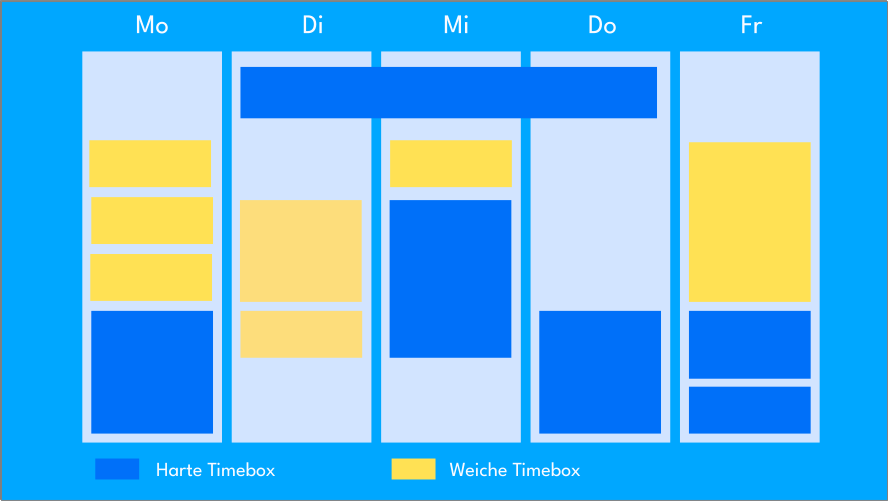
With "timeboxing," you schedule a fixed time frame for a specific task. With a "hard" timebox, you stop working when the time is up, regardless of progress. With a "soft" timebox, you extend the time frame if needed. You add the timebox to your calendar wherever there is space.
A timebox can be short — for example, covering a single agenda item in a meeting — or it can span longer periods, such as an entire project phase.
What Is Timeboxing?
Timeboxing is a goal-oriented time management technique developed to boost productivity and make workflows more efficient. With this method, a fixed time window — the so-called “timebox” — is set for each task, within which the task should be worked on and completed. This clear limit prevents tasks from expanding endlessly or consuming more time than necessary.
The term “timeboxing” was introduced into agile software development by James Martin in 1991, where it became established as a useful tool for planning and structuring tasks. Originally developed as a method for teams in agile project management, timeboxing is also an excellent approach for self-management.
By planning time for specific activities in advance, you get an overview of your daily tasks and their priority. The goal is to spend no more time on a task than is strictly necessary — which in turn helps avoid distractions and reduce “work about work.” This method is similar to the Pomodoro technique and can be combined with time blocking, in which you also work in fixed time intervals, each separated by breaks.
Hard vs. Soft Timeboxing
The timeboxing method provides a clear structure for completing tasks within defined time windows. You can choose between hard and soft timeboxes, each supporting different requirements and goals.
With a hard timebox, the working time ends strictly when the allotted time expires — regardless of whether the task has been fully completed. This variant works well for tasks with fixed deadlines, as it ensures that time is not overrun. Hard timeboxes are particularly helpful for people who tend toward perfectionism, because they prevent tasks from being revised endlessly. In meetings, they ensure that all topics are covered within the time frame, avoiding excessive overruns.
Soft timeboxes, on the other hand, offer more flexibility. They establish a rough time frame and serve as a signal that a task should be wrapping up. Unlike a hard timebox, going over time is permitted here when needed, in order to finish a task properly and potentially achieve higher-quality results.
This flexibility is especially useful for complex tasks where it is difficult to estimate the exact time required in advance. Soft timeboxes are ideal when the quality of the work takes priority over strict time adherence. A soft time frame can also be used in meetings where participants should be kept on track without being abruptly cut off.
When Should You Use Hard or Soft Timeboxes?
Whether a hard or soft timebox is more appropriate depends on the goals and requirements of the task at hand. When meeting a deadline is critical, or there is a risk of getting lost in the details, a hard timebox is advisable. It ensures that work is completed efficiently — even if the result is not perfectly polished. The motto here is “better done than perfect.” This approach also works well in team settings to ensure that all important tasks are completed on time and that meetings run in a structured way.
Soft timeboxes, by contrast, are ideal for tasks where flexibility is needed — especially when the exact duration is hard to estimate. Here, it is helpful to use the time frame as a guideline while allowing more time for completion when necessary.
Soft timeboxes promote quality of work and are suited for topics where the task must be completed thoroughly rather than just on time. Teams can use them to reduce pressure without losing control over the time frame, and in complex projects, the soft timebox provides the room needed to adapt the work process to actual requirements.
In practice, hard and soft timeboxes can also be combined depending on the task and goal. Before each timebox begins, decide whether it is hard or soft — and then stick consistently to that decision. This turns the timeboxing method into a flexible tool that provides the right structure for both strict deadlines and high-quality results.

How Timeboxing Works
Here are the key steps for successfully applying the timeboxing method.
- Define tasks and break them down into subtasks
- Estimate time requirements and establish time blocks
- Maintain focus and avoid distractions
- Wrap up and reschedule if you go over time
Step 1: Define tasks and break them down into subtasks
At the start of the timeboxing process, it is important to get an overview of all the tasks that need to be completed. Ideally, these tasks should be divided into smaller, manageable subtasks to make planning easier. A task list can help — whether digital in tools like Outlook, Planner, or Teams, or handwritten on paper. Even at this stage, it is useful to decide whether a task needs a hard timebox (strict deadline) or a soft timebox (flexible deadline).
Step 2: Estimate time requirements and establish time blocks
Once the tasks are listed, the next step is estimating the time needed for each task. For realistic time planning, you should also factor in breaks and buffer time for unexpected events to increase flexibility. A good rule of thumb is to schedule only 60–75% of your available working time and reserve the remaining quarter to third as a buffer. The defined time blocks can then be entered into your work calendar so that the entire day is clearly structured.
Step 3: Maintain focus and avoid distractions
Once the timeboxes are set, you should stay as focused as possible on each individual task during its time block. Distractions should be avoided so that your full attention remains on the task. It can be particularly helpful to schedule separate time blocks for handling emails or brief communication tasks, so these do not bleed into your actual working time. For many people, it is enough to check email three times a day (morning, noon, and afternoon) for about 30 minutes each.
Step 4: Wrap up and reschedule if you go over time
If a task cannot be completed within the assigned time block, the remaining work is moved to a new timebox. With a soft timebox, drawing on previously scheduled buffer time can help finalize the task. What is important, however, is not to “borrow” time from other timeboxes — doing so would undermine the structure and effectiveness of the timeboxing approach.
The Right Duration for Effective Timeboxing
The timeboxing method does not prescribe how long a timebox should be. The duration is flexible and depends on the specific requirements of the task. Some teams — particularly in agile work processes — use timeboxes that span weeks or even months. The key to success is choosing a time window in which you can work without interruption and with full focus. During the timebox, all distractions should be switched off — for example, by activating a “do not disturb” mode — so that your concentration is entirely on the task.
Timeboxes are not only suited to short tasks. Larger projects, project phases, and iterations such as Scrum Sprints can also be well organized using this method by breaking them down into manageable steps. For tasks that require more than two or three hours, it is recommended to divide them into smaller segments in order to approach the work in a more structured and focused way.
Take the creation of a comprehensive marketing report as an example — one that encompasses various analyses, charts, and written sections. This project might span several weeks, with other tasks to complete in between. By dividing it into specific timeboxes, you keep oversight and preserve your energy. Start with a timebox for data collection and analysis, then follow with additional time blocks for writing chapters, creating graphics, and formatting. With clear time windows for each step, you work in a targeted way toward completion without being overwhelmed by the size of the project.
Timeboxing is not a technique for completing tasks faster — it is a method for structuring them efficiently and planning them realistically. In the marketing report example, you might first schedule timeboxes for research before beginning to write. This way, you distribute the work across several days and ensure steady progress without becoming overwhelmed. This step-by-step approach makes each section manageable, and the project advances in controlled, measurable steps.
- Timeboxing focuses on the amount of time you want to devote to a specific task.
- Time blocking focuses on when you want to set aside time for something.
Using Timeboxing in a Team
Here are some tips on how timeboxing can be used successfully in teams:
1. Clear Time Windows for Meetings
- Agenda timeboxes: Set a fixed time span for each agenda item in a meeting. This prevents discussions from running over and ensures that all topics are addressed.
- Example: 10 minutes for updates, 15 minutes for problem-solving, 5 minutes for open questions.
2. Shared Work Phases (Focused Sprints)
- Timebox for group work: Schedule fixed periods during which the team works together on specific tasks. This might be, for example, a 90-minute block for brainstorming or a 45-minute block for solving a problem.
- Pomodoro technique in a team: Work together in focused 25-minute intervals, followed by a short break. Repeat as needed.
3. Prioritize tasks and work efficiently
- Sprint timeboxes: In agile teams, particularly within the Scrum framework, sprints are time-limited (e.g., two weeks) to achieve clear goals.
- Micro-timeboxes: Break larger tasks into smaller, time-bounded blocks that team members can work on in parallel.
4. Decision-Making and Problem-Solving
- Discussion timeboxes: During decision-making processes, define clear time windows — for example, 20 minutes to discuss options and 10 minutes for the final decision.
- Workshops: Use timeboxing to structure exercises or group activities in a workshop and engage all participants.
5. Monitor Progress and Schedule Reflection
- Review and retrospective timeboxes: Schedule fixed time windows to review progress or reflect on improvements. This structured reflection saves time and generates productive insights.
- Feedback rounds: Set a timebox for each person to give feedback, and stick to it so that everyone has a chance to speak.
6. Introduce Simple Rules
- Timebox as a team standard: Make timeboxing a permanent part of team culture. For example: “No meeting longer than 60 minutes without a break” or “Maximum 90 minutes of focused work.”
- Moderation: One person on the team takes responsibility for monitoring adherence to timeboxes.
Benefits of Timeboxing in a Team
- Efficiency: It helps complete tasks faster and in a more targeted way.
- Focus: Teams stay concentrated and are less likely to drift off topic.
- Fairness: Everyone gets an equal opportunity to contribute.
- Predictability: Clear time limits make progress measurable.
With timeboxing, your team can work more productively, improve collaboration, and minimize unnecessary time losses.
Using Timeboxing for Effective Meetings
Timeboxing can make meetings significantly more efficient by setting clear time limits and keeping the focus on the most important topics. Here are concrete tips on how to make the most of timeboxing in your meetings:
1. Preparation: A Clear Agenda with Time Allocations
- Agenda with time frames: Divide the meeting into topic sections and define a timebox for each item. For example:
- Updates (10 minutes)
- Discuss Issue A (20 minutes)
- Proposed solutions (15 minutes)
- Wrap-up and next steps (5 minutes)
- Prioritization: Start with the most important topics to ensure they receive sufficient attention.
2. Roles and Facilitation
- Appoint a facilitator: One person takes responsibility for monitoring adherence to the timeboxes and ensuring the meeting does not go off track.
- Introduce a timekeeper: Optionally, a team member can act as timekeeper, watching the clock and alerting the group when a topic needs to be wrapped up.
3. Focus and Efficiency During the Meeting
- Use a timer: Use a timer or a meeting app with a built-in timeboxing feature to make the time visible.
- Stick to the structure: Adhere strictly to the predefined time frames. If a topic is not concluded, decide at the end of the timebox whether to defer it or address it in a separate meeting.
- Encourage discipline: Encourage participants to keep their contributions brief and to the point. Long monologues should be avoided.
4. Flexibility in Implementation
- Build in a buffer: Reserve 5–10 minutes at the end of the meeting for unplanned discussions or open questions.
- Adapt dynamically: If a topic is resolved more quickly than expected, use the remaining time for the next item or return it as bonus time.
5. Integrate Breaks
- Break up longer meetings: For meetings lasting longer than 60 minutes, schedule a short break after at most 90 minutes. This keeps participants focused.
6. After the Meeting: Results and Follow-Ups
- Review goal achievement: Close the meeting with a brief summary of the topics discussed and the next steps.
- Gather feedback: Ask participants to evaluate whether the timeboxing was helpful, and adjust future meetings accordingly.
Example of an Effectively Timeboxed Meeting
Duration: 60 minutes
- Welcome and meeting goal (5 minutes)
- Team member updates (10 minutes)
- Discussion of main topic (30 minutes, divided into 3 blocks of 10 minutes each: problem, solutions, decisions)
- Open questions (10 minutes)
- Summary and next steps (5 minutes)
Benefits of Timeboxing in Meetings
- Time savings: No unnecessary digressions — every minute is used effectively.
- Focus: The most important topics are prioritized and addressed.
- Accountability: Participants know that time frames will be respected.
- Productivity: Clearly structured meetings lead to faster outcomes.
With consistent application, timeboxing will make your meetings leaner, more structured, and more productive.
Timeboxing and Scrum
If you work with the agile project management methodology of Scrum, you are already using timeboxing. There are five time-limited events in the Scrum framework:
- Sprint: A Sprint lasts a maximum of one month and serves to define and achieve a concrete goal. Timeboxing not only sets the duration of the Sprint, but can also define time frames for individual processes within the Sprint.
- Sprint Planning: Before a Sprint begins, teams identify the necessary tasks and how to implement them. For one-month Sprints, it is recommended to spend a maximum of eight hours on planning; for one-week Sprints, two hours or less is sufficient.
- Daily Scrum: Teams align in a daily 15-minute meeting (Daily Scrum) to clarify priorities and remove obstacles on the way to the Sprint goal.
- Sprint Review: At the end of the Sprint, teams review progress and provide feedback in a Sprint Review. This session is time-limited and typically lasts about half as long as Sprint Planning.
- Sprint Retrospective: After the Sprint concludes, the team reflects on the entire process, identifies areas for improvement, and plans changes for the next Sprint. A Sprint Retrospective for a one-month Sprint typically lasts three to four hours — a similar duration to the Sprint Review.
Effective Timeboxing: Time Management Tips
1. Plan Realistic Time Estimates
When planning, you mentally anticipate what should happen later. Based on experience, you estimate the effort required for a task or process. Several phenomena are worth keeping in mind:
- Effort is often underestimated because you do not yet know the details or have never done anything similar before
- Effort is underestimated because wishful thinking drives the estimate — you would like to finish something in an hour, so that is how long it will take
- Effort is overestimated because the budget is available to support it
- Effort is overestimated because you are being overly cautious
When estimating effort, leave yourself a sensible buffer. Beyond that, there is no substitute for experience with similar tasks.
2. Respect Time Limits
Timeboxing lives and dies by adherence to time limits. Only those with the self-discipline to respect them will truly benefit from the method. The “soft” timebox variant gives you the option to be more flexible with time limits — but that does not mean they disappear. They remain in the calendar as a reference and a goal.
3. Maximum Duration of a Timebox
As already mentioned, a timebox can theoretically span several months. To keep this manageable, however, you should divide the total time into smaller, workable units that you can tackle in a single session.
What is the realistic maximum duration of a timebox?
According to the often-cited science of ultradian rhythms, the human brain cannot focus on a single task for more than 90 minutes at a stretch. Therefore, you should never plan a single timebox longer than 90 minutes.
Of course, you can also choose shorter time frames: for a brief, important task such as a 5-minute brainstorming session, you can easily define a correspondingly short timebox.
Flexibility in timebox duration
The length of your timeboxes depends entirely on you and the tasks you need to complete. Time windows of 15, 20, 30, or 45 minutes are excellent for different types of tasks. The only important rule is not to make any timebox longer than 90 minutes without scheduling a break — which brings us directly to the next tip.
4. Take Breaks
Taking breaks is essential for maintaining focus over a longer period — studies show that attention begins to fade after 90 minutes, often even sooner. It is therefore important to build breaks firmly into your routine.
One example: work in focused 45-minute sessions and then give yourself a 15-minute break. This way, you effectively use a full hour as a timebox.
Make good use of your break: if you spend the entire day in front of a screen, give your eyes a rest — do not scroll through Instagram, but do something relaxing instead. Listen to a favorite song, make yourself a cup of tea, or step outside for a breath of fresh air.
After the break, you will return refreshed and focused — perfectly ready to motivate yourself for another 45-minute work session.
Benefits of Timeboxing
Timeboxing offers numerous benefits both professionally and in everyday life. The method forces you to plan tasks more deliberately and to assess how much time each activity actually requires. Regularly estimating time requirements improves your long-term sense of how long things take and reduces stressful surprises. This planning also prevents the notorious trap of multitasking: instead of jumping between tasks, you focus completely on one thing at a time — which minimizes the risk of distraction and boosts productivity.
Another important application for timeboxing is meetings and team discussions, which can often spiral out of control and become time traps. Defined time blocks ensure that the essential topics are covered and unnecessary discussions are avoided. For people who tend toward perfectionism and repeatedly revise their work, timeboxing is also valuable. Since each task is tied to a fixed time window, there is a natural “closing point” that prevents you from getting lost in the details. Prominent figures such as Elon Musk and Bill Gates are said to use timeboxing to structure their days — which lends the method additional weight.
Timeboxing is also a practical response to Parkinson’s Law and the Pareto Principle — two well-known effects that often contribute to inefficiency. For team implementation, project management tools can map timeboxes directly in the calendar. Parkinson’s Law states that work expands to fill the time available for its completion. Timeboxing counters this effect, since each task has a fixed time window and cannot be extended indefinitely. The Pareto Principle — the so-called 80/20 rule — states that 80% of results can be achieved with 20% of the total effort, while the final 20% takes disproportionately more time. The defined time blocks make it easier to focus on the essential 80% and avoid investing unnecessary time in perfecting the last details.
In addition, timeboxing can be motivating: each completed timebox represents a small success that you can check off and cross out. Even unpopular tasks are tackled in a targeted way rather than postponed indefinitely. The clear phases of focused work promote concentration and reduce distractions, which ultimately lowers stress and increases efficiency. Timeboxing thus creates a more structured and productive work environment in which tasks are completed more quickly and with greater satisfaction.
Criticism and Challenges of Timeboxing
1. Too Rigid and Unsuitable for Creative Work
One stumbling block with timeboxing — particularly for creative tasks — is the risk of being pulled out of your “flow.” This is especially true with hard timeboxes, which end abruptly regardless of how far you have progressed in a task. When you have gotten into a good working rhythm, the interruption can be frustrating and makes the seamless transition to the next task more difficult. If you find that a hard timebox is more of a hindrance for certain tasks, try using soft timeboxes for those activities — they offer more flexibility and allow tasks to be brought to a natural conclusion.
2. Work Quality Can Suffer Under Preset Time Windows
A common mistake when applying the timeboxing method is setting time windows that are too short. This often leads to stress and pressure when tasks cannot be completed within the allotted time. Especially for newcomers to the method, it is advisable to schedule more time than you think you need at first — to avoid unnecessary stress and to develop a feel for appropriate time windows. Creative professions or safety-critical tasks, where quality comes first, require additional flexibility. Here, a generous buffer should be factored in to ensure that all aspects can be handled carefully and thoroughly. When you are in a creative flow or working on a safety-critical task, focus on quality and completion rather than strictly following the clock.
3. Tasks Are Broken Down Too Granularly
A common difficulty arises from the planning process itself. If timeboxes are scheduled too tightly, it can quickly feel overwhelming — especially when the calendar is packed with time blocks. To maintain a clear overview, it can be helpful to create a separate calendar just for timeboxes, which you can show or hide as needed. This allows you to manage your timeboxing plan flexibly and, when necessary, view it in the context of your main calendar.
Frequently Asked Questions
How Does Timeboxing Work?
Timeboxing is a method in which a fixed time block is reserved for each task. The task must be completed within that time frame. The clear definition and structuring of tasks enables more effective work — achieving more in less time.
What Does the Term “Timebox” Mean in Scrum?
In Scrum, the term “timebox” has an important meaning. A timebox is a limited period of time within which a specific unit of work must be completed. By setting a timebox, projects run efficiently and in a structured way, and deadlines are respected. The term comes from agile software development and was introduced by James Martin in 1991.
What Role Does Timeboxing Play in Scrum?
Timeboxing is an essential method in the Scrum process. In the Daily Scrum, a timebox of 15 minutes is set to allow the team to synchronize, discuss obstacles, and plan upcoming tasks. This clear time limit promotes efficiency and focus during the meeting. Scrum teams use timeboxing to ensure a structured workflow.

CEO Alltena GmbH
Christoph Friedrich is a computer scientist and certified Project Management Professional. He has extensive experience in the introduction and integration of project management tools as well as the analysis and definition of processes in project and service management.


