Task Management Software or task management software is designed to help users collect, structure, and work through their tasks. In this post I walk through the different categories of task management solutions and explain the most important features. A separate post covering the best tools for task management will also appear in this blog later.
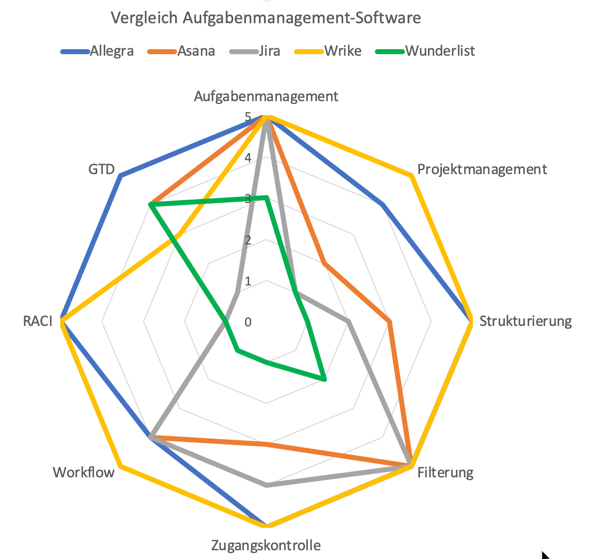
Task management tools can be divided into two classes:
- Personal productivity tools
- Team-oriented collaboration tools
The first class grew out of notebooks and “analog” productivity management tools such as Filofax and Time Systems. The second class has its roots in the bug-tracking systems used by software developers. The distinction is not always entirely clear, because many vendors have retrofitted their personal solutions with collaboration features.
Task Management Software for Personal Use
Many people use task lists to offload mental overhead and keep track of what they need to get done. Some use a notebook, others their smartphones. There are a great many applications for this purpose. They differ in the range of features they offer, the way they integrate with other tools, and how they store their data.
Today it is common practice to keep such personal task lists in a cloud environment so that they are available on all devices. Operating systems such as Android, iOS, and Windows already come with simple apps pre-installed that can serve this purpose.
Beyond those basics, there are more powerful tools. The best-known and most widely used are
These solutions stand out because they allow better categorization and structuring of tasks and, in some cases, implement the core ideas of the Getting Things Done methodology (see below). Some of these tools also offer basic team support so that tasks can be delegated or viewed by others.
Task Management Tools for Teams
Since hardly anyone works entirely on their own anymore, coordinating tasks between team members and keeping communication flowing plays an important role in most work. For collaboration on projects, it is not enough for everyone to maintain their own personal task lists. Others also need to be kept informed about the status of tasks. It must be easy to delegate tasks, route them through a workflow, and make them accessible to a defined group of people. This calls for capable ticket systems or project management tools.
Which Features Matter Most?
Ultimately everyone has to decide that for themselves. Here is the essential list:
- Custom attributes: Sooner or later you will need additional categorization options beyond just “tags” and “labels.”
- Role-based access control: Access to other team members’ tasks must be configurable through roles and permissions; user levels and similar mechanisms are not enough.
- Saveable complex filters: Simple sorting or filtering by a single attribute is insufficient.
- Support for the Getting Things Done principle: This includes features such as follow-ups and delegation.
- Support for the RACI matrix: Essential for systematically assigning responsibilities — nothing works better.
- Eisenhower principle: Combining importance and urgency for clear prioritization of tasks.
Beyond these essentials, there are features that become important once the volume of tasks reaches a certain level. These include
- Hierarchical tasks: Necessary in project work to represent, for example, a work breakdown structure (WBS). Simple “sub-tasks” are not enough.
- Workflows: These allow work processes to be controlled and automated — a must once the organization involves more than just a handful of people.
- Support for agile practices: A task board or Kanban board and burn charts are popular ways to present tasks in meetings.
- Powerful APIs and integration capabilities.
The Getting Things Done Method
“Getting Things Done” is a method for personal task management developed by David Allen. Everything that appears in your thoughts, on your desk, or on your computer — referred to as “items” — is classified according to a scheme.
Examples of such “items” include tasks, open issues, bug reports, ideas, and customer requests. The recipient cannot directly influence the flow of incoming items. All incoming items are first collected in a personal inbox. In a project management software context, the “inbox” is a folder or other container.

The items that have arrived there are reviewed on a regular basis. There are three possible outcomes of this review:
- An item is “actionable” — that is, something needs to be done.
- An item is “not actionable” — that is, it only needs to be noted and possibly filed somewhere.
- An item requires a sequence of actions, possibly involving multiple people and spanning a longer period of time. For these, “planned activities” must be created or updated. Planned activities could be, for example, a work breakdown structure (WBS) for a project or a Scrum product backlog.
For non-actionable items there are three buckets into which they can be placed:
- Trash — items here are not considered further and are deleted at some point.
- Incubator — items that require no action now or in the near future, but may be revisited later. These items serve as seeds for future work. Examples include ideas, wishes, and improvements.
- Reference / Favorites — this bucket contains material that will be important someday or is frequently needed right now, such as FAQs, requirements, standards, etc.
For actionable items you have three buckets:
- Next Actions — place items here that you want to work on in the near future. There is no real planning or deadline for next actions. If there are deadlines or appointments that must be taken into account, the items should be placed in the calendar bucket.
- Calendar — place here all actions that have a strict relationship to a date or time, such as an appointment, a meeting, or something similar. The calendar contains three types of items: appointments, actions, and day-specific information.
- Delegated / Waiting — this bucket contains actions you have delegated to someone else.
The “planned activities” bucket is reviewed regularly. Some of the items in this bucket may eventually be moved to one of the actionable buckets.
The RACI Method
In every project, responsibilities should be clearly defined. Regardless of team size, everyone must understand the role assigned to them — that is, everyone must know which activities and tasks they are responsible for.
One way to define each team member’s role is to use a RACI matrix. In its original form, it is a diagram system that names, for every task that arises, the people who are somehow involved with that task. The goal is to reduce confusion about responsibilities and increase the efficiency of the project. Decisions are made faster, accountability is clear, and the workload is evenly distributed.
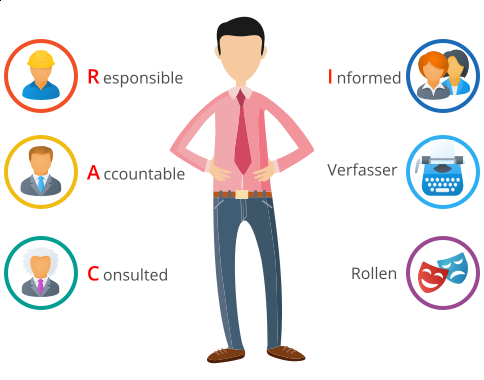
It informs the organization about the workload of its employees, since it shows which role or roles have been assigned to each person. For example, the organization can see whether someone has been placed in the responsible role too often or not often enough — in other words, whether that person has too many or too few tasks to fulfill. This tells the organization whether someone is overloaded or could take on more responsibility.
Use RACI for the successful completion of a project, since all stakeholders are affected. This reduces miscommunication and increases productivity. And if a task was completed incorrectly, RACI tells you who was involved and ultimately responsible.
In short, RACI makes it easier to have the right conversation with the right people — and in turn, everyone saves time.
The Eisenhower Principle
The Eisenhower principle provides four categories with which tasks can be scheduled for processing. It distinguishes between “urgency” and “importance”:
- Important and urgent: these tasks should be done first.
- Not important but urgent: these tasks should be done immediately afterward when possible.
- Important but not urgent: these tasks can be worked on occasionally.
- Not important and not urgent: these tasks do not really need to be done at all.
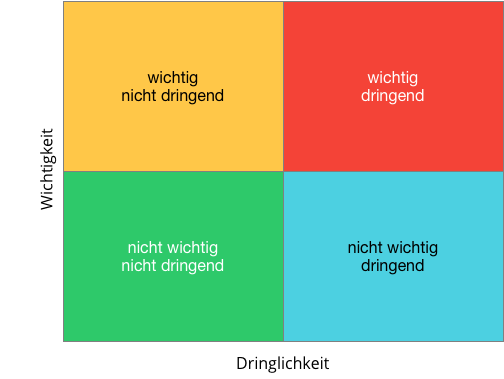
Many task management tools offer the ability to prioritize tasks or mark them with tags or labels. Priorities can often be configured, and these four classes lend themselves well to that purpose.
If you want to learn more about the difference between task management and project management, take a look at this article on “project management vs. task management.”

CEO Alltena GmbH
Christoph Friedrich is a computer scientist and certified Project Management Professional. He has extensive experience in the introduction and integration of project management tools as well as the analysis and definition of processes in project and service management.


