Project Management Software Features
With the ultimate project-management software Allegra you have every feature you need to make project portfolios, projects with sub-projects, and classic, agile, or hybrid projects succeed — because it is always clear who has to do what, by when.
Projects and Project Portfolios
-
Every task belongs to a project or workspace -
Nest projects into sub-projects to manage entire portfolios -
Break tasks into sub-tasks for a product structure or work breakdown -
Stay in control even on large initiatives
Scheduling
-
Target dates and planned dates per task -
Automatic warnings when planned dates fall outside targets -
Define milestones, logical dependencies, and fixed dates -
Recurring activities and reminders for upcoming deadlines
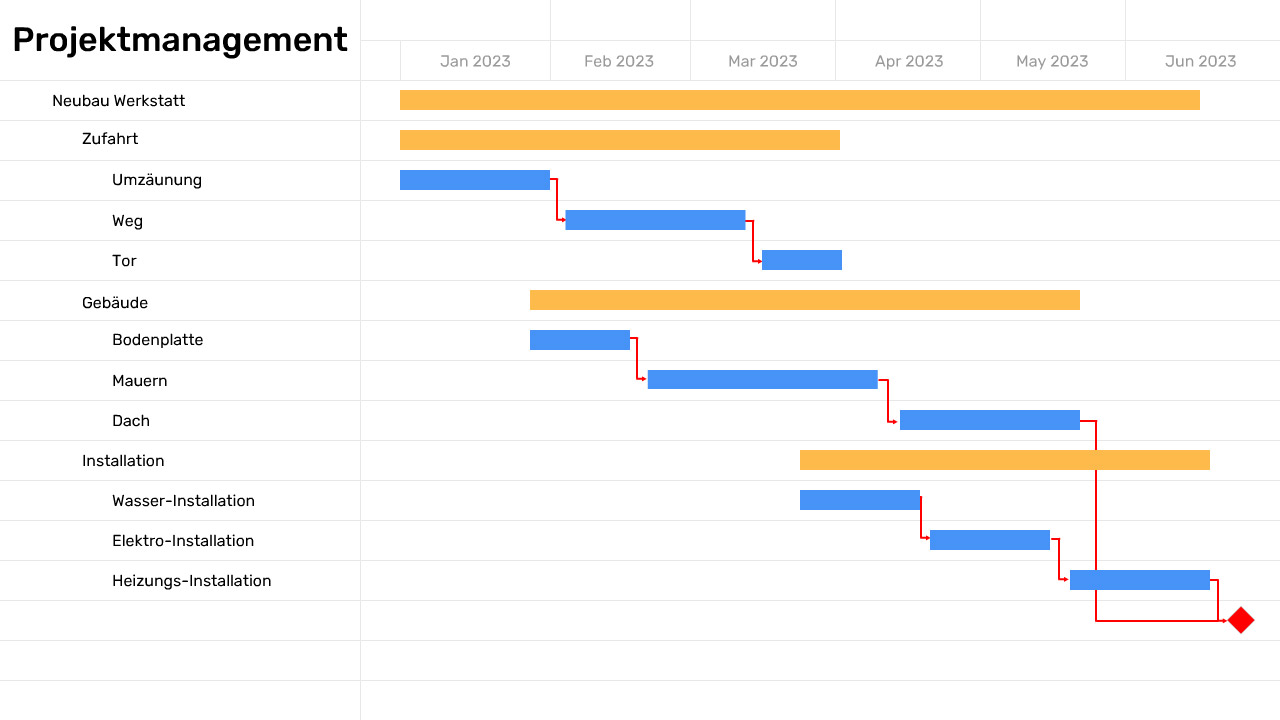
Interactive Gantt Charts
-
See at a glance which tasks are due when -
Logical dependencies and milestones clearly visualised -
Show the critical path or compare planning to baseline -
Progress visible at every level of the breakdown
Agile: Scrum and Kanban
-
A complete Scrum tool for the full agile workflow -
Epics, user stories, backlogs, sprints, and agile boards -
Story points, sprint capacity, burn charts, and velocity charts -
Integrations with Sonar, Git, Bitbucket, GitLab, and GitHub
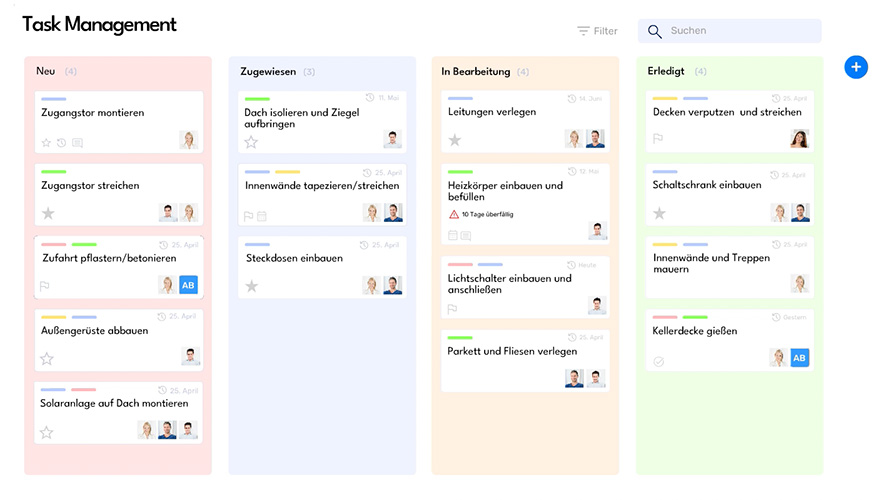
Hybrid Project Management
-
Classic and agile project management — in the same project or in separate sub-projects -
Use Scrum concepts inside classic projects -
Bring classic elements into agile projects where it helps -
One tool that follows your process — not the other way around
Core Features
Everything you need for day-to-day project work — built in.
Hierarchical items
Nest tasks as deep as you like and keep the overview at every level.
Hierarchical areas
Break projects into sub-areas — even huge initiatives stay manageable.
Custom forms
Decide which fields appear where. Show each user only what they need.
Custom attributes
Pick from many attribute types exactly what each item type requires.
Complete audit trail
Every change is logged — fully traceable, at any time.
Attachments
As many attachments per item as you like, files or links — searchable by full-text.
Dashboard
All project metrics in one place in real time. Deadlines and budgets at a glance.
Multilingual
All UI text is localisable in an upgrade-safe way and available in multiple languages.
Branding customisation
Integrate the service portal into your existing websites and adapt it to your corporate identity.
Portfolios
Keep an overview of every task with cross-project queries and reports.
Delegating and follow-up
Delegate items and put them on your follow-up list. The list of delegated items is available at any time.
Item links
Define relationships like "is duplicate of" — freely extensible.
Recurring tasks
Define once, never forget. Reminders included.
Favourites
Mark frequently used items as personal favourites and keep them in their own list.
Getting Things Done
Boost your personal and team productivity with the proven Getting-Things-Done method.
Follow-up
Hand tasks over to teammates and set a personal follow-up date.
Excel import & export
Export items to Excel and import existing spreadsheets into Allegra.
Responsibilities
Allegra helps you keep responsibilities transparent for everyone using the RACI method.
Dependencies
Link tasks that depend on each other — e.g. those that can only start once the predecessor is done.
Time tracking
Capture time per item and produce customer-specific activity records.
Views and Reports
Your data — visualised exactly the way you need it right now.
Your tasks
One click for a list of all your tasks. Favourites for frequent ones.
Table view
Lots of information, compact and structured, in a clear table.
Boards
Organise tasks like sticky notes — perfect for transparent workflows.
Timelines
Visualise dependencies in the interactive Gantt chart and compare to your baseline.
Workload
Plan resources so no one is overloaded or under-utilised.
Portfolios
Cross-project queries and reports keep the overview across all work.
Reports and KPIs
Meaningful reports with Microsoft Power BI — improve processes via KPIs.
Dashboard
Project metrics in real time in one place — deadlines and budgets at a glance.
Excel export
Export any project data to Excel and shape it any way you like.
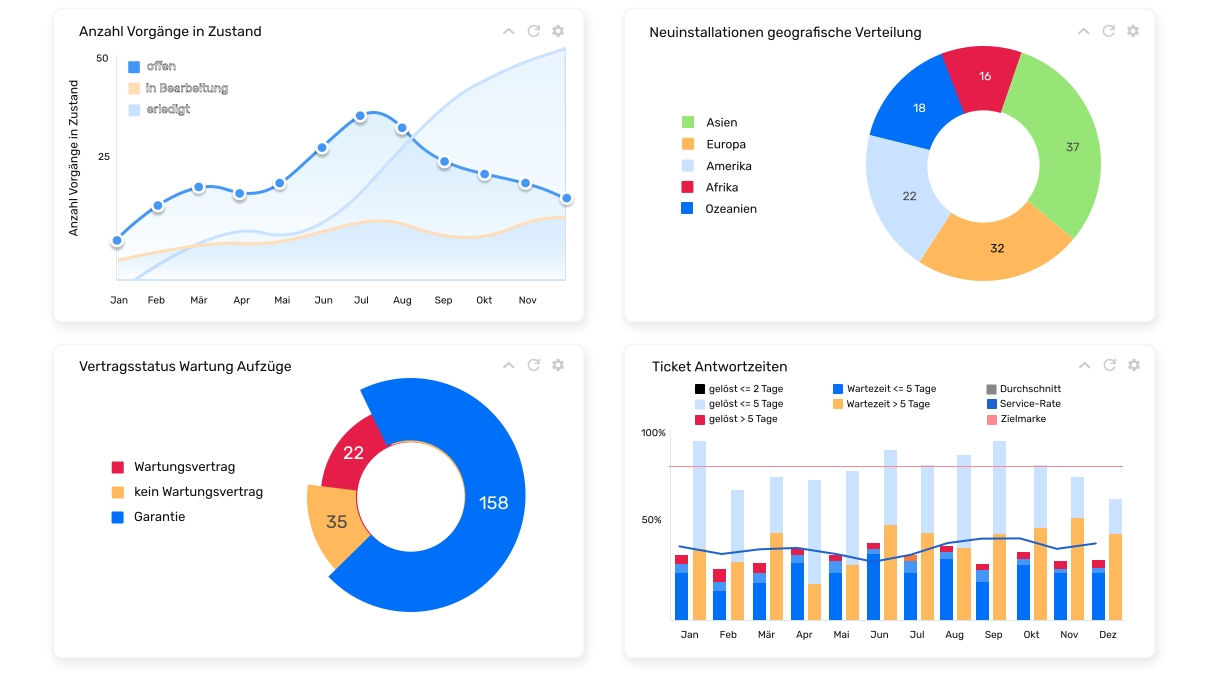
Dashboard
All project metrics in real time
Dashboards are the heart of modern data analysis. With the Allegra dashboard you always have every key figure in view — for better decisions, higher efficiency, and closer team collaboration.
Document and follow up on meetings
Capture your project meetings effectively, in real time
-
Track to-dos from previous meetings in real time -
Create tasks directly while taking minutes -
Start new minutes from templates or earlier documents -
Generate recurring jour-fixe minutes automatically -
Share minutes online or as PDF
Communication
Everyone gets exactly the information they need right now.
RACI
The RACI-based communication scheme delivers targeted information — nothing more, nothing less.
Followers
Add team members as readers or editors on tasks and notify them precisely.
Chat integration
Slack and MS Teams integration: stay informed and join discussions — without logging in.
Reminders
Automatic email or chat reminders for due and overdue tasks.
In-app notifications
Already drowning in email? Get notified directly inside Allegra instead.
Text templates
Standard answers for standard questions — in seconds, not minutes.
Likes
Give positive or negative feedback on items, documents, or discussion posts.
Discussions
Discuss with team, partners, and customers — via comments, email, or chat.
Follow-up
Hand tasks over to teammates and set a personal follow-up date.
Administration
All the admin functions you actually need day-to-day.
Users
Assign roles, sync with Active Directory or LDAP — user management made simple.
Guests
Collaborate with customers, suppliers, contractors, and partners directly in Allegra.
Groups
Organise users into groups — simplifies administration and permissions.
Organisations
Assign departments and companies, organise hierarchically — for clean resource planning.
Two-factor authentication
Strengthen access protection via email or standard 2FA apps.
Permissions
Freely defined roles and system roles — administration can be shared across many people.
Project administration
Archive inactive projects — the data remains reactivatable at any time.
Data safety
Export data and configuration and reimport on another server.
Investment safety
Even 10+ year-old installations upgrade cleanly — including all configurations and data.
Integrations
Allegra plays well with the tools you already use.
REST API
Full access to every piece of Allegra data — perfect for custom integrations and automation.
Slack
Post updates to Slack, create tasks, comment, complete, and edit.
Email to Allegra
Send or forward email to Allegra to turn it into tasks or discussions.
GitLab
Link GitLab commits to tasks — your team stays informed about every code change.
MS Power BI
Build complex reports on top of your Allegra data — directly in Power BI.