Why Reporting Is More Than “A Few Reports”
Without reliable information, no one can steer a project — they can only react. Project reporting ensures that project managers and stakeholders regularly share the same picture: what is done, what is delayed, where resources or budget are tied up, and which decisions are pending.
Many teams confuse reporting with merely generating charts. What really matters is the process behind it: who delivers which data, when, and in what form — and how that feeds into governance and project controlling. If this process is not clarified at the kick-off meeting or at the start of the project, friction builds: duplicated work, outdated figures, and surprises at steering committee meetings.
What Is Project Reporting?
At its core, project reporting covers the collection, preparation, and distribution of project information to the relevant stakeholders. The information delivered typically refers to a clearly defined reference date — for example, the Friday before a status meeting or the end of a sprint.
You can think of it as the logistics of the project information system: it is not just about content, but also about recipients, channels, frequency, and responsibilities. The rules governing content are typically set out in the communication plan (sometimes also in the project manual): who receives which information, in how much depth, and for what purpose.
Distinction: Project reporting is not a substitute for the entire project controlling function — it is the visible and recurring component that translates controlling data into understandable reports. It overlaps heavily with the project status report, which is often the central standard document of the reporting process.
Goals: Transparency, Governance, Decisions
The most important goals can be reduced to three points:
Transparency. All relevant parties work from the same information. This reduces follow-up questions, after-the-fact debates about “the real numbers,” and prevents problems from surfacing too late.
Governance and early warning. Regular reports make trends visible — such as repeated delays to milestones or growing variances in the target/actual comparison. This allows countermeasures to be initiated early. Which metrics are worth tracking and how to consolidate them is covered in project KPIs at a glance.
Decision preparation. Clients, steering committees, or executives receive the basis for approvals, prioritizations, and escalations — concisely and clearly.
Roles and Responsibility: Reporting Is a Proactive Duty
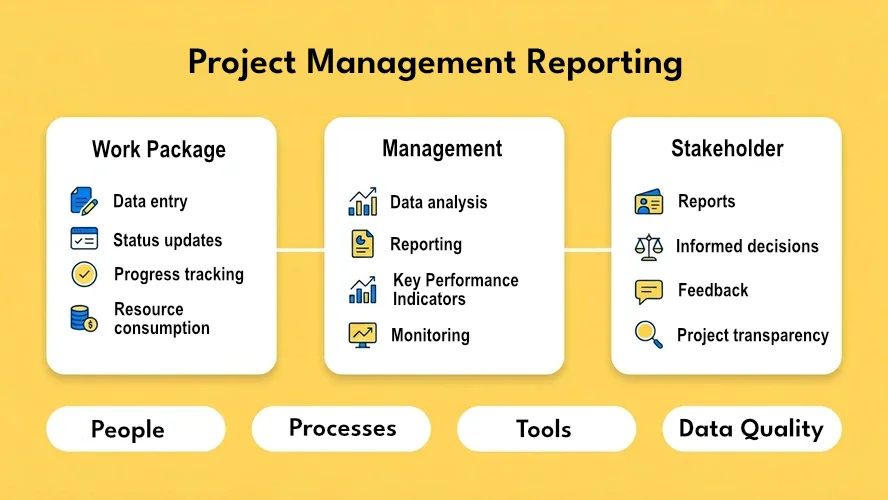
Reporting is a team task, not solely the project manager’s job. Those responsible at the work package or team level supply facts and assessments; the project manager consolidates, evaluates impacts on the overall plan, and communicates outward.
The key principle is proactive delivery: information must be actively provided at agreed times — not only when asked. The project manager’s job is to introduce the process, enforce it as the project progresses, and onboard new team members into it. Without this discipline, data becomes stale, and every dashboard creates a false sense of certainty.
Simple Versus Extended Reporting Processes
Small and Medium-Sized Projects
In projects without additional hierarchy levels (e.g., no sub-project leads), a simple reporting flow is often sufficient: work package owners update their packages, the project manager evaluates and distributes the consolidated view to the team and stakeholders.
The cadence should fit the calendar and the governance meetings — often weekly or monthly. Many organizations use a fixed day of the week (e.g., Thursday for data collection, Friday for evaluation) so that everyone knows which status is “official.”
Large Projects with Sub-Projects
As soon as independent sub-projects with their own plans and owners exist, an extended process pays off: work package owners report to the sub-project lead, who consolidates and delivers compact information to the overall project manager.
The advantage: many issues are resolved at the sub-project level before they burden overall governance. The overall project manager keeps the overview without diving into every detail.
Cadence and Rhythm: Consistency in Multi-Project Environments
The cadence of reports should match decision cycles and planning granularity. Very fine daily rhythms are rarely needed in classical projects and create significant overhead; pure quarterly reports are usually too coarse for operational governance. Weekly or monthly cycles are most common in practice.
In multi-project environments, it is helpful when projects use the same reporting cadence — at least where portfolio or resource decisions converge. Otherwise data becomes hard to compare, and portfolio views are based on figures of different ages.
What Happens at the Work Package Level
At the work package level, the focus is on operational truth: deadlines, resources, progress of activities, and any technical or substantive obstacles. Those responsible should update the completion percentage and the schedule status and — where customary — maintain a traffic-light status.
If the traffic-light status is not “green,” many environments require a problem report or a documented deviation: what happened, what the impact is, and what actions are underway. Plan artifacts (e.g., schedule, work breakdown structure) are then adjusted or at least the latest status is documented. Details are kept in the central repository or in the tool so the project manager can find them without searching.
What Happens at the Project Level
The project manager reviews incoming information for impacts on the overall schedule, resources, and budget. Where necessary, they align countermeasures with work package owners, update plans, and inform the team, client, or steering committee.
When problems cannot be resolved within the project, an escalation report may be required: clearly worded, with options, consequences, and the specific decision needed at the next level up.
Typical Reports and Report Types
There is no universal menu that fits every organization equally. A needs-based selection makes sense — depending on role, industry, and governance model. Common types include:
- Project status report — overall status, traffic lights, top risks and issues, next steps
- Schedule / milestone reports — used in conjunction with milestone trend analysis or Gantt chart views
- Resource and utilization reports — especially relevant for shared teams
- Cost and effort reports — linked to project costs and budget
- Management summary — highly condensed for executive level
- Portfolio or program views — consolidating multiple projects
The key point: every report should have a clear purpose and a defined audience. Reports “for everyone” tend to be too long for decision-makers and too superficial for specialist teams.
People, Processes, and Tools
Good software does not replace a clear process. Data must be correct or at least consistently interpretable (e.g., when progress is based on estimates). Processes define who delivers what and when. People need the discipline — and often the honesty — not to conceal variances.
Role-specific views are useful: team members need a different level of detail than the project manager or a central PMO. At the same time, it should be clear what a number means — otherwise decision-makers draw wrong conclusions from apparent precision.
Data Quality: Complete, Correct, Current
Reporting only delivers its value with reliable data. Three simple criteria help with assessment:
Completeness. Are all relevant activities and deliverables captured? If line tasks or absences are missing from the resource view, utilization figures appear artificially low. A clear definition of done for tasks and milestones reduces grey areas in progress tracking.
Correctness and plausibility. Do estimates and status entries reflect reality? Are costs and hours assigned to the right projects? Targeted plausibility checks — by the project manager or a PMO — prevent false pictures from taking hold.
Currency. When were data last updated, and do the interfaces between tools align? A report with data from two days ago can already be misleading in fast-moving phases.
Aligning Communication Plan and Reporting
The communication plan defines which information flows through which channel at what frequency. Reporting implements this for recurring, structured documents and dashboards. Planning both together prevents redundant reports and gaps — for example, when the team reports weekly by email but the steering committee decides monthly and expects different project KPIs.
Checklist Before Getting Started
Before you finalize report templates or configure tools, a brief clarification is worthwhile — drawing on typical reporting projects:
- Purpose: Which decisions should the report support?
- Audience: Who reads it — and who decides based on the report?
- Content: Which project KPIs and narratives are really needed?
- Permissions: Who is allowed to see which view?
- Frequency: Does the cadence fit meetings and planning cycles?
- Channel: Digital only, or also printable / archived?
- Ad hoc: Are special analyses needed?
- History: Should trends and versions remain traceable?
- Maintenance: Who can adjust templates and metrics — and who approves that?
Once these points are answered, selecting and designing reports becomes significantly easier — and subsequent controlling more effective.
How Software Helps — Without Replacing the Process
Project management software can provide a central repository, standard templates, automation, and dashboards, so recurring reports are produced faster and trends can be explored via drill-down. What remains critical is that a shared data foundation for planning, tasks, and status is used — otherwise parallel truths emerge in spreadsheets and in the tool.
For organizations that want to bring together project data and operational task or service data, an end-to-end platform is a practical lever — for example, based on project management software: less manual consolidation, clearer ownership per work package, and a traceable history.
Conclusion
Project reporting is the link between operational progress and actionable information. It thrives on clear rules, reliable cadence, and accountability at every level. Those who take definition, process, and data quality seriously create transparency without bureaucracy — and precisely the foundation that well-informed decisions and successful projects require.

Senior Advisor
Jörg Friedrich is the original author of the project management software Allegra and continues to accompany its development to this day. He has many years of industry experience as a project and department manager. He also serves as a professor in the Faculty of Computer Science and Information Technology at Esslingen University of Applied Sciences.


