What Is a Work Package?
DIN 69901-5 defines a work package as the “smallest, non-further-decomposed element in the work breakdown structure (WBS)”. In English, the term Work Package (WP) is used.
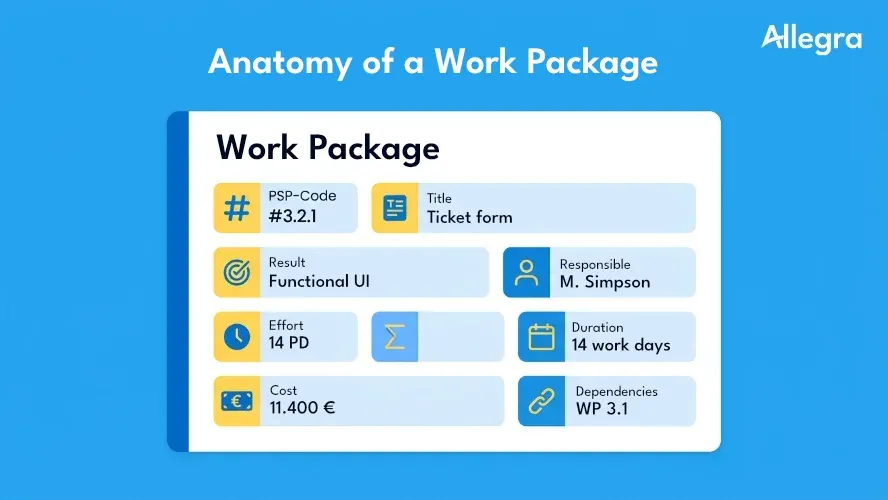
A work package describes a thematically coherent scope of work within a project. It has a clearly formulated deliverable, a single owner, an estimated effort, and a timeframe. This makes it the level at which a project becomes concretely plannable and manageable.
Position in the Project Hierarchy
The work breakdown structure (WBS) structures a project top-down: from the overall project through sub-projects or phases down to the work packages. These form the lowest level of the WBS — the leaves of the tree.
Above the work packages sit summary elements (sub-projects, phases, or functional areas) that do not describe any work themselves but merely group it. Below the work packages, scheduling and sequencing begins: the contents of a work package are broken down into individual activities, to which start and end dates, sequences, and dependencies are assigned.
Distinction: Work Package, Activity, Milestone
These three terms are often confused:
- Work package — describes what needs to be delivered (structural planning). It is a content unit with a defined deliverable.
- Activity — describes when something takes place (scheduling). A work package can contain multiple activities.
- Milestone — marks a point in time at which a defined result is to be available. It has no duration and no effort.
A work package often ends with a milestone — such as the formal acceptance of its deliverable. The activities within the work package describe the path to get there.
Why Are Work Packages Important in Projects?
Projects rarely fail for a single reason. Common root causes include a lack of transparency, unclear responsibilities, or an unreliable planning baseline. Work packages address exactly these weaknesses.
Structure and clarity. A complex project becomes manageable by being broken down into work packages. Instead of a monolithic undertaking, you get discrete units the team can grasp and work on.
Planability. Effort, duration, and costs can be estimated much more accurately at the level of individual work packages than at the project level. Good effort estimation is built on clearly defined work packages.
Control. Work packages are the natural unit for progress measurement. The completion percentage of individual packages feeds into project controlling and the planned vs. actual comparison — all the way to the earned value analysis.
Accountability. Every work package has exactly one owner. This creates clarity and prevents the diffuse distribution of responsibilities where, in the end, nobody is accountable. Combined with a RACI matrix, roles can be precisely defined for each work package.
Communication. Work packages create a shared language within the team. When everyone involved understands the same thing by “WP 3.2 — Data Migration,” misunderstandings and follow-up questions are reduced.
Creating a Work Package Description
The work package description is the central document that records the content of a work package completely and traceably. The format and level of detail vary depending on the organization and project size — the following elements have proven effective in practice:
| Element | Description | Example |
|---|---|---|
| WBS Code | Unique identifier in the work breakdown structure | 3.2.1 |
| Title | Concise, understandable designation | Design ticketing system user interface |
| Description | Detailed explanation of the scope of work | Design and implementation of the user interface for the ticket entry form, including responsive design |
| Expected deliverable | What is available at the end? | Approved UI design as a Figma prototype and implemented frontend |
| Activities | Key tasks within the work package | Create wireframes, design review, frontend development, QA testing |
| Owner | Exactly one person responsible for the deliverable | Maria Schmidt, UX Lead |
| Resources | Required personnel and equipment | 1 UX designer, 1 frontend developer, Figma license |
| Effort | Estimated work effort in person-days | 12 PD |
| Duration | Calendar period from start to end | 01.05. – 21.05.2026 (15 working days) |
| Costs | Planned costs (personnel + equipment) | €9,600 personnel costs + €200 licenses |
| Dependencies | Prerequisites and interfaces with other work packages | Result of WP 3.1 (requirements analysis) must be available |
| Acceptance criteria | By what measure is completion determined? | Design sign-off by product owner, passed usability test |
Not every project needs every field. The key is balance: the description must be detailed enough that the owner can work on the package without further questions — but not so extensive that creating the description takes more time than the actual work.
Deliverable Before Activity
A common mistake: the description lists activities but defines no measurable deliverable. Without a deliverable, there is no benchmark for completion. The question “What is available at the end?” should therefore always be answered first — it sets the frame for all other details.
Practical Example: Work Package in an IT Project
A mid-sized company is introducing a new ticketing system for customer service. The work breakdown structure (WBS) divides the project into the sub-projects “Requirements,” “System Configuration,” “User Interface,” “Data Migration,” and “Training.” The following work package is derived from the “User Interface” sub-project:
| Element | Content |
|---|---|
| WBS Code | 3.2.1 |
| Title | Design ticket entry form |
| Description | Design, review, and implementation of the form that service agents use to create new tickets. The form includes fields for category, priority, description, attachments, and customer assignment. It will be implemented as a responsive web interface. |
| Expected deliverable | Fully functional, approved entry form in the staging environment |
| Activities | 1. Create wireframes · 2. Design review with business unit · 3. Frontend development · 4. Backend API integration · 5. QA testing |
| Owner | Maria Schmidt, UX Lead |
| Resources | 1 UX designer (8 PD), 1 frontend developer (6 PD), Figma, test environment |
| Effort | 14 person-days |
| Duration | 01.05.–23.05.2026 (17 working days, as resources work in parallel) |
| Costs | €11,200 (personnel costs) + €200 (licenses) |
| Dependencies | WP 3.1 (requirements analysis) completed; backend API (WP 2.3) available at minimum as a mock |
| Acceptance criteria | Design sign-off by product owner; form works in Chrome, Firefox, and Safari; passed usability test with 3 service agents |
This example shows: a good work package description answers all the questions needed for independent execution — without overloading the owner with unnecessary details.
Determining the Right Size for Work Packages
Work packages only deliver their value when they have the right level of granularity. Packages that are too large are hard to control; packages that are too small generate administrative overhead disproportionate to the benefit.
Rule of Thumb
A well-established guideline: a work package should encompass between 5 and 20 person-days of effort — or roughly 5% of the total project effort. This size is large enough to deliver a tangible result and manageable enough to measure progress meaningfully.
Three Check Questions
If you are unsure whether a work package is the right size, three questions can help:
- Is the deliverable self-contained and independently assessable? A work package should deliver a complete result that can be evaluated independently of other packages.
- Can the package be delegated to one person? If the owner cannot get a clear overview of the package, it is too large. If delegating it is more effort than doing the work itself, it is too small.
- Does the package fit into the overall structure? Work packages within a project should have a similar level of complexity. A single package of 2 person-days alongside one of 80 indicates a structural problem.
Typical Mistakes
Cut too large. A work package called “System Implementation” with 200 person-days is not a plannable unit — it is a disguised sub-project. Progress cannot be measured meaningfully, and problems only become visible late.
Cut too small. A work package called “Send email to supplier” with 0.5 person-days is a task, not a work package. The administrative overhead for the description, assignment, and controlling is out of all proportion to the output.
Work Packages in Agile Projects
In classical project management, work packages are the central structuring element. In agile frameworks like Scrum, user stories and backlog items serve a similar function — with different emphases.
| Characteristic | Work Package (classical) | User Story (agile) |
|---|---|---|
| Perspective | Output and deliverable | User view and value |
| Level of detail | Complete description before implementation | Detailed only during the Sprint |
| Estimation | Person-days, costs | Story points, relative size |
| Assignment | One owner | Team responsibility |
| Changes | Formally via change request | Prioritization in the backlog |
In hybrid projects — that is, initiatives combining classical and agile elements — user stories can be mapped to work packages. The WBS hierarchy (sub-projects → work packages → activities) then roughly corresponds to the agile hierarchy (epics → features → user stories). The bridge between the two worlds is the deliverable: whether formulated as the “done criterion” of a user story or as the “expected result” of a work package — measurable outcomes are the key to progress tracking in both approaches.
Practical Tips
Involve subject matter experts. The project manager does not know every domain in detail. Creating the work package description together with the people who will carry out the work yields more realistic estimates and greater team buy-in.
Use the WBS as a foundation. Work packages don’t emerge in a vacuum. They are the result of structured project planning with a WBS. Starting directly with work packages without clarifying the overall context risks gaps and overlaps.
Define deliverables, not activities. “Migrate database” is an activity. “Customer data fully available and verified in the new system” is a deliverable. The second formulation makes the end of the work package measurable and acceptance unambiguous.
Use work packages for controlling. Recording planned effort and planned costs for each work package provides the foundation for a meaningful planned vs. actual comparison. Without this baseline, controlling has no benchmark.
Choose an appropriate level of detail. The work package description is not a contract or a scientific paper. It should be detailed enough that the owner can work independently — and lean enough that it is actually read and used.
Document dependencies explicitly. Which work package must be completed before this one can begin? Which inputs are needed? Unresolved dependencies are one of the most common causes of delays during a project.
Managing Work Packages with Software
In small projects, work packages can be maintained in a spreadsheet. Once a project encompasses multiple sub-projects, dozens of work packages, and a distributed team, this approach hits its limits. Information scatters across different files, versions diverge, and the overall picture is lost.
Project management software solves exactly these problems:
- Central documentation — work package descriptions, responsibilities, and dependencies in one place, accessible to all stakeholders.
- Progress tracking — the completion percentage of individual work packages is captured where the work actually happens. Project status reports are generated from real-time data.
- Effort and cost control — planned and actual values per work package flow directly into the project budget and the earned value analysis.
- Dependency management — links between work packages make bottlenecks and critical paths visible before they lead to delays.
Allegra combines work breakdown structure planning, task management, and cost controlling in a single platform. Work packages are created as structured activities, linked with owners, dates, and budgets, and tracked throughout the entire project lifecycle — from the project plan to the final report.
Frequently Asked Questions
What is a work package explained simply?
A work package is a clearly defined building block within a project. It describes what needs to be delivered, who is responsible for it, what result is expected at the end, and how much effort is planned for it. Work packages are the smallest planning unit in the work breakdown structure and form the foundation for scheduling, cost planning, and resource planning.
How are work packages and the work breakdown structure related?
The work breakdown structure (WBS) organizes a project hierarchically into progressively smaller units. Work packages form the lowest level — the leaves of the tree. Everything above them (sub-projects, phases) serves to group them. The actual work is described and planned at the level of the work packages.
What is the difference between a work package and an activity?
A work package describes a thematic scope of work with a defined deliverable (structural planning). An activity is a scheduled work step within a work package (scheduling). A work package can encompass multiple activities that are carried out in a specific sequence and with defined dependencies.
How large should a work package be?
A common rule of thumb is 5 to 20 person-days, or roughly 5% of the total project effort. The package should be large enough to deliver an independent, measurable result, and small enough to allow meaningful progress control. Packages that are too small generate unnecessary administrative overhead; packages that are too large are difficult to manage.
Who is responsible for a work package?
Every work package has exactly one owner. This person ensures that the defined deliverable is produced at the agreed quality, within the planned timeframe, and within budget. Responsibility cannot be shared — even if multiple people contribute to the execution.

Senior Advisor
Jörg Friedrich is the original author of the project management software Allegra and continues to accompany its development to this day. He has many years of industry experience as a project and department manager. He also serves as a professor in the Faculty of Computer Science and Information Technology at Esslingen University of Applied Sciences.


