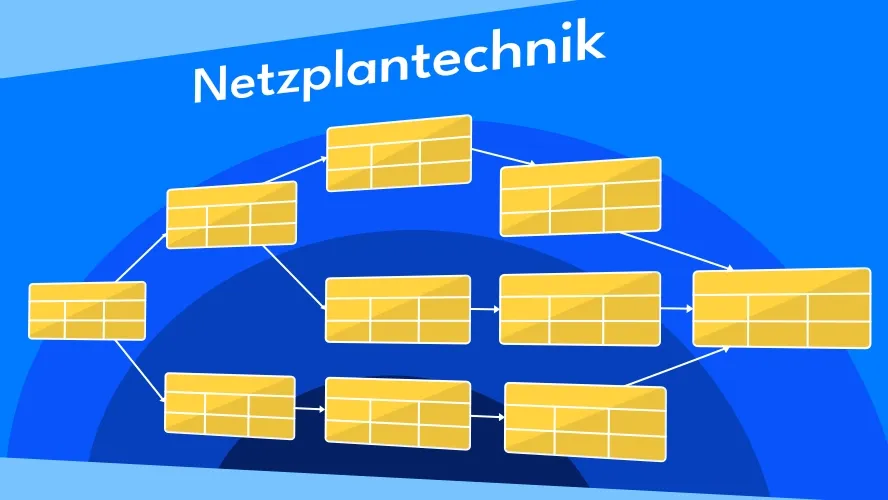
What is network diagram technique and why is it indispensable for modern projects?
Network diagram technique is a project management method for planning, controlling, and monitoring projects. It is based on the graphical representation of project workflows as a network of activities and their logical dependencies. Starting from a work breakdown structure (WBS), it is an excellent way to create a project schedule. This visual representation makes complex project structures tangible and analyzable.
The historical development: from military origins to a universal tool
Network diagram technique did not emerge in a vacuum. The two main methods were developed almost simultaneously, but independently of each other:
The Critical Path Method (CPM) was developed in 1957 by DuPont for planning maintenance work at chemical plants. The focus was on identifying the critical path — the chain of activities that determines the total duration of a project.
In parallel, the US Navy developed the Program Evaluation and Review Technique (PERT) in 1958 for the Polaris missile program. Unlike CPM, PERT incorporated uncertainty in time estimates from the outset by using probability distributions.
In Germany, the Metra Potential Method (MPM) was added in the 1960s, distinguished by its activity-on-node representation.
What was once laboriously drawn with paper and pencil can now be created in minutes with specialized software. However, the fundamental principles have remained the same.
The added value compared to traditional planning methods
I am repeatedly asked: “Why shouldn’t I just stick with my tried-and-true bar charts?” The answer lies in the analytical depth of network diagram technique:
Unlike simple bar charts (Gantt charts), network diagram technique puts logical dependencies front and center. You see not only WHEN something happens, but also WHY it must happen at that particular time.
The calculation of buffer times shows you which activities have flexible time windows and which must be adhered to precisely. This enables accurate resource allocation and prevents bottlenecks.
Identifying the critical path provides a clear focus for your attention: delays here directly affect the overall project duration.
Network diagram technique can lead to complex representations in larger projects. It is not supported by many project management tools.
What methods of network diagram technique exist and how do they differ?
The various network diagram methods are like different dialects of a language — they share the same core idea, but differ in important details. Let me explain the three most important methods.
Critical Path Method (CPM): the deterministic approach
CPM is probably the best-known network diagram method and is characterized by its deterministic approach. Here you work with fixed time values for each activity.
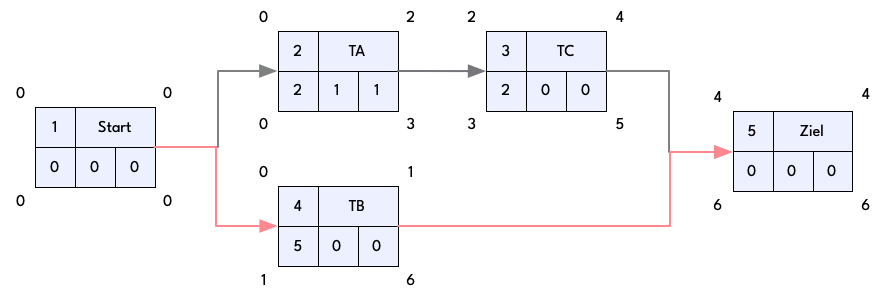
The core idea is to identify the critical path — the chain of activities that determines the minimum duration of the project. Activities on this path have no buffer; any delay extends the project timeline.
CPM’s strength lies in its clarity and precision. It is ideally suited to projects with well-plannable activities and known durations, such as in construction or manufacturing.
Program Evaluation and Review Technique (PERT): the probabilistic way
PERT differs fundamentally from CPM through its probabilistic approach. Instead of a fixed duration, you work with three time estimates for each activity:
- Optimistic time (a): “In the best case, we can do it in…”
- Most likely time (m): “Normally it takes…”
- Pessimistic time (b): “In the worst case, it could take…”
From these three values, PERT calculates an expected duration using the formula: (a + 4m + b) / 6
The key advantage: PERT accounts for uncertainty in project planning and is therefore particularly suited to research and development projects or other endeavors with considerable uncertainties.
In a software development project I was involved with, PERT enabled us to schedule more realistically by accounting for the uncertainties of new technologies. While other teams regularly missed their deadlines, we were able to achieve an on-time delivery rate of over 90%.
Metra Potential Method (MPM): the European alternative
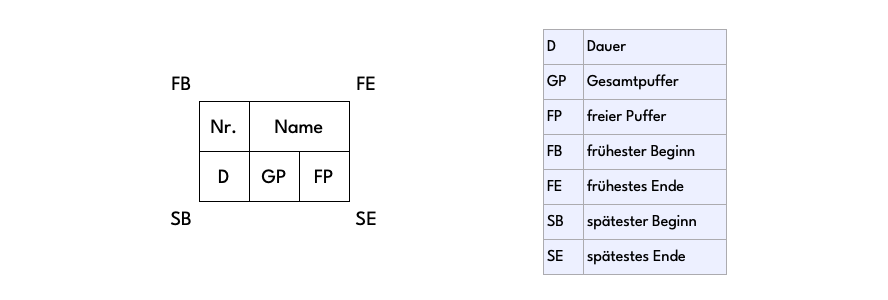
MPM, also known as the precedence diagram method, is particularly widespread in Europe. Unlike CPM and PERT, which were originally conceived as activity-on-arrow networks, MPM represents activities as nodes and relationships as arrows.
A key advantage of MPM is its ability to represent more complex dependencies:
- Finish-to-start: B can only begin when A has ended
- Start-to-start: B can only begin when A has begun
- Finish-to-finish: B can only end when A has ended
- Start-to-finish: B can only end when A has begun
This flexibility makes MPM the ideal tool for projects with complex activity relationships, such as in plant engineering or systems development.
Decision criteria: which method for which project?
The choice of the right method depends on several factors:
For projects with well-known durations and predominantly simple finish-to-start relationships, I recommend CPM. Its clarity and simplicity make it the ideal entry point into network diagram technique.
For significant uncertainties — for example in research projects or when developing new products — PERT with its probabilistic approach is the better choice.
If you need to map complex dependencies that go beyond simple finish-to-start relationships, go with MPM.
In practice, I often use a combination of methods — for example, CPM for high-level planning and PERT for particularly uncertain project phases.
How do you create a network diagram step by step?
Creating a network diagram may seem complex at first, but it follows a logical process. Let me walk you through the key steps.
The preparation phase: structure your project
Before you draw the first line of your network diagram, you need to understand and structure your project. Start by creating a work breakdown structure (WBS) that breaks the overall project down into manageable work packages.
A work package should be small enough that it:
- can be assigned to a person or a team
- has a defined start and end point
- shows measurable progress
- covers a manageable time span (usually 1–10 working days)
A well-structured WBS is the foundation of every network diagram. In my projects I deliberately take time for this step — the better the structure, the more robust the subsequent plan.
Identifying activities and their dependencies
Based on the WBS, you now define the individual activities and their logical dependencies. An activity is a clearly delimited task with a defined start and end.
For each activity, you ask yourself four key questions:
- What must be completed before this activity can begin?
- What can only begin once this activity is completed?
- What can be carried out in parallel with this activity?
- What resources are required?
Identifying dependencies requires both technical understanding and experience. I recommend carrying out this step in a workshop with subject-matter experts. Visualize the dependencies on a whiteboard or with sticky notes first, before transferring them to a tool.
Time estimation: the art of realistic forecasting
The quality of your network diagram stands or falls with the accuracy of your time estimates. Do not rely on optimistic assumptions or spontaneous judgments. Instead:
Use historical data from similar projects as reference points. Consult experts with hands-on experience in the relevant activities. Account for learning curves, especially with new technologies or teams. Factor in an adequate risk buffer for unforeseen events.
If you are working with PERT, estimate the optimistic, most likely, and pessimistic duration for each activity. This gives you a significantly more realistic picture of the expected project duration.
The right tools: from Excel to specialized solutions
For simple network diagrams, standard office tools such as Excel or PowerPoint are often sufficient. For more complex projects, however, I recommend specialized software:
Microsoft Project is the classic choice and offers comprehensive features for creating and analyzing network diagrams. Primavera P6 is particularly common in large projects and construction, and impresses with its analytical depth. Jira with plugins such as BigPicture offers good integration into agile development environments. Open-source alternatives such as ProjectLibre or GanttProject provide basic network diagram functions for smaller projects.
In my practice, I have had good experiences with a combined approach: the initial structuring often takes place in workshops with sticky notes and whiteboards, while the formal elaboration is then done in specialized software.
A concrete example: when planning a factory relocation, we identified a critical dependency between dismantling a specialized machine and installing it at the new site through careful network diagram creation. By recognizing this early, we were able to provide additional resources and defuse a potential bottleneck.
What do the key metrics in network diagram technique mean?
Network diagram technique delivers a range of metrics that are indispensable for project controlling. Understanding these is like reading a map for your project journey.
Earliest and latest dates: the time framework
For each activity, network diagram technique calculates four key points in time:
The earliest start time (EST) indicates when an activity can begin at the earliest. It is derived from the latest end of all predecessor activities.
The earliest finish time (EFT) is the earliest possible point at which an activity can be completed (EST + duration).
The latest start time (LST) indicates when an activity must begin at the latest without delaying the project end (LFT − duration).
The latest finish time (LFT) is the latest point at which an activity must be completed without jeopardizing the project end.
These calculations take place in two passes:
- The forward pass determines EST and EFT, starting from the project start.
- The backward pass determines LST and LFT, starting from the project end.
From personal experience, I can say: understanding these values sharpens your eye for time buffers and bottlenecks in the project. In an IT migration project, I was able to fit a server cutover optimally into a tight time window through precise analysis of the earliest and latest dates.
Buffer times: the flexible reserves
The true treasure of network diagram technique lies in the calculation of various buffer times:
The total float (TF) of an activity indicates by how many time units it can be shifted without delaying the project end (LFT − EFT or LST − EST).
The free float (FF) indicates by how many time units an activity can be shifted without affecting the earliest start times of subsequent activities.
The independent float (IF) is the time buffer that remains even when all predecessors finish as late as possible and all successors start as early as possible.
Knowing the various types of float enables differentiated project controlling. In one of my product development projects, we used float information to deliberately concentrate additional resources on activities with no float, while other activities with larger floats were handled more flexibly.
The critical path: the backbone of your project
The critical path is the chain of activities that determines the minimum duration of the project. Activities on this path have a total float of zero — any delay here immediately extends the project timeline.
Identifying the critical path delivers two decisive insights:
-
You know where your attention is required. Critical activities require close monitoring and proactive risk management.
-
You can see where acceleration potential lies. Shortening the project duration is only possible by accelerating activities on the critical path.
In my practice, I review the critical path regularly, as it can change during the course of the project. A delay in a non-critical activity can put it on the critical path, shifting the focus of project controlling.
Progress monitoring with milestones
Milestones are special events in the course of a project that consume no time and mark important phases. They serve as checkpoints for progress measurement and provide occasions for project reviews.
Effective milestones should:
- have clearly defined deliverables
- be measurable and objectively assessable
- be placed at strategically important points in the project timeline
- serve as decision points for “go/no-go” decisions
In a complex infrastructure project, I once deliberately reduced the number of milestones to seven — one per project phase, each with clear quality criteria. This sharpened the team’s focus and greatly simplified communication with the steering committee.
Where are the most common mistakes when applying network diagram technique?
Despite its power, network diagram technique does not automatically lead to success. From my many years of experience, I would like to highlight typical pitfalls that I have observed or lived through myself.
Typical pitfalls when creating network diagrams
Probably the most common mistake is excessive detail. A network diagram that is too granular becomes confusing and loses its value as a controlling instrument. Find the right balance: enough detail for a meaningful analysis, but not so much that you lose the overview.
Another classic mistake is “wishful thinking” in time estimates. Being realistic may be uncomfortable when there are scheduling constraints, but optimistic estimates inevitably lead to delays and frustration. I recommend using historical data and taking “Hofstadter’s Law” into account: everything takes longer than planned, even when you take this law into account.
Many planners also forget “invisible” activities such as approval processes, quality inspections, or delivery times. These often have a significant impact on the project. In a construction project, I once overlooked the drying time of a specialized concrete — an apparently trivial detail that later led to a two-week delay.
Overestimating dependencies and undervaluing buffer times
There is a tendency to define too many “hard” dependencies where flexible relationships would actually be possible. Not every relationship is technically mandatory; some are based on habit or perceived efficiency.
Ask yourself critically: does activity B really have to wait until A is completely finished? Couldn’t B start when A is 80% done?
Equally problematic is ignoring buffer times in everyday project work. Buffers are often seen as a “reserve” that can be used without a second thought. This means that when unforeseen events occur, no flexibility remains.
In an IT rollout project, I therefore established the rule that the use of buffer time must be a conscious decision that is documented and justified — similar to drawing on financial reserves.
Recognizing and resolving resource conflicts
A network diagram initially considers only logical dependencies, not resource constraints. This frequently leads to unrealistic plans in which the same resource is supposed to be deployed in multiple places simultaneously.
Resource planning requires an additional analysis step:
- Identify resource requirements for each activity
- Create resource histograms to identify over- and under-utilization
- Resolve conflicts by shifting non-critical activities within their buffers
- If necessary, adjust the plan through resource leveling
In a software development project, this analysis revealed that our critical back-end developer was overloaded in the start phase. By redistributing some tasks to other team members, we were able to achieve a more realistic schedule.
Adjusting the network diagram when deviations occur
A network diagram is not a static document, but a living controlling instrument. Many project managers shy away from regular updates, whether due to time pressure or concern about making deviations visible.
My approach is pragmatic: the network diagram should be updated regularly (at least monthly, and weekly during critical phases). The rule is:
- Record actual times for completed activities
- Adjust forecasts for ongoing activities
- Recalculate the critical path
- Define countermeasures for significant deviations
Regular updates make problems visible early and enable proactive action. In one of my projects, this practice meant we recognized an emerging delay in a software component three weeks earlier and were able to initiate countermeasures.
How is network diagram technique used in different industries?
Network diagram technique is not a one-size-fits-all approach. Its application varies considerably depending on the industry and project type. Let me show how different sectors tap the full potential of this method.
Network diagram technique in construction and architecture
Construction is almost predestined for network diagram technique. Complex dependencies, clear milestones, and the need for precise scheduling make it an indispensable tool.
In construction projects, network diagram technique typically follows the Critical Path Method (CPM), with individual trades defined as activities. Particular attention goes to the interfaces between different trades — such as the transition from the shell to the building services.
A key success factor is integrating approval processes and regulatory sign-offs into the network diagram. These are easily overlooked but can have massive consequences. In a hotel construction project, I deliberately planned generous buffer times for the fire protection inspection — a decision that paid off when unexpected requirements caused delays.
Modern BIM software (Building Information Modeling) now offers direct interfaces to network diagram technique, so that 3D modeling and scheduling merge into what is called 4D planning. This enables impressive visualizations of construction progress before the first sod is turned.
Application in software development and IT projects
In the IT world, network diagram technique long had a difficult standing — agile methods like Scrum seemed to be at odds with it. Yet in complex IT projects, I am witnessing a renaissance of network diagram technique, albeit in a modified form.
The key lies in hybrid application: while the overarching project structure — with milestones and major dependencies — is managed through a network diagram, individual work packages can be implemented in an agile manner. I call this approach “agile within a framework” — it combines flexibility in the detail with commitment in the big picture.
In an enterprise software rollout, I used this approach successfully: integration with legacy systems, data migration, and training measures were mapped in the network diagram, while the actual development was organized in Sprints.
The PERT method is particularly useful in IT projects. Estimating optimistic, most likely, and pessimistic times accounts for the inherent uncertainty of software development. In a project to replace an ERP system, we applied PERT consistently and achieved a remarkable planning accuracy of 85%.
Use in product development and manufacturing
Product development places special demands on network diagram technique. Here the process is often iterative, with feedback loops and dependencies between parallel development streams.
In the automotive industry, I have seen MPM (Metra Potential Method) used successfully to map complex dependencies between mechanical engineering, electronics, and software. MPM’s ability to represent different types of dependencies comes fully into its own here.
A success factor is the integration of quality gates into the network diagram. These defined quality checkpoints ensure that only approved interim results pass into the next phase. When developing a medical device, this approach helped us systematically incorporate regulatory requirements into the development process.
In manufacturing, network diagrams are used to optimize production workflows. When converting a production process from batch to flow manufacturing, a detailed network diagram helped us minimize machine changeover times and almost completely eliminate idle time.
Special applications: event management, research projects, and more
The versatility of network diagram technique is evident in its application in niche areas:
In event management, it is indispensable for coordinating complex events. For an international conference with over 3,000 attendees, a detailed network diagram helped us optimize critical transitions between setup and teardown as well as parallel sessions.
Research projects benefit particularly from PERT. In an interdisciplinary research project between industry and a university, PERT enabled us to make a realistic assessment of project risks and define sensible go/no-go decision points.
Even in disaster protection and emergency planning, network diagram technique finds application. When developing an evacuation plan for a hospital, a network diagram helped us determine the optimal sequence of measures and identify critical bottlenecks.
My experience shows: there is hardly a project type that cannot benefit from network diagram technique — when it is correctly adapted to the specific requirements.
How is network diagram technique evolving in the digital age?
Network diagram technique, originally developed in the 1950s with methods such as CPM (Critical Path Method) and PERT (Program Evaluation and Review Technique), is undergoing a profound transformation in the digital age. These changes affect not only the technical tools, but also the underlying methods and ways of working.
Integration of artificial intelligence and machine learning
A key development step is the integration of AI and machine learning into network diagram technique. These technologies enable smarter predictions and optimizations:
AI-supported project planning can learn from historical project data and thereby provide more realistic time estimates. If, for example, certain types of tasks have regularly taken longer than planned in the past, an AI system can recognize this and suggest appropriate adjustments. This addresses one of the most common weaknesses of traditional network diagrams — the inaccuracy of human estimates.
Machine learning algorithms can also identify patterns in resource utilization and help detect bottlenecks early. This leads to more dynamic resource allocation compared to classic static network diagrams.
Real-time adaptability and agility
Digitalized network diagram technique enables a flexibility that was unthinkable in its paper-based origins:
Modern project management tools allow the continuous recalculation of the critical path and other metrics with every change. This makes network diagram technique compatible with agile methodologies that are geared toward rapid adaptation to changing circumstances.
An interesting example is the fusion of classic network diagram technique with Scrum or Kanban. Here, the detailed scheduling aspects of network diagram technique are combined with the flexibility of agile methods, which is particularly advantageous for complex projects with many unknowns.
Cloud-based collaboration and integration
Moving network diagram technique to the cloud revolutionizes collaboration:
Team members can access current project plans and make updates regardless of their location. This is especially valuable in an increasingly globalized world of work with distributed teams.
Modern network diagram tools offer interfaces to other enterprise systems such as ERP or CRM, enabling a seamless flow of information. If, for example, a material delivery is flagged as delayed in the ERP system, this information can automatically flow into the network diagram and calculate the impact on subsequent activities.
Extended visualization and simulation
Visualization capabilities have expanded dramatically:
Where simple network diagrams were once drawn on paper, today’s tools enable interactive 3D visualizations of complex project structures. This greatly improves understanding of dependencies and critical paths.
A particularly fascinating advance is the integration of network diagrams into virtual reality environments. In construction projects, for example, project managers can walk through a virtual version of a planned building and visualize schedules, resource assignments, and progress indicators in the three-dimensional environment.
Data-driven decision-making
Decision-making is increasingly supported by comprehensive data analysis:
Modern network diagram systems continuously collect data on project progress and enable detailed analysis of performance indicators. These “big data” approaches help identify patterns that would not be visible with traditional methods.
Simulation tools make it possible to run through different scenarios and forecast their impact on the project. A project manager can, for example, simulate several resource allocation strategies and select the optimal solution based on cost, time, and risk.
Blockchain and smart contracts
One of the newest developments is the integration of blockchain technology into network diagram technique:
Smart contracts can automatically verify the fulfillment of milestones and trigger corresponding payments or subsequent processes. This reduces administrative effort and increases transparency.
The immutable nature of blockchain technology enables a seamless documentation of all changes to the network diagram, which can be valuable in projects with high compliance requirements or in disputes between project partners.
Challenges and outlook
Despite all the advances, challenges remain:
The increasing complexity of the tools requires specialized knowledge. The risk is that network diagram technique will again become an expert tool that only specialists can fully understand and use.
Integrating different digital tools remains a challenge despite standardization efforts, particularly when organizations with different technological ecosystems work together.
For the future, it is clear that network diagram technique will become increasingly autonomous — with AI systems that not only perform analyses, but also independently make adjustments to the project plan based on a continuous assessment of project progress and external factors.
Network diagram technique is thus evolving from a static planning instrument into a dynamic, intelligent control system for complex projects — a development that is fundamentally reshaping project management in the digital age.
Frequently asked questions
What is network diagram technique?
Network diagram technique is a method in project management that graphically represents complex workflows and dependencies in order to identify the critical path and efficiently control the project workflow.
Why is network diagram technique important in project management?
The method helps you identify bottlenecks early, allocate resources optimally, and make the overall process transparent — essential for on-time and cost-efficient project execution.
How does network diagram technique work?
First, you capture all required activities and arrange them logically in a network diagram. Using methods such as CPM and PERT, you identify the critical path and can thus determine the time required as well as potential risks with precision.
When should you use network diagram technique?
Network diagram technique is particularly suitable for complex projects with many interdependent tasks, high risk, or international collaboration, where transparency and precise planning are indispensable.
What advantages does network diagram technique offer compared to traditional methods?
Compared to linear methods such as the Gantt chart, network diagram technique visualizes dependencies and critical paths, enabling more accurate planning, early risk mitigation, and more efficient resource utilization. A comparison of all common methods can be found in our article on scheduling methods.

CEO Alltena GmbH
Christoph Friedrich is a computer scientist and certified Project Management Professional. He has extensive experience in the introduction and integration of project management tools as well as the analysis and definition of processes in project and service management.


