Every project stands or falls with its schedule. Yet projects repeatedly fail because of unrealistic deadlines, overlooked dependencies, or missing buffer time. Scheduling in a project is the bridge between a completed work breakdown structure and a reliable project schedule — and the method you choose determines whether that bridge holds.
This article presents the proven scheduling methods, compares their strengths and weaknesses, and shows when each method is the right choice.
What Is Scheduling in a Project?
Scheduling assigns concrete start and end dates to the activities of a project. Its result is the schedule — the document by which all project stakeholders orient themselves.
Scheduling must be clearly distinguished from sequencing: sequencing establishes the logical order of activities (what follows what?), while scheduling translates that order into calendar dates (when exactly does each activity begin and end?).
In a project’s planning process, scheduling comes after structuring and before resource assignment:
- Create a work breakdown structure (WBS)
- Define the project sequence plan
- Carry out scheduling
- Add resource planning
Without solid scheduling, the project plan remains a wish list.
Five Steps to a Project Schedule
Before looking at the individual methods, it is worth reviewing the basic process. Regardless of the method chosen, scheduling in a project follows five steps:
Step 1: Define Activities
All tasks and work packages from the work breakdown structure are carried over. Each activity must be clearly delineated and have a measurable result. Rule of thumb: an activity should take between one and ten working days.
Step 2: Establish Dependencies
Activities rarely stand in isolation. The four types of dependency relationships determine how activities relate to one another:
- Finish-to-Start (FS): The successor begins when the predecessor ends — the most common type.
- Start-to-Start (SS): Both activities start at the same time.
- Finish-to-Finish (FF): Both activities end at the same time.
- Start-to-Finish (SF): The successor ends when the predecessor begins — rare in practice.
Step 3: Estimate Duration
The expected duration is determined for each activity. Proven methods include expert estimation, analogous estimation based on previous projects, and three-point estimation (optimistic, most likely, pessimistic). Our article on effort estimation describes these techniques in detail.
Step 4: Assign Resources
The estimated duration depends directly on the resources available. If only one developer instead of two is available, the duration doubles. Vacation, illness, and parallel projects must all be taken into account. More on this under resource planning.
Step 5: Create and Optimize the Schedule
This is where the actual method comes into play. From activities, dependencies, duration estimates, and resources, the schedule is built. After the initial calculation comes optimization: can the critical path be shortened? Can activities be parallelized? Are the buffers sufficient?
The Methods in Detail
Bar Chart / Gantt Chart
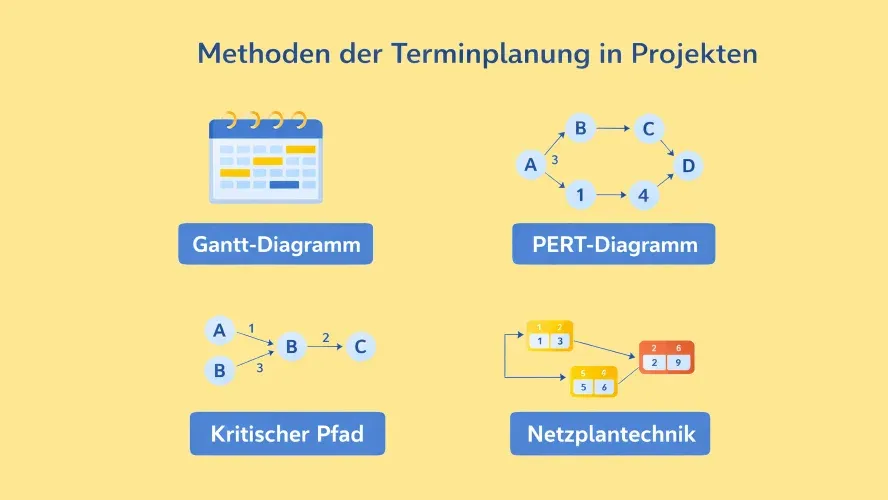
The Gantt chart is the most widely used way to display project schedules. The horizontal axis shows the time scale; the vertical axis lists the activities. Each activity is represented as a horizontal bar whose length corresponds to its duration.
Strengths:
- Very intuitive — immediately understandable even for stakeholders with no project management experience
- Shows overlaps and parallel activities at a glance
- In modern tools, dependencies can be shown as arrows between bars
Weaknesses:
- With more than 100 activities, the view quickly becomes cluttered
- In the simple variant (without links), dependencies are not visible
- Buffer times and the critical path must be calculated separately
Use: The standard method for small to medium-sized projects. Particularly well suited as a communication tool for clients, management, and steering committees. In practice, the Gantt chart is frequently combined with other methods — for example, the network diagram for calculation and the Gantt chart for visualization.
Network Diagram (CPM and PERT)
The network diagram represents activities as nodes and dependencies as arrows in a directed graph. From this network, the earliest and latest start and end dates can be calculated mathematically.
Critical Path Method (CPM) identifies the critical path — the longest chain of activities with no buffer. Any delay on this path delays the entire project. All activities that do not lie on the critical path have buffer time (total float and free float).
PERT (Program Evaluation and Review Technique) supplements CPM with probability distributions. Instead of a single duration estimate per activity, three values are used: optimistic, pessimistic, and most likely duration. This yields a statistical statement about the probability of completion by a given date. PERT is especially useful for projects with high uncertainty.
Strengths:
- Identifies the critical path and shows where delays threaten the project
- Calculates buffer times for each activity
- Enables scenario analyses (What happens if activity X takes three days longer?)
Weaknesses:
- Requires a complete activity list with all dependencies
- More effort to create than a Gantt chart
- More difficult to read for non-specialists
Use: Large, complex projects with many dependencies — typical in construction, plant engineering, and large-scale IT projects. Indispensable when the critical path needs to be actively managed.
Milestone Planning
Milestone planning focuses on the most important events in the course of a project rather than mapping every individual activity. Milestones mark transitions between project phases, decision points, delivery dates, or quality gates.
Strengths:
- Clear and concise — the entire project on one page
- Ideal for management reporting and communication with the steering committee
- Low effort to create and maintain
Weaknesses:
- No detail at the task level — not sufficient on its own for operational control
- Dependencies between milestones are not explicitly shown
- Problems often only become visible when a milestone is already at risk
Milestone planning is frequently supplemented by a milestone trend analysis. In this analysis, the planned milestone dates are plotted across multiple reporting periods. Rising curves signal schedule slippage — even before the milestone is actually missed.
Use: Milestone planning is suitable as a high-level view that is supplemented by a detailed Gantt chart or network diagram at the working level.
Critical Chain Method
The critical chain method extends CPM with resource constraints. It was developed by Eliyahu Goldratt as part of the Theory of Constraints and addresses two well-known behavioral effects:
- The student syndrome: Work is postponed until just before the deadline, even though enough time was planned.
- Parkinson’s Law: Work expands to fill the time available — an activity with buffer time rarely finishes early.
The core idea: instead of attaching individual safety buffers to each activity, buffers are consolidated — as a project buffer at the end of the critical chain and as feeding buffers before merge points. The activity durations themselves are reduced to the most likely duration (50% estimate).
Strengths:
- Shortens the planned project duration through more efficient buffer allocation
- Addresses psychological effects in duration estimation
- Particularly effective in multi-project environments where resources are shared
Weaknesses:
- Requires a cultural shift in the team (providing estimates without safety padding)
- Less tool support than CPM or Gantt
- Only works if management consistently refrains from individual deadline control
Use: Organizations that manage multiple projects in parallel and suffer from resource bottlenecks. The method requires that the organization is willing to adapt its planning culture.
Agile Scheduling (Sprints and Iterations)
Agile approaches deliberately avoid detailed upfront scheduling. Instead, the team works in fixed timeboxes (Sprints of one to four weeks). Planning takes place on two levels:
- Release planning: Rough assignment of epics and features to releases (horizon: weeks to months)
- Sprint planning: Detailed selection of user stories for the next Sprint (horizon: one to four weeks)
Strengths:
- High flexibility when requirements change
- Regular delivery of working results
- Early feedback from stakeholders and end users
Weaknesses:
- Fixed end dates for the total scope are difficult to predict
- Less suitable when contractual milestones are fixed
- Requires experienced teams and an active product owner role
Use: Software development, product development, and projects with high requirements uncertainty. In hybrid approaches, agile Sprints for the operational level are combined with a higher-level milestone plan or Gantt chart.
Which Method Suits Which Project?
| Method | Complexity | Planning Horizon | Strength | Typical Use Case |
|---|---|---|---|---|
| Gantt chart | Low–medium | Short–medium | Visualization | Small and medium-sized projects |
| Network diagram | High | Medium–long | Critical path, buffers | Construction, plant engineering, large IT projects |
| Milestone plan | Low | Any | Overview | Management reporting |
| Critical chain | High | Medium–long | Resource optimization | Multi-project environments |
| Agile Sprints | Low | Short (iterative) | Flexibility | Software, product development |
In practice, methods are almost always combined. A typical setup: the network diagram provides the calculation of the critical path and buffer times. The Gantt chart serves as a communication tool for the project team. The milestone plan goes to the steering committee. And when requirements are still unclear, individual work packages are handled in agile Sprints.
Tips for Project Scheduling
Plan buffer time. A schedule without buffers is a schedule for failure. A good rule of thumb: 10–20% on the critical path. The critical chain method shows how buffers can be intelligently distributed rather than attached to every individual activity.
Question dependencies. Not every finish-to-start relationship is strictly necessary. Check whether activities can be partially parallelized (fast tracking). Simply questioning seemingly fixed dependencies can often shorten schedules by 10–15%.
Set realistic resource availability. Do not plan at 100% utilization. Vacation, illness, meetings, and parallel projects all reduce available capacity. A realistic figure is 60–80% of theoretical availability.
Update regularly. The schedule is a living document. Update it at least at every milestone and in every project status meeting. A target-versus-actual comparison makes deviations visible early.
Set a baseline. Freeze the schedule before the project starts as a reference. Only against this baseline can deviations be measured and communicated transparently in the project status report.
Involve stakeholders. Deadlines set without consulting those responsible generate neither commitment nor realism. Align duration estimates and milestones with the team.
Frequently Asked Questions
What methods are available for project scheduling?
The five most important methods are the Gantt chart, the network diagram (CPM/PERT), milestone planning, the critical chain method, and agile Sprint planning. The choice depends on project size, complexity, and the degree of requirements uncertainty. In practice, several methods are combined.
What is the difference between sequencing and scheduling?
Sequencing establishes the logical order of activities — which task follows which, and which can run in parallel. Scheduling assigns concrete calendar dates to those activities. Both steps build on each other: without solid sequencing, reliable scheduling is not possible.
What is the critical path?
The critical path is the longest chain of activities in the network diagram that has no time buffer. Any delay on the critical path shifts the project end date by exactly that amount of time. Identifying the critical path is the core achievement of the network diagram method and the foundation for targeted schedule control.
How detailed should a project schedule be?
As detailed as necessary, as high-level as possible. Work packages of one to ten days in duration are suitable for operational control. For communication with management, a milestone plan is sufficient. A common mistake is over-planning: if maintaining the schedule takes more time than actual control, the plan is too detailed.
How often should the schedule be updated?
At least at every milestone and in every project status meeting. In agile projects, this happens automatically through Sprint planning and Sprint review. A regular cadence — for example, every one to two weeks — ensures that deviations are detected early and countermeasures can take effect in time.

Senior Advisor
Jörg Friedrich is the original author of the project management software Allegra and continues to accompany its development to this day. He has many years of industry experience as a project and department manager. He also serves as a professor in the Faculty of Computer Science and Information Technology at Esslingen University of Applied Sciences.


