What is Milestone Planning?
Milestone planning is the process of identifying, scheduling, and integrating the most important checkpoints of a project into the project plan. It answers three questions:
- What needs to be achieved? — The concrete interim results.
- When should it be achieved? — The planned date.
- Who is responsible? — The accountable person or role.
A milestone itself has no duration — it marks a state, not an activity. Milestone planning, on the other hand, is an active planning task: it requires decisions about how many checkpoints a project needs, where they sit, and how they are worded.
Milestone planning comes at the beginning of project planning — before work packages are defined in detail or resources are assigned. It forms the framework around which all detailed planning is oriented.
Why is Milestone Planning So Important?
Projects without milestones are like journeys without stops along the way. You keep moving, but never know exactly how far you’ve come. Milestone planning gives a project something that is otherwise easily lost: orientation.
Structure and overview. Milestone planning divides a project into verifiable sections. Each project phase gets a clear endpoint, and each section gets a measurable goal. This helps the team maintain an overview — even in complex endeavors.
Early warning system. When a milestone is not reached on time, that is a signal. Milestone trend analysis makes such shifts visible over time. This allows you to identify problems before they jeopardize the overall project.
Communication. Milestones create a common language. They show everyone involved — from the team to the steering committee — where the project stands. A project status report without reference to milestones would be virtually unthinkable.
Accountability. A planned milestone is a commitment: by this point in time, this result should be in place. That creates responsibility and focus.
Basis for decisions. Decisions are made at milestones: Do we continue as planned? Do we need to change course? Is the project being terminated? These go/no-go decisions are only possible if the milestones were carefully planned in advance.
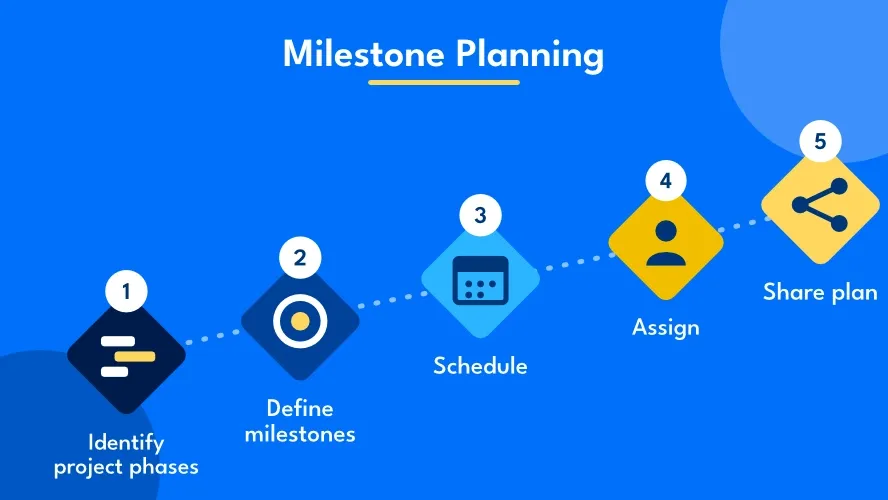
Creating a Milestone Plan: Step by Step
1. Identify Project Phases
Before setting milestones, you need to know the phases of your project. Typical phases are initiation, planning, execution, and close-out. Depending on the project type, additional phases may be added — such as conception, testing, or rollout.
Each phase should be concluded with at least one milestone. The transition from one phase to the next is a natural checkpoint.
2. Define Milestones
Formulate a concrete result for each checkpoint. A good milestone describes a state, not an activity:
| Avoid this | Better this way |
|---|---|
| Create concept | Concept finalized and approved |
| Conduct tests | All test cases passed |
| Training sessions | User training completed |
Use the format noun + past participle: “Requirements specification agreed,” “System implemented,” “Acceptance test passed.” Each milestone needs a concrete proof — a document, minutes, or a sign-off that demonstrates it has been reached.
3. Schedule Milestones
Assign a planned date to each milestone. Base this on:
- Dependencies: What preparatory work must be completed?
- Available resources: Is the team able to meet the deadline?
- External requirements: Are there contractual deadlines or delivery dates?
- Buffer time: Build in realistic time reserves — not for every individual milestone, but for critical transitions.
The scheduling of milestones forms the basis for detailed scheduling with Gantt charts or network diagrams.
4. Assign Responsibilities
Every milestone needs an owner — the person who ensures that all preparatory work is completed and the milestone is reached on time. Use a RACI matrix to make responsibilities transparent.
5. Document and Communicate the Milestone Plan
Compile all milestones into a milestone plan. This contains for each milestone:
- Name
- Planned date
- Responsible person
- Required proof (evidence of achievement)
- Dependencies on other milestones
Communicate the milestone plan to all stakeholders — ideally at the kick-off meeting. The plan is the working foundation for the entire project.
How Many Milestones Does a Project Need?
A proven rule of thumb: at least one more milestone than project phases. One for the project start and one each for the end of every phase.
Within phases, additional milestones can be useful — for example for:
- Important interim results (e.g., prototype completed)
- External dependencies (e.g., supplier approval)
- Quality checks (e.g., acceptance test)
- Decision points (e.g., go/no-go for the next phase)
Set as many milestones as necessary, but as few as possible. Too many dilute their significance. Too few leave the project running too long without a checkpoint.
Milestone Planning: Template
The following template can be used as a starting point for your own milestone planning:
| No. | Milestone | Phase | Planned Date | Responsible | Proof | Status |
|---|---|---|---|---|---|---|
| M0 | Project launched | Initiation | [Date] | [Name] | Kick-off minutes | ⬜ |
| M1 | Requirements agreed | Planning | [Date] | [Name] | Approved requirements specification | ⬜ |
| M2 | Concept finalized | Planning | [Date] | [Name] | Approved functional specification | ⬜ |
| M3 | Implementation completed | Execution | [Date] | [Name] | System in test environment | ⬜ |
| M4 | Acceptance test passed | Execution | [Date] | [Name] | Test report with no critical errors | ⬜ |
| M5 | Project closed | Close-out | [Date] | [Name] | Final report created | ⬜ |
Practical Example: Milestone Planning for an IT Project
A mid-sized company is introducing a new CRM system. The milestone plan looks like this:
| No. | Milestone | Date | Proof |
|---|---|---|---|
| M0 | Kick-off conducted | Jan 6 | Kick-off minutes |
| M1 | Requirements analysis completed | Jan 31 | Requirements specification agreed |
| M2 | System selection made | Feb 14 | Decision paper signed |
| M3 | System configured | Mar 31 | Test environment available |
| M4 | Data migration completed | Apr 15 | Migration report with no errors |
| M5 | User training conducted | Apr 30 | Attendance certificates |
| M6 | Go-live | May 15 | System live in production |
| M7 | Project close-out | May 31 | Final report created |
The milestones form the framework of the project plan. Detailed planning of work packages takes place within this framework. Throughout the entire project duration, milestone trend analysis provides a picture of whether deadlines are being met.
Presenting the Milestone Plan
Milestone List
The simplest form: a tabular overview of all milestones with date, responsible person, and status. Well suited for a quick overview and as an appendix to the project status report.
In the Gantt Chart
In the Gantt chart, milestones appear as diamonds on the timeline — embedded between the bars of the work packages. This view shows at a glance how milestones fit into the overall schedule and where dependencies exist.
Milestone Network Diagram
The milestone network diagram shows only the milestones and their logical dependencies — without the details of individual work packages. It is ideal as an overview for clients and management and is often the first planning step in a new project.
Tips for Successful Milestone Planning
Milestones are not tasks. A milestone describes a result, not an activity. “Create concept” is a task. “Concept approved” is a milestone. If you’re unsure, ask: does it have a duration? Then it’s not a milestone.
Be specific. Vague milestones like “design completed” leave room for interpretation. Better: “Design approved by the client.” The more specific, the easier it is to verify.
Define proof. Specify for each milestone how its achievement will be demonstrated. A set of minutes, an approved document, a test report — something tangible. What cannot be documented is not considered achieved.
Set realistic dates. Ambitious deadlines motivate. Unrealistic deadlines frustrate. Agree on dates with those responsible before setting them. Take vacations, public holidays, and parallel projects into account — especially during capacity planning.
Review regularly. The milestone plan is not a static document. Check at every status meeting whether the dates are still realistic. Use milestone trend analysis to make trends visible early.
Involve the team. Milestones defined by the project manager alone at their desk get less buy-in than those developed together. Involve the team in the planning — this promotes understanding and commitment.
Common Mistakes in Milestone Planning
Too many milestones. When every small step is given a milestone, the truly important checkpoints lose their significance. Focus on the essential decision points and phase transitions.
No clear criteria. A milestone without fulfillment criteria is wishful thinking. Define in advance exactly what must be achieved and how you will prove it.
Milestones without an owner. What belongs to no one is driven forward by no one. Every milestone needs a responsible person.
Milestones used only as pressure tools. Some organizations set milestones deliberately early to put pressure on the team. The result: frustration, quality loss, and a milestone plan that no one believes in anymore.
No updates. A milestone plan created at the start of a project and never adjusted quickly loses its value. Update dates when circumstances change — and document the reasons.
Tools for Milestone Planning
A milestone plan can be created with simple means — a spreadsheet in Excel is sufficient to start. It becomes more professional and efficient with project management software that integrates milestones directly into the project plan.
Good PM tools make it possible to set milestones in the Gantt chart, define dependencies, assign responsibilities, and track status in real time. Milestone trend analysis is then generated automatically from the recorded data — with no additional effort.
Frequently Asked Questions
What is milestone planning?
Milestone planning is the process of identifying, scheduling, and documenting the most important checkpoints of a project. It defines which interim results should be in place by when and who is responsible for them. Milestone planning forms the framework for all project planning.
How many milestones does a project need?
A common rule of thumb: at least one more milestone than project phases — one for the start and one each for the end of every phase. Depending on complexity, additional milestones within phases may be added for interim results, approvals, or external dependencies.
What is the difference between milestone planning and scheduling?
Milestone planning defines the high-level checkpoints and their dates. Scheduling is more detailed: it plans the individual work packages, their duration, and their sequence. Milestone planning comes first and provides the framework within which scheduling takes place.
When should the milestone plan be created?
Milestone planning is among the first steps of project planning — ideally immediately after defining objectives and scoping the project scope. It is presented at the kick-off meeting and reviewed and updated regularly throughout the project.
How do I monitor the milestone plan?
The most effective method is milestone trend analysis. At regular intervals, it is checked whether the planned dates are still realistic. Shifts are recorded in a chart so that trends become visible early. In addition, project status reports provide a regular snapshot of milestone status.

Senior Advisor
Jörg Friedrich is the original author of the project management software Allegra and continues to accompany its development to this day. He has many years of industry experience as a project and department manager. He also serves as a professor in the Faculty of Computer Science and Information Technology at Esslingen University of Applied Sciences.


