If you are reading this article, you have already realized that Excel is not the best tool for planning, executing, and controlling your projects. Specialized project management software is designed to offer what Excel alone cannot: structure, clarity, traceability, access control, efficient communication, and support for collaboration.
In this article you will learn
- how good project management software helps you
- what advantages it brings to everyday project work
- which selection criteria to consider
- how to find the right solution for your needs
For the 7 commercial and 4 open source solutions presented here, you will receive a clear, understandable evaluation — without marketing jargon. By the end, you will have a solid basis for making the right choice.
If you like working with scorecards, you might find this article about project management tools interesting and helpful. Take a look!
| Tool | Cloud | Self-hosted | Agil | Klassisch | DSGVO-konform | Ideal für |
|---|---|---|---|---|---|---|
| Allegra | ✔ | ✔ | ✔ | ✔ | ✔ | Unternehmen, Behörden |
| Asana | ✔ | ✘ | ✔ | ✘ | Teilweise | Agenturen, Kreative |
| Jira | ✔ | ✔ | ✔ | ✘ | Teilweise | IT-Teams, Entwickler |
| monday.com | ✔ | ✘ | Teilweise | ✘ | ✘ | HR, Vertrieb |
| MS Project | ✔ | ✘ | ✔ | ✘ | ✔ | Kreative, kleine Teams, Einsteiger |
| OpenProject | ✔ | ✔ | ✔ | ✔ | ✔ | Open-Source-Fans |
| ProjeQtOr | ✔ | ✘ | ✔ | ✘ | ✘ | Open Source, etwas veraltet |
| Redmine | ✘ | ✔ | ✔ | ✔ | ✔ | Entwickler |
| Trello | ✔ | ✘ | ✔ | ✘ | ✘ | Einsteiger |
| Wrike | ✔ | ✘ | ✔ | Teilweise | Teilweise | Unternehmen |
| ZenTao | ✔ | ✘ | ✔ | ✔ | ✘ | Open Source |
What Is Project Management Software?
Good project management software supports you through all phases of a project — from planning and execution to completion. It helps structure tasks, manage resources, and maintain an overview. Typical functional areas include:
-
Task management: Capture, assign, prioritize, modify, and track tasks.
-
Time management: Set deadlines. Track progress. Identify bottlenecks before they arise. Send reminders, re-flag items, and escalate automatically.
-
Resource management: Who does what, when, and for how long? What is the effort involved?
-
Team communication: Comments, @mentions, updates — directly on the tasks.
-
Documentation: Meeting notes, files, to-dos, even requirements specifications and functional specifications — all digital and up to date.
-
Project controlling: Track budgets, time spent, and milestones in real time and respond as needed.
-
Risk management: Maintain risk registers and review them regularly.
-
Quality management: Manage test plans and test reports. Make all processes traceable and transparent.
Many tools offer dashboards, Gantt charts, Kanban boards, and automated workflows.
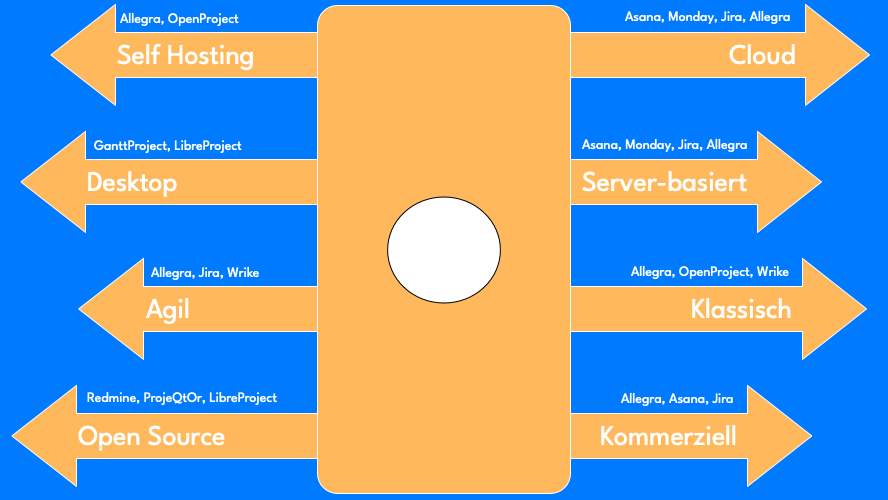
Most project management tools are cloud-based today. You work online, location-independently, and often on mobile devices as well. Some vendors focus on open source, others on proprietary enterprise models.
Not every project management software suits everyone. Those who work in an agile way have different requirements than someone planning according to the classical waterfall model. Some teams need maximum flexibility. Others prefer control and compliance.
What Are the Benefits of Using Project Management Software?
Good project work is no accident. It arises from clarity, collaboration, and control. Project management software supports exactly that. It brings order where complexity reigns. It connects people working toward a shared goal. And it makes visible what would otherwise get lost.
Below, we show you what advantages project management tools truly deliver in everyday work — beyond colorful promises.
1. Better Overview of Tasks and Processes
With project planning software, you can see at a glance where your project stands. Who is working on what? What is done? What is running behind? Visualizations such as Kanban boards, Gantt charts, or dashboards help make complex workflows easy to understand.
The result: fewer surprises, less chaos, more transparency and structure.
2. Efficient Team Collaboration
Emails get buried. Information spreads across many channels. With good project management software, you bring all stakeholders to one (virtual) table. Tasks can be assigned, commented on, and prioritized. Files, notes, deadlines? Everything is in one central place. Your team always sees not only the communication that led to the current state, but also the current state itself.
This is a major advantage especially for remote teams or hybrid work models. And traditional office teams also benefit from shorter paths, fewer misunderstandings, and faster coordination.
3. Clear Time Management and Realistic Planning
Time is often the scarcest resource in a project. Modern project management software helps set and meet deadlines. You identify bottlenecks early, plan buffer time realistically, and can see when tasks are going off track.
With features for time tracking or automated reminders, you stay in control — without micromanagement.
4. Resource-Conscious Work
Who is overloaded? Who has capacity available? Resource planning is a critical success factor — and often difficult without a system. Tools such as Wrike, Microsoft Project, Allegra, or OpenProject enable targeted allocation of people, time, and budget.
This protects your teams from being overwhelmed. And it protects your project from delays.
5. Transparency and Traceability
Good software documents as you go — automatically. Who decided what? When was which change made? Were milestones reached?
This is especially valuable for project managers who need to be accountable — whether internally or to clients. You can present workflows in a traceable way and back up decisions with evidence.
6. Better Control Over Budget and Project Goals
Most tools offer project controlling capabilities. You can record budgets, compare actual time against planned time, and receive alerts when deviations occur. This way you keep not only time but also costs under control — a real asset for projects with tight constraints or many stakeholders.
7. Scalability for Small and Large Teams
Whether a two-person startup or a large international project: many project management tools are scalable. You start with a free basic version — and grow with the project. Tools like Trello, Asana, or Monday.com offer easy entry points with clear upgrade paths.
For large enterprises, there are specialized solutions with extended features and integrations into existing systems.
8. Automation of Routine Tasks
Recurring tasks consume time. Many modern tools now support workflow automation. For example: when task A is completed, task B is automatically created and assigned. Or: reminders go out three days before the due date. This saves time and reduces errors.
9. More Motivation Through Clarity
An often underestimated effect: when teams know what needs to be done — and why — they work with greater motivation. A good tool shows goals, progress, and responsibilities. Everyone sees how their own contribution fits into the bigger picture. This creates meaning and fosters a sense of teamwork.
Summary: Why You Should Not Go Without Project Management Software
Project management software for small and medium-sized businesses, large corporations, or agencies — the benefits are universal. You save time, avoid errors, and improve quality. You maintain control over costs, deadlines, and teams.
In short: you make your projects more successful.
In the next section, we present the most popular project management tools in comparison — clearly structured, practically described, and arranged alphabetically. So you can find what suits you.
Project Management Software Comparison: 11 Tools at a Glance
Not every project is the same — and not every tool suits every team. That is why we have compared eleven popular project management tools for you. Arranged alphabetically, described in practical terms, and clearly evaluated. Whether you work in a startup or lead a major project — here you will find the right tool.
1. Allegra
The project management software Allegra from Alltena GmbH can aptly be described as a combination of Jira and Wrike. Allegra supports agile, classical, and hybrid project management models quite comprehensively. Established methods such as the Eisenhower principle, Earned Value, Getting Things Done, and the RACI matrix are consistently applied to ensure clarity even in large endeavors. The software is still developing at a rapid pace and is well on its way to the absolute top tier in terms of usability, design, and functionality.
Modern, Mature, Complete — but Little Known
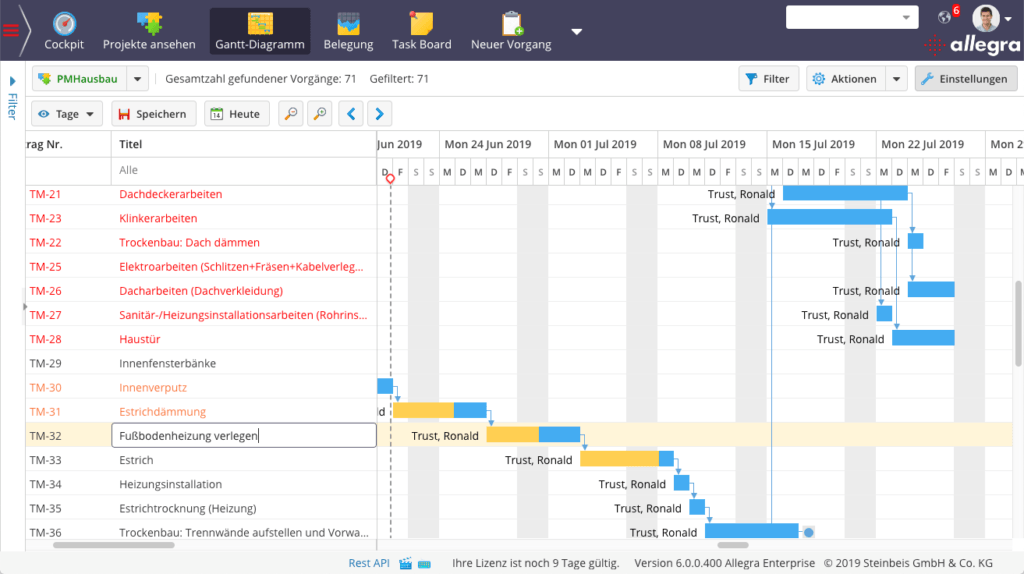
Allegra supports virtually all important features for a team-ready task management and project management solution — you can, for example, easily create a project plan with it. The user interface is clean and modern. The configurability is a little intimidating at first, but reveals itself as logical and well thought-out after a short learning period. The Gantt chart, the resource view, and the graphical workflow editor are all interactive.
Comprehensive Role and Permission System
The role and permission system is impressively well conceived and is based on the RACI matrix principle. Access permissions can be configured down to individual fields. All important methods — such as Earned Value, milestone trend analysis, the Eisenhower principle, and Getting Things Done — are supported. Drag and drop operations are available virtually everywhere.
Allegra supports common database systems and runs on all widely used operating systems. It is written in Java and JavaScript, has been on the market for over ten years, and is used by approximately 10,000 users.
Servers Located in Germany
Allegra Cloud runs on servers located in Frankfurt am Main, Berlin, and Karlsruhe. Allegra Cloud is fully GDPR-compliant. Personal support is available via email, phone, and web conference.
Key features:
-
Multi-project management
-
Gantt charts, Kanban, Scrum
-
Resource and cost planning
-
Project controlling
Strengths:
-
Flexible use: for waterfall, Scrum, or Kanban
-
Highly customizable
-
Privacy-compliant (hosting in Germany and self-hosting option)
Weaknesses:
-
Configuration is fairly complex during onboarding
-
Still relatively little known
Pricing:
From €6.60/user/month to €14.60/user/month for 25 users, self-hosted
Best suited for:
Teams of all sizes, small and medium-sized businesses, public authorities, companies with high data protection requirements, defense
2. Asana
Asana is a widely used cloud-based project management tool for managing projects. An attractive user interface with many guides and tips makes getting started with this project management software relatively comfortable. The free version for a single user does not allow for productive work; it is merely a teaser offer.
Templates, Lists, and Boards
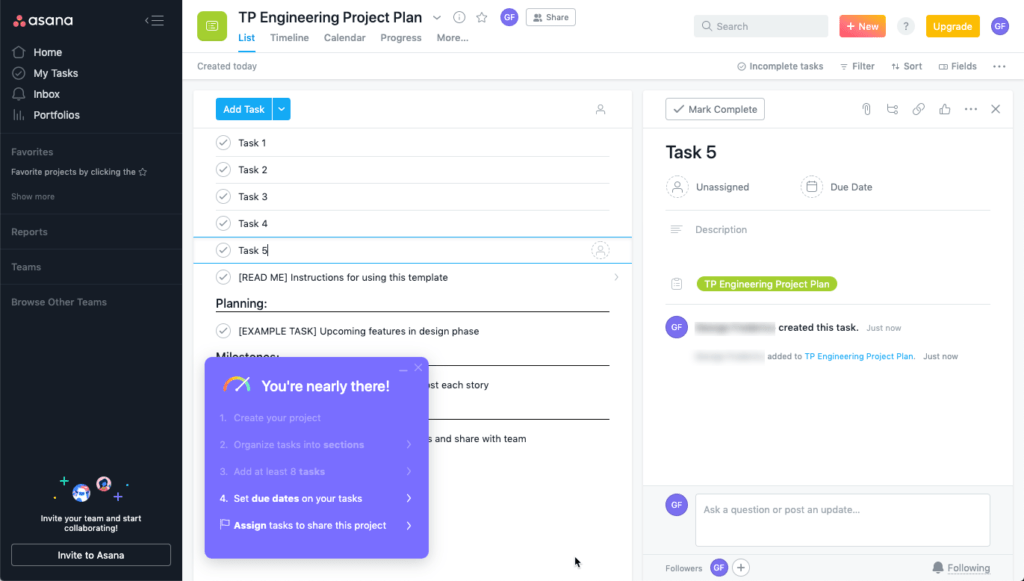
When creating a project, you start from a project template. There is a whole range of ready-made templates, and you can also create your own. The core of the tool revolves around projects in which tasks are managed. There is only one type of task per project, so you cannot define separate items such as risks or open issues.
Tasks can be displayed in list views or on boards. The project management software Asana offers a timeline view similar to a Gantt chart, as well as a calendar view. You can create your own input forms.
A Good Solution with a Few Gaps
It is clear that the concept of Asana as a project management tool provides fully adequate functionality for many users. However, keep the following points in mind if you want to start with Asana. Asana is a good fit if
- You do not need a work breakdown structure (WBS), i.e., hierarchically arranged tasks. Sub-tasks can only be created one level deep
- You do not need sub-projects — they do not exist
- You do not need read-only or hidden task attributes
- You can treat tasks, risks, open issues, milestones, etc. all the same way
- You do not need tables in task descriptions
- You can do without methods like RACI or Earned Value
- You do not need to compare the actual state of a project against a target state
American Company, Servers in the US and Europe
The project management software Asana runs in the cloud. In the enterprise licensing model, there is an option to store data on European servers. This allows Asana to comply with European data protection regulations.
Asana’s Financial Situation
Asana was founded in 2008, co-founded by Facebook co-founder D. Moskovitz. In 2023, the company posted a loss of $407 million on revenues of $547 million. In 2024, revenues were $652 million with a loss of $257 million. Asana has consistently posted losses amounting to roughly half its revenue since its IPO, but aims to achieve a positive result starting in 2026. The strategy appears to be geared toward maximum market share gains, in the hope of becoming profitable later through cost savings or price increases.
Key features:
- Task and project planning
- Timelines, boards, calendar view
- Automations
- Integrations with over 100 tools (Slack, Google Drive, etc.)
Strengths:
-
Very intuitive and quick to learn
-
Many visual representations
-
Powerful team communication
Weaknesses:
-
No real project controlling
-
Limited suitability for very large projects with dependencies
Pricing:
Free basic version, Premium from approx. €13/user/month to €30/user/month
Best suited for:
Startups, marketing teams, small to medium-sized project groups
3. Jira
Jira is an issue tracker optimized for software development and a popular Scrum tool. Jira is extensively configurable and offers many interfaces to other tools useful for software development, such as wikis, source code repositories, and continuous integration systems. It supports simple workflows and can be extended through a range of APIs.
Perfect for Agile Project Management
Jira sets the standard for agile project management software in software development — both in terms of functionality and usability. Standard workflows such as creating and working through Sprints are optimized. The user interface is functional, friendly, and clean. All necessary views are available, including configurable task boards and lists. The different issue types such as Epics, User Stories, and Tasks are also handled differently.
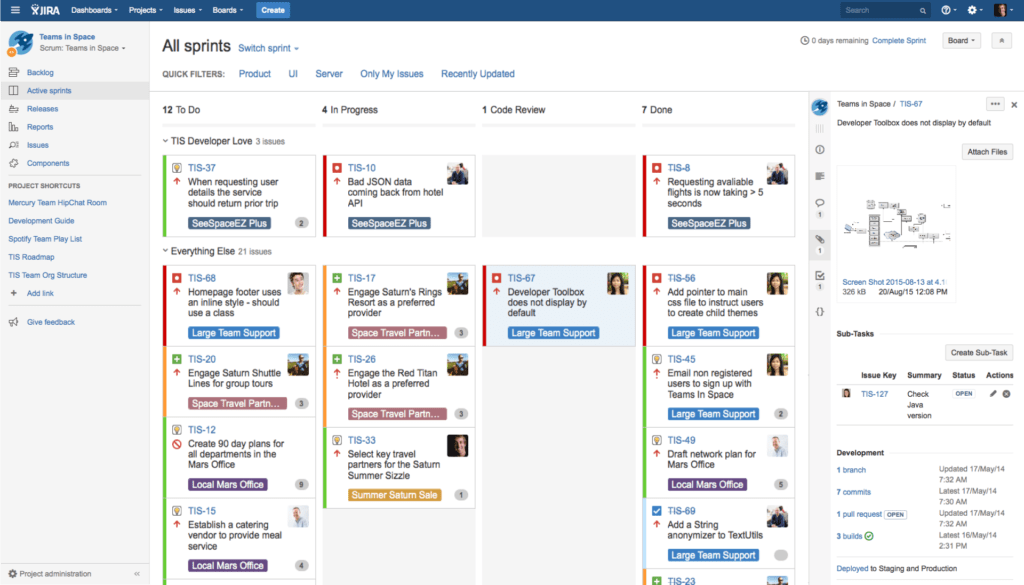
Classical Project Management Not Supported
Jira does not support project hierarchies and allows only one level of sub-tasks. This means you cannot map a work breakdown structure (WBS). Views for scheduling (no Gantt) and resource planning are also missing. There is no concept of “project types,” for example for hardware and software sub-projects within an embedded system. Some third-party vendors offer plugins that attempt to fill these gaps.
American Company, High Costs for On-Premises
Jira is offered both as a cloud solution and as an on-premises solution. The vendor does not commit to a specific server location and merely promises to support customers in achieving GDPR compliance.
The on-premises solution is unattractive for smaller user counts, with a minimum price of approximately €50,000 per year. There is also the question of plugin support, which is intended to be developed primarily for the cloud offering going forward.
Jira is based on Java and JavaScript technology and supports all major database systems. Installation is relatively straightforward on both Windows and Linux servers.
Atlassian’s Financial Situation
Atlassian, the maker of Jira, recorded a net loss (EBT) of $300 million in 2024 on revenues of $4.36 billion — though with a solidly positive EBIT. Atlassian has been producing net losses since 2017. The strategy appears to be aimed at maximum market share gains. It is becoming clear that profitability is to be achieved not least through price increases. For example, there is no longer an affordable on-premises solution available for smaller and mid-sized companies.
Jira by Atlassian is the gold standard for agile project management in IT teams. Particularly strong in software development and DevOps.
Key features:
- Scrum and Kanban boards
- Release planning
- Issue and bug tracking
- Time tracking & reports
Strengths:
- Highly customizable for agile methods
- Strong community and plugin variety
- Seamless integration with Bitbucket, Confluence, etc.
Weaknesses:
- Steep learning curve
- Can quickly overwhelm non-technical teams
Pricing:
Free for up to 10 users, then from approx. €8/user/month
Best suited for:
Development teams, agile software projects, technical teams
4. Monday
The Solution with the Best Marketing
“I want to hug the people who invented this” is what Monday says about Monday. Monday also claims about Monday that it offers a similar range of features to Wrike. Monday makes other promising statements as well. So I took a look at Monday without any preconceived notions.
Colorful and Bright
Monday’s user interface is clearly laid out and makes liberal use of colorful colors. Instead of boring lists, there are many colorful tiles decorated with icons. Everything is generously sized. For those who like things colorful, there is little better.
Where Are the Projects?
A project management tool without projects? Is that possible? The answer is: no! Monday organizes all tasks in “views” on which “boards” are placed. A range of board types is provided, such as a calendar view or a timeline. In the table view, board columns can be configured. There are also templates for boards. The whole thing looks a bit like Trello — one has to wonder.
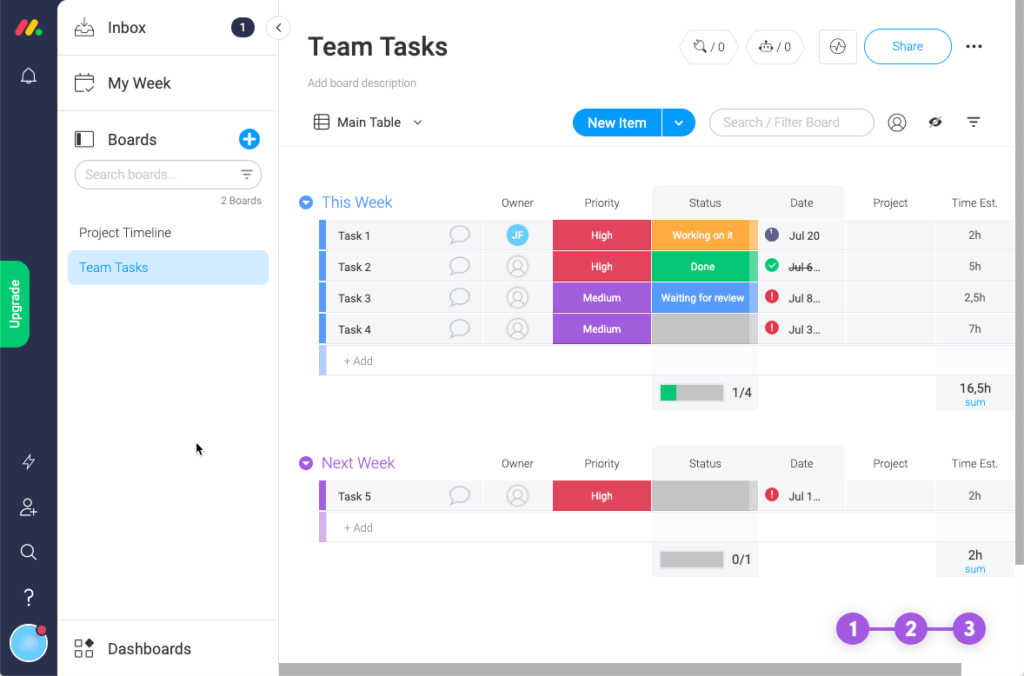
Monday Can Now Handle More Complexity
Due to Monday’s originally simple approach, project management was never complex. The reason: the software simply did not support handling more complex tasks. Here is a summary of what still does not work:
- Only boards, no projects or sub-projects. Once a board reaches around 30 tasks, the overview deteriorates noticeably
- No task hierarchy, so no work breakdown structure (WBS) possible
- Very basic access control: either an entire row on the board, all content, or read-only
- The entire layout and design is probably overwhelmed by endeavors with more than 5 people and a few hundred tasks
No Longer a Toy?
Only each person can answer that for themselves. Monday offers something of both worlds — you can play with it and you can also handle manageable tasks with it. Functionality has developed considerably over the past year, although this has also made the tool more complicated.
Israeli Company, Servers in the US and Europe
Monday is offered only as a cloud solution and runs on Amazon Web Services servers. Depending on the customer’s location, either European or North American servers are used. Monday assures compliance with the relevant data protection standards and describes itself as GDPR-compliant.
Monday’s Financial Situation
Monday posted a net loss of $136 million on revenues of $519 million in 2022. In 2023, revenues reached $729 million with a net loss of just under $2 million. Since its IPO, Monday has consistently posted high net losses. Through massive investments in marketing, Monday is evidently aiming to secure market share in order to monetize it profitably later.
Classification:
Monday.com is a modern, visual project management tool that focuses on flexibility and ease of use.
Key features:
-
Task and team management
-
Workflows & automations
-
Time tracking
-
Integrations & dashboards
Strengths:
-
Extremely visual and intuitive
-
Easy to customize
-
Many templates for different industries
Weaknesses:
-
Limited for complex dependencies
-
Performance can degrade on large projects
Pricing:
€12/user/month to €24/user/month for 25 users
Best suited for:
Startups, marketing, agencies, HR projects
5. MS Project
A Tool for the Project Planner
MS Project is well known to many as desktop software and has a mixed reputation. This is mainly because working with such a powerful tool requires solid knowledge of project management and its associated terminology. Added to this is the fact that the software’s extensive functionality is presented to the user almost completely unfiltered, which even experienced project managers find demanding.
In use for decades — and still one of the most powerful solutions for classical project management.
Key features:
-
Scheduling and resource planning
-
Gantt charts
-
Budget tracking
-
Integration with Office 365
Strengths:
-
Comprehensive reporting
-
Ideal for structured, linear projects
-
Well integrated in Microsoft environments
Weaknesses:
-
Outdated-looking interface
-
Very technical to get started with
Pricing:
From approx. €25/user/month (cloud version), on-premises more expensive
Best suited for:
Large enterprises, construction and industrial projects, experienced project managers
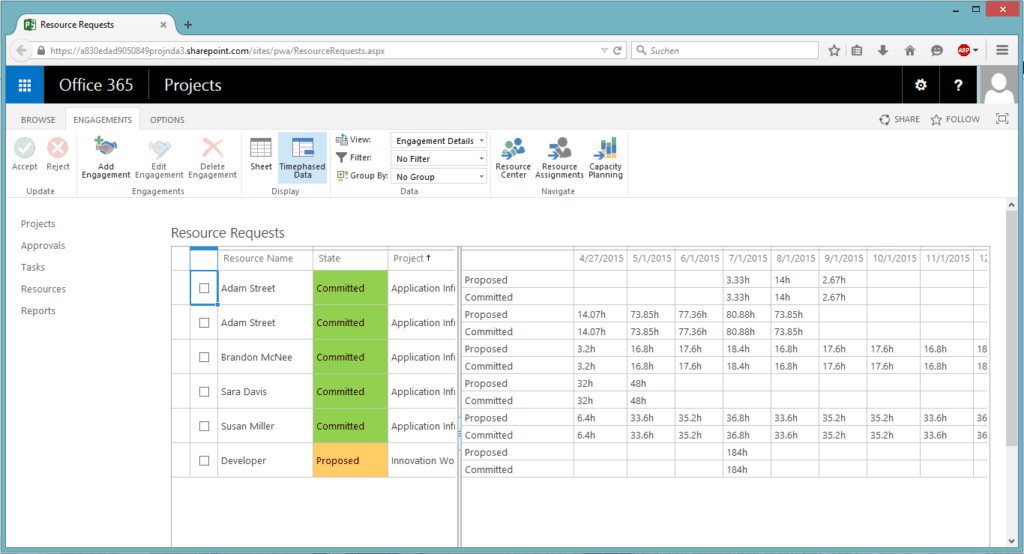
The desktop version of MS Project project management software is unsuitable for modern, team-based, collaborative project management. However, an MS Project Server is also available, and with it a web interface.
MS Project Server: Too Complex for the Team
To involve the entire team in project management, project management software must be able to offer role-based, reduced views of its functionality. The software must also be able to support important process elements that feed back into project management (e.g., issue tracking, requirements management, continuous integration).
Unfortunately, MS Project does not offer exactly this. Even in the web version, the solution remains a tool for the project planner, who must try — through meetings and queries — to continually realign the plan with the harsh reality.
MS Project Installation and Support
MS Project comes without personally accessible support from the manufacturer. Users can access a help center and find assistance through search queries.
Installation of this project management tool can only be performed on Windows servers and requires solid system administrator knowledge. After installation, the software must be configured to adapt it to your own processes.
6. OpenProject
The Best Open Source Project Management Software
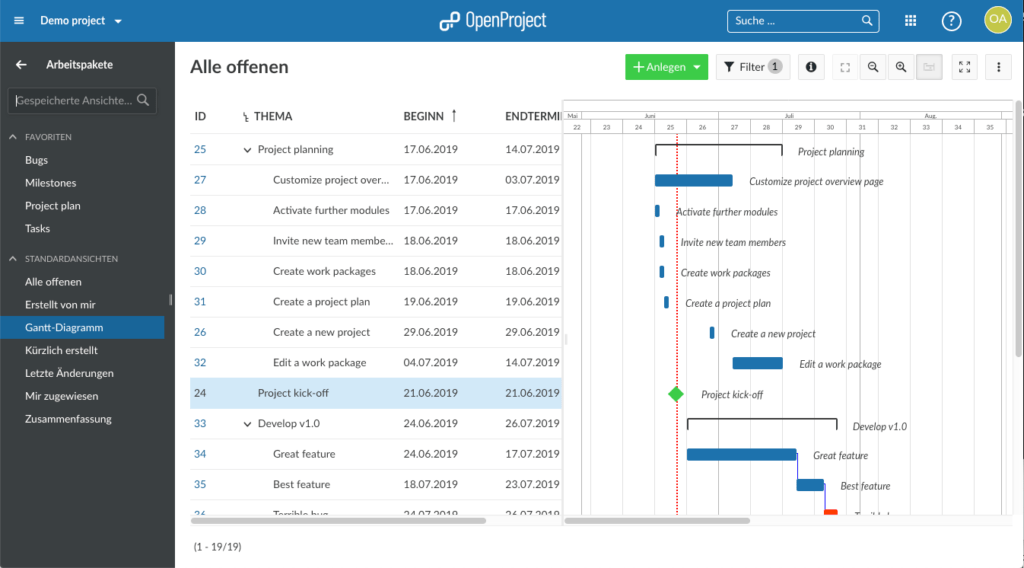
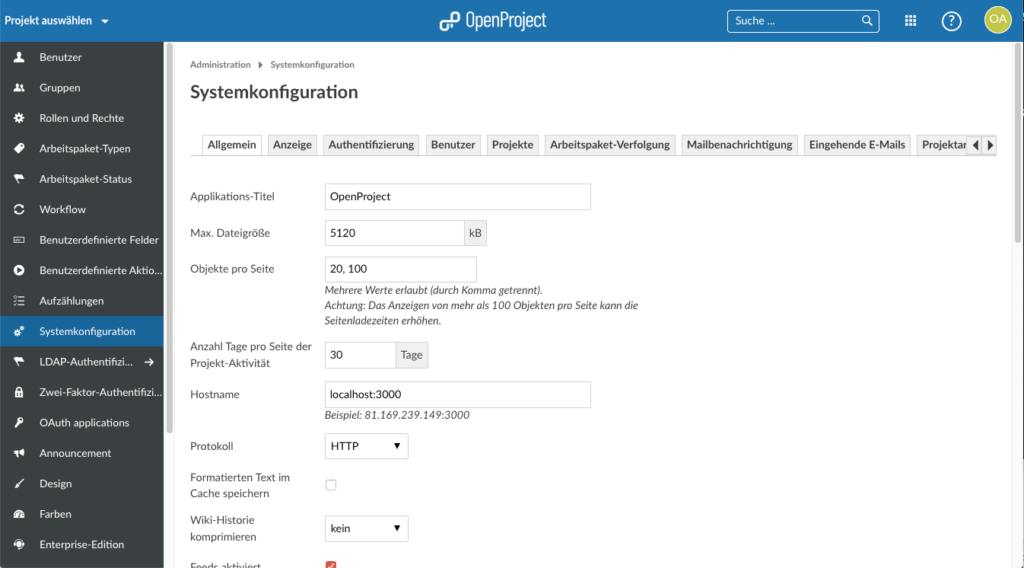
When looking for free project management software, OpenProject ranks quite high in terms of quality and scope. It is one of the best solutions I have found. It forked from the Redmine project and is developed independently of it. It offers a clear, clean, and modern interface.
Large Feature Set
OpenProject is well suited for projects related to software development. The system is comprehensively configurable. Like Redmine, it offers “modules” that can be activated per project. Such modules exist for tickets (issue tracking), time tracking, news, documents, files, wiki, repository, forums, calendar, and an interactive Gantt view.
Project and Issue Hierarchies
OpenProject allows you to create project hierarchies and issue hierarchies of any depth. Issues can be linked to each other, for example through predecessor-successor relationships. Effort can be logged by category.
No Support for Agile Methods
To find out what OpenProject does not offer, I looked at the feature list of the paid enterprise version. It quickly becomes clear that the free version has no Agile Board for Scrum and Kanban. Support for Single Sign-On, attribute highlighting, full-text search in attachments, a usable workflow system, and even something as basic as a multi-select custom field are also missing. I also found no way to freely design input forms.
Good for Classical PM and Issue Tracking
The free version is therefore best suited for classical project management, task management, and as an issue tracking tool — for cases where workflows are not required and the number of attributes for tasks remains manageable.
OpenProject is maintained by a company in Berlin and developed further together with an active developer community. The project has approximately 3,100 stars on GitHub.
OpenProject Installation and Technology
The free project management software OpenProject is written in Ruby on Rails and supports the PostgreSQL database system. I installed my test system on a Linux server, which was relatively easy using a Docker container. Installation on Windows servers is possible but demanding.
OpenProject is an open source project management software that combines many classical features with agile methods.
Key features:
-
Gantt charts, work packages
-
Agile boards
-
Time tracking
-
Project controlling
Strengths:
-
Privacy-compliant (EU hosting)
-
Very structured and flexible
-
Ideal for hybrid projects
Weaknesses:
-
Interface is somewhat technically oriented
-
Less visually appealing design
Pricing:
Free community version; Enterprise from €5 per user
Best suited for:
IT teams, NGOs, companies with a focus on data protection
7. ProjeQtOr
Versatile Project Management Software
ProjeQtOr is a very comprehensive software package for general project management. The product covers many process areas, including project planning, resource management, incident management, requirements management, and test management.
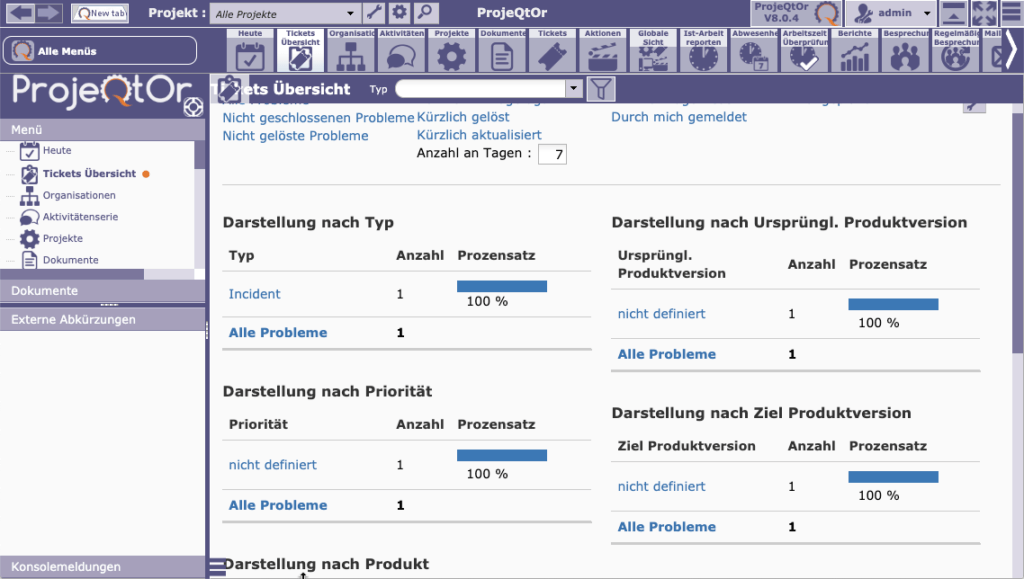
When I installed and logged into the project management software, I was confronted with an abundance of controls and functions. Behind the default configuration lies a particular development process that you first have to adapt to your own. The default configuration is suited to a software house that runs software development projects for external clients.
Input Forms and Fields Not Configurable
If you do not need certain features, they cannot always be removed from the user interface. You also cannot define your own fields and input forms. If your own process matches the one mapped in this project management tool, you should take a closer look at ProjeQtOr. Installation and initial setup on a Linux server takes around one hour.
Very Complex User Interface
The many features unfortunately result in a very complex user interface. The Gantt view available is not truly interactive. The limited context menus and minimal drag and drop functionality make working with this project management software cumbersome. The workflow editor is tabular rather than graphical. There is little support for agile project management.
ProjeQtOr Installation and Technology
There is no indication that ProjeQtOr is directly supported by a company. Commercial support is available via a contact form on the website. The Sourceforge administrators are located near Toulouse, France. The project has been relatively consistently active since 2010.
ProjeQtOr is written in PHP and JavaScript and has approximately 400 downloads per week on Sourceforge.
ProjeQtOr is a lesser-known but powerful open source tool focused on project planning and controlling.
Key features:
-
Classical PM with Gantt, scheduling
-
Risk and quality management
-
Resource and budget management
Strengths:
-
Comprehensive project structure
-
Free to use
-
Ideal for long-term projects
Weaknesses:
-
Outdated UI
-
Limited user support
Pricing:
Completely free (open source)
Best suited for:
Technically minded project managers, research & education
8. Redmine
Mature, Comprehensive Project Management Tool
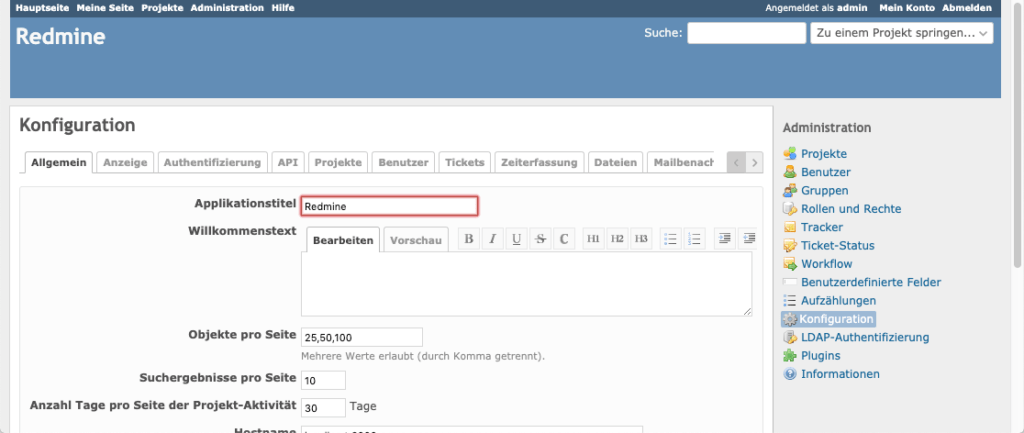
Credit where credit is due. Redmine has been serving the “free project management software” category since 2006. Redmine is a project management tool primarily for software projects. The project management software is highly configurable. It offers “modules” for tickets (issue tracking), time tracking, news, documents, files, wiki, repository, forums, calendar, and a non-interactive Gantt view.
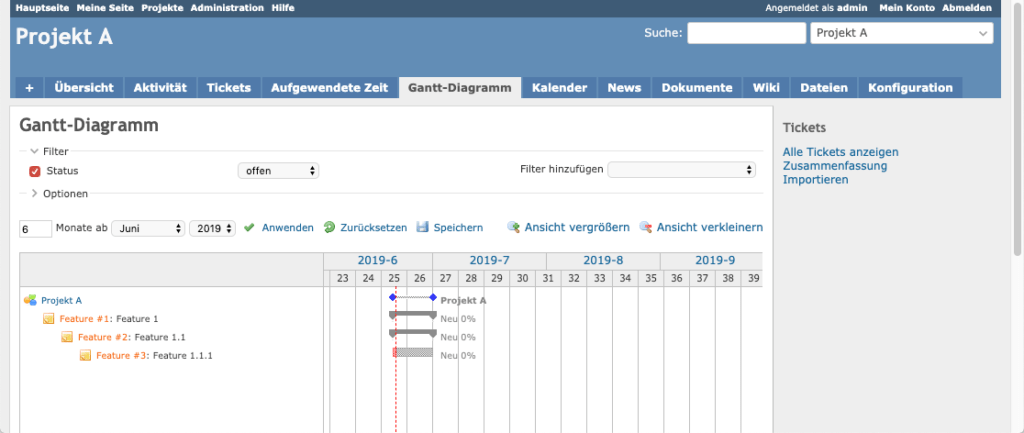
You can create “trackers” to handle different types of issues separately. Custom fields can be created for projects, tasks, time entries, and users. There are integrations with SVN and Git. Tasks can also be created via email.
Project and Issue Hierarchies
Redmine supports project planning with project hierarchies and issue hierarchies of any depth. Tasks can be linked to each other, for example through predecessor-successor relationships. There are simple, tabular workflows. Effort can be logged by category.
A Few Shortcomings
Redmine is a mature, high-quality, and configurable system suited to different types of teams. When looking for weaknesses, one can point to the no longer contemporary design of the user interface, the absence of drag and drop functionality, the rudimentary Gantt chart, the lack of configurability for input forms, and only rudimentary workflow support.
The most significant shortcoming, however, is likely the lack of support for agile methods in the core system. Teams that need support for Scrum or Kanban can partially work around this with plugins.
Redmine Installation and Technology
The Redmine project currently has a team of two active developers plus a large user community. The project management software Redmine is based on the Ruby on Rails framework and supports a range of database systems. Due to the technology used, installation is straightforward on Unix systems but challenging on Windows systems. The project has approximately 3,400 stars on GitHub.
Redmine is a classic open source project management tool distinguished by high customizability and a wide variety of plugins.
Key features:
-
Task management
-
Time tracking
-
Gantt charts
-
Knowledge base & forums
Strengths:
-
Completely free
-
Ideal for developer teams
-
Large community
Weaknesses:
-
Technical in setup and operation
-
Dated design
Pricing:
Open source / free
Best suited for:
IT teams, internal project work, budget-conscious users
9. Trello
A Well-Made Task Board — but Not Project Management Software
Trello’s simple and clear view is user-friendly. The Kanban board view can be set up as a workflow or as a kind of “sticky note” board. The simplicity of Trello is of course also due to the fact that there is no variety of views.
A project or workflow can only be organized in the form of boards. Useful views such as a Gantt chart, a task list, or a project structure tree are missing. For anyone who considers it important to visualize projects and thus create fast, intuitive access to complex project content, a pure Kanban board view is not enough.
Limited Data Protection
Trello — like Asana — has US-based servers, which means it lacks compliance with German BDSG (new) requirements. Anyone who values data security and the protection of personal data must accept a “compromise” here: their company data will be stored at locations outside of Europe.
Online Help, but No Personal Customer Service
Users who prefer personal service will not find it with Trello. However, alternatives — such as YouTube tutorials and static text pages — are offered on the homepage. These do not replace a personal contact person, but do give users initial answers.
Not a Tool for Complex Projects
Anyone who wants to professionally digitize their way of working with Trello quickly reaches its limits. The very basic functionality means that complex projects and work processes can no longer be mapped. The comparison between Trello and Allegra provides further information about Trello’s features and also covers the topic of “practical background.”
For a completely agile way of working, Trello is an excellent solution. Those coming from a more traditional background are probably better served by a hybrid of classical and agile. After all, a Gantt chart, a cross-project view, time tracking & controlling, and several other features are simply not available in Trello.
Trello is the epitome of the Kanban board and ideal for small, agile teams that value simple structures.
Key features:
-
Card and board system
-
Checklists, due dates
-
Power-Ups (integrations)
Strengths:
-
Extremely easy to use
-
Visually appealing
-
Free for many use cases
Weaknesses:
-
No real project controlling
-
No resource planning
Pricing:
Free version with solid core features; Business Class from €5/user/month
Best suited for:
Startups, creative teams, fast task management
10. Wrike
Cloud Solution with a Large Feature Set
Wrike offers its eponymous project management software under various pricing tiers, each providing different levels of functionality. I tested the enterprise version, as the free and professional offerings are too limited in functionality.
Folders, Projects, and Tasks
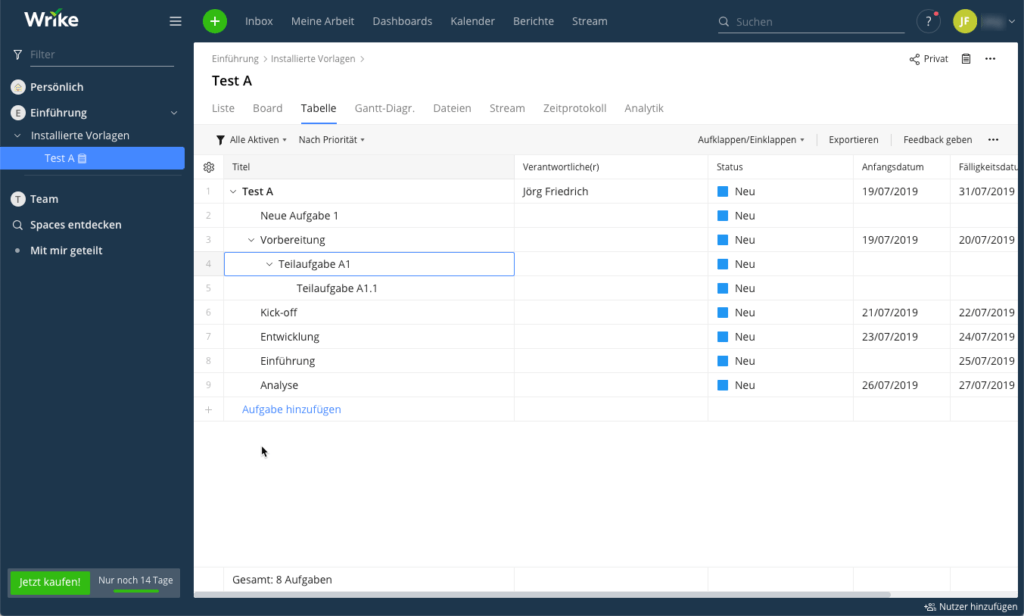
Wrike works with the concepts of “folders,” “projects,” and “tasks.” Tasks can be nested as deeply as desired. Projects and folders can also be structured hierarchically and grouped into “spaces.” Tasks can be given custom fields. Some time is needed to get used to this modeling approach; after that, it makes sense.
All the Important Views Are There
Wrike offers a list view, a Kanban board view, a Gantt view, a calendar view, and a table view of tasks. A particular strength of Wrike is its workflow module, which allows a range of tasks to be automated.
No Support for Scrum
For agile project management, Wrike offers a Kanban board. However, there is unfortunately no genuine support for Scrum — the concepts of backlogs, Epics, User Stories, and Sprints are missing. This makes the software primarily suitable for classical project management, but not for agile or hybrid project management.
GDPR-Compliant
The California-based vendor operates European servers in Amsterdam and hosts user data within the European Economic Area. Wrike is GDPR-compliant. Anyone who does not need agile project management and is comfortable with the pricing will find in Wrike a mature, feature-rich solution for simple workflow management and classical project management.
Wrike is aimed at professional teams managing many projects simultaneously. Particularly strong in project controlling and reporting.
Key features:
-
Task and resource management
-
Time tracking
-
Gantt charts & dashboards
-
Automated workflows
Strengths:
-
Very scalable
-
Excellent reporting features
-
Good integration into existing systems
Weaknesses:
-
Higher price point
-
Complex to set up
Pricing:
Free version for up to 5 users; from €9.80/user/month
Best suited for:
Agencies, IT service providers, large marketing teams
11. ZenTao
Excellent for Agile Software Projects
ZenTao is a project management software primarily suited to teams that develop software in an agile way. The free tool is especially popular in China, where it is also developed.
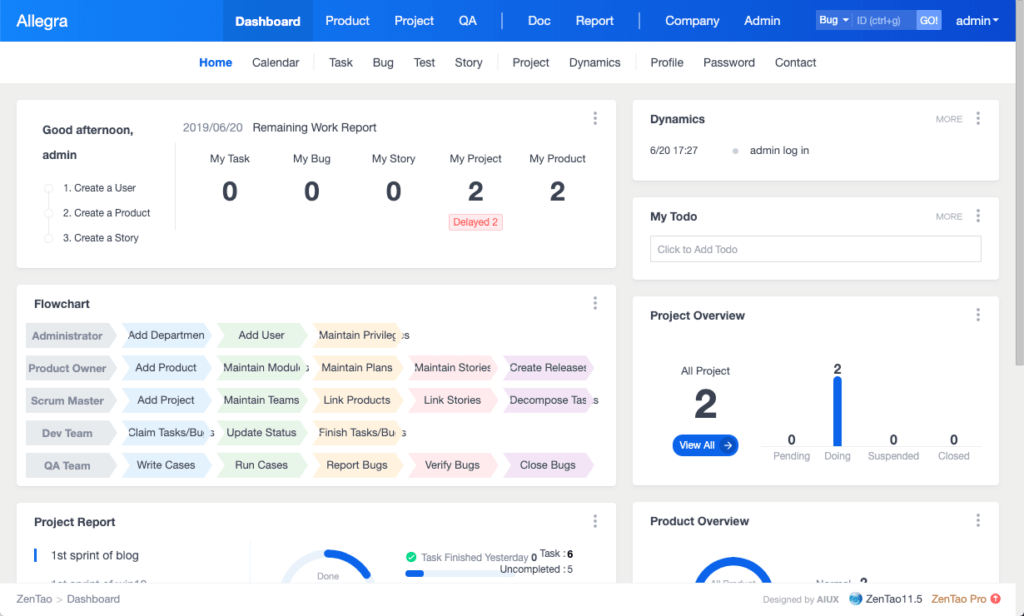
The user interface of the project management software is clean and modern. The open source edition is functionally limited, but provides teams with all the key features needed for every task in a Scrum development process. If you need Gantt charts, Excel import, SVN/Git integration, or custom report templates, you will need to switch to a paid version. Online help is available in both Chinese and English.
ZenTao does not support effort-based allocation and billing of issues; there is no support for accounts and cost centers.
Classical PM Only Partially Possible
The open source variant of this project management software has no customizable fields or input forms. Roles cannot be assigned per project; they are always permanently associated with a user. Permissions are not configurable. Issue types are fixed and no custom ones can be created.
ZenTao allows recurring tasks to be defined. There is no support for issue hierarchies; however, tasks can have child tasks. Projects cannot be hierarchically split into sub-projects.
ZenTao Installation and Technology
ZenTao is an interesting solution if you are confident that the process mapped in the tool matches your own. The project management tool is written in PHP and JavaScript and has approximately 600 downloads per week on Sourceforge.
ZenTao is an open source project management software with a strong focus on agile development and test management.
Key features:
-
Task management
-
Scrum and Kanban boards
-
Bug and test management
-
Release planning
Strengths:
-
Very comprehensive for IT teams
-
Free in the community edition
-
Can be used locally or in the cloud
Weaknesses:
-
Complex interface
-
Limited user guidance for beginners
Pricing:
Free (community); paid cloud versions available
Best suited for:
Development departments, QA teams, open source fans
The Best Project Management Software: A Summary
It is initially surprising that we found no more than 4 usable open source products that can be seriously used as project management software. With the exception of two, all the others offer paid extensions that turn the tools into complete solutions. It is also interesting that two tools emerged from the same codebase.
The many other solutions (over 300) for project management software are either no longer maintained (e.g., dotProject, ]ProjectOpen[, LibrePlan), can only be used for desktop purposes (e.g., ProjectLibre), are pseudo-free offerings, or fit only very limited usage scenarios. There are also a number of free desktop tools that are not suitable for teams.
In the commercial space, there is a large range of solutions, of which I have presented a few of what I consider the best (or at least the best in marketing) here. Let me briefly mention a few other interesting solutions.
Meistertask
Meistertask is essentially a task management system and does not claim to be a complete project management tool.
Freedcamp
Freedcamp is an interesting software for general task management and project management in teams. Freedcamp lures users with a free entry-level version, which however is only adequate for very basic task management. Freedcamp only becomes a genuine project management software with the paid Business and Enterprise versions.
Clickup
From simple task management to basic project management, you can cover a lot with Clickup. With an interesting hierarchy concept of Workspaces, Spaces, and Folders, the system scores points in structuring projects, even if genuine support for WBS and project structure is lacking. ClickUp is also one of the few project management tools that supports the Getting Things Done method.
Bitrix24
Bitrix24 is a multifunctional web-based collaboration platform for communication, CRM, support, and also task management and project management. Bitrix24’s strength lies in its CRM module.
awork
awork is a simple software for general task management in teams. With awork, tasks can be structured, assigned, and tracked. awork has features for basic project management, but is not a genuine project management tool.
Please use the comments section to point out any errors or important products that are missing from the list.
Frequently Asked Questions
What is project management software?
Project management software is a digital solution that helps teams plan projects, organize tasks, manage resources, and monitor progress. It improves collaboration and ensures structured project execution.
What features should good project management software have?
Good project management software should offer features such as task management, time tracking, resource planning, Gantt charts, collaboration tools, document management, and integrations with other tools.
What advantages does project management software offer?
Project management software helps manage projects more efficiently, improves team communication, reduces errors, enables better resource planning, and ensures greater transparency and traceability of tasks.
Which project management software is the best?
The best project management software depends on individual requirements. Popular options include Allegra (for classical and agile projects), Trello (for simple task management), Asana (for collaborative projects), and Jira (for agile software development). Our article on agile project management tools provides a detailed comparison specifically for agile teams.
Is project management software GDPR-compliant?
Not every project management software is automatically GDPR-compliant. However, many vendors such as Monday.com, Asana, or Trello offer European data centers or special data protection agreements. Companies should check where data is stored and whether a DPA (Data Processing Agreement) is available.
Which project management software is best for small teams?
Trello, Asana, and ClickUp are popular tools for small teams — they offer simple task planning and collaboration.
Which affordable project management tools are suitable for startups?
Startups often use tools such as Notion, Trello, or Freedcamp, as they offer free or low-cost entry-level pricing.
Is there a comparison of cloud-based project management software?
Yes, many portals compare cloud-based tools such as Monday.com, Wrike, Asana, and MeisterTask by features and price.
Which project management software offers time tracking?
Tools such as Allegra, ClickUp, Jira, or Clockify offer integrated time tracking for tasks and projects.
Which project management tools are available in English?
Allegra, Stackfield, and factro are tools with German-language support and German server locations.
Which software is suitable for agile project planning?
Jira, Allegra, and ZenHub are specifically geared toward agile methods such as Scrum or Kanban.
Which project management tools offer Gantt charts?
Allegra, TeamGantt, ClickUp, and Zoho Projects support Gantt charts for visualizing project phases.
Which simple project management solution is ideal for freelancers?
Freelancers often use Todoist, Notion, or Trello for their intuitive operation and flexible structure.
Is there privacy-compliant project management software?
Yes, for example Allegra, Stackfield, factro, or Projektron BCS meet GDPR requirements and host data on German servers.
How do I find the right project management tool?
Important criteria are team size, budget, desired features, and integrations with other tools.
Which project management software supports task assignment?
Tools such as Asana, Allegra, ClickUp, and Monday.com allow tasks to be assigned to team members with deadlines and comments.
What is better: Asana or Monday.com?
Asana offers more structure for task management, while Monday.com allows more visual customizations and workflows. Even better is Allegra.
Is there project management software with an integrated chat function?
Yes, for example ClickUp, Bitrix24, and Teamwork have integrated chat or comment functions for team communication.
Which free project management software is recommended?
Trello, Notion, and Wrike offer solid free versions with core features for simple projects.
Which project management app works well on smartphones and tablets?
Asana, Trello, Notion, and ClickUp offer optimized mobile apps for Android and iOS.
Which software is suitable for multiple users in a project?
Allegra, Monday.com, Asana, Zoho Projects, and Teamleader are designed for multi-user projects with roles and permissions.
Is there project management software with budget management?
Yes, tools such as Allegra, Wrike, Meisterplan, and Zoho Projects allow budget control and cost overview per project.
Which software supports real-time project tracking?
Allegra, ClickUp, Monday.com, and Smartsheet offer real-time updates, dashboards, and status tracking for tasks.
How does collaborative project management work online?
Tools such as Allegra, Notion, Asana, or Microsoft Planner enable simultaneous work, commenting, and sharing of content in real time.

Senior Advisor
Jörg Friedrich is the original author of the project management software Allegra and continues to accompany its development to this day. He has many years of industry experience as a project and department manager. He also serves as a professor in the Faculty of Computer Science and Information Technology at Esslingen University of Applied Sciences.


